Chapter 3 Error Correction 3-11
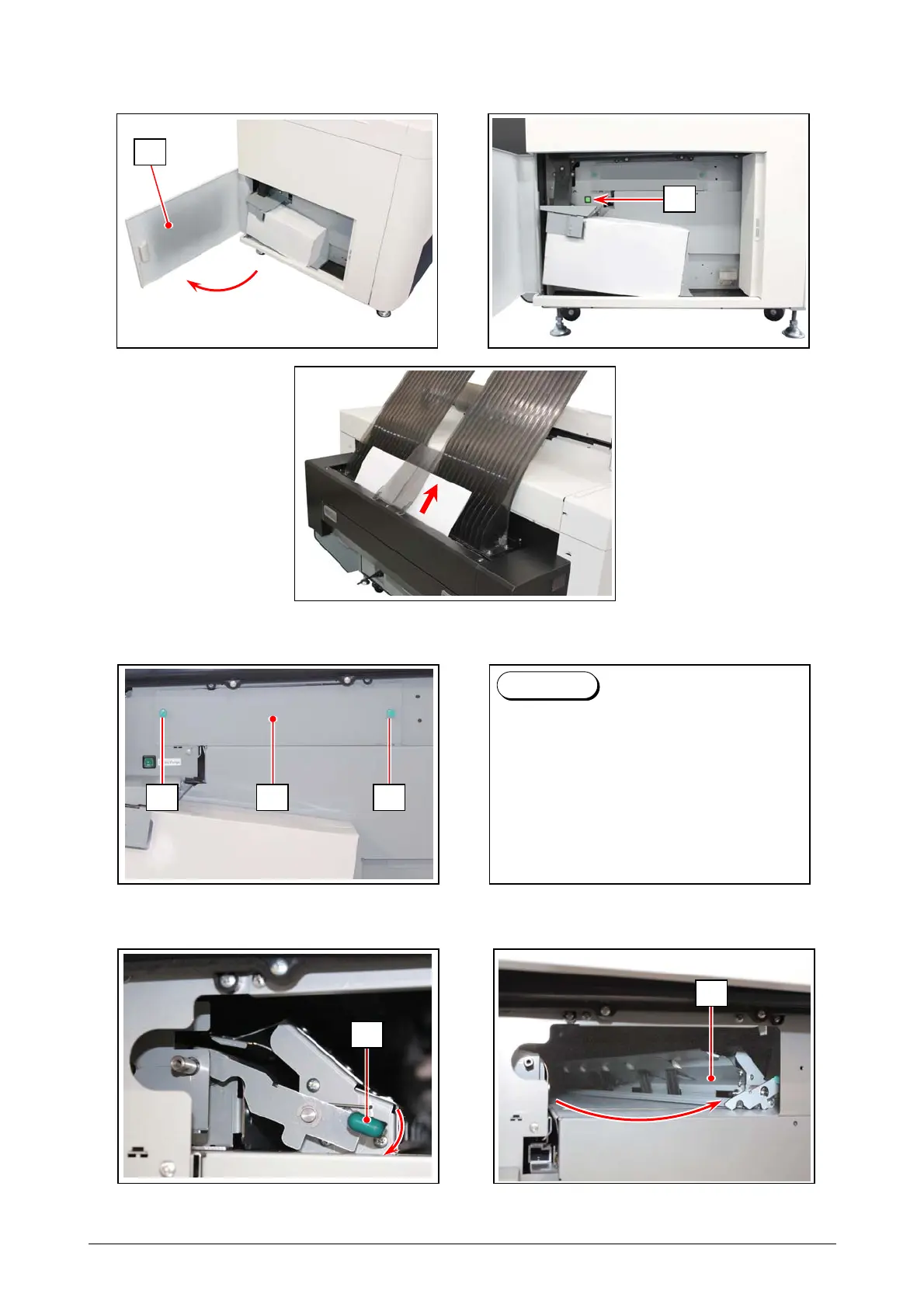
4. After as many accessible remaining sheets are taken out, open the Left Side Door (3).
Press Purge Switch (4) to force the printer’s media drive system to forward and eject a
remaining sheet that cannot be accessible on the step 2.
5. If any sheet is still remaining even using the Purge Switch (4), loosen both the Knobs (5) to
remove the Left Side Cover (6).
6. Press and hold the Lever (7) downward and then fully move (pivot) the entire Feeder Unit (8)
toward the printer’s front. Take out the remaining sheet.
7. Return the Feeder Unit (8), the Left Side Cover (6) and the Left Side Door (3) in position.
3
7
8
When the Left Side Cover (6) is
removed, the KIP Touch UI indicates
another status “Left Side Cover Open”.
After removing all the sheets, return the
Left Side Cover (6) in position and “Left
Side Cover Open” will be cancelled
automatically.
Reference
55 6
4



 To Next Page