Chapter 1 Before Use 1-9
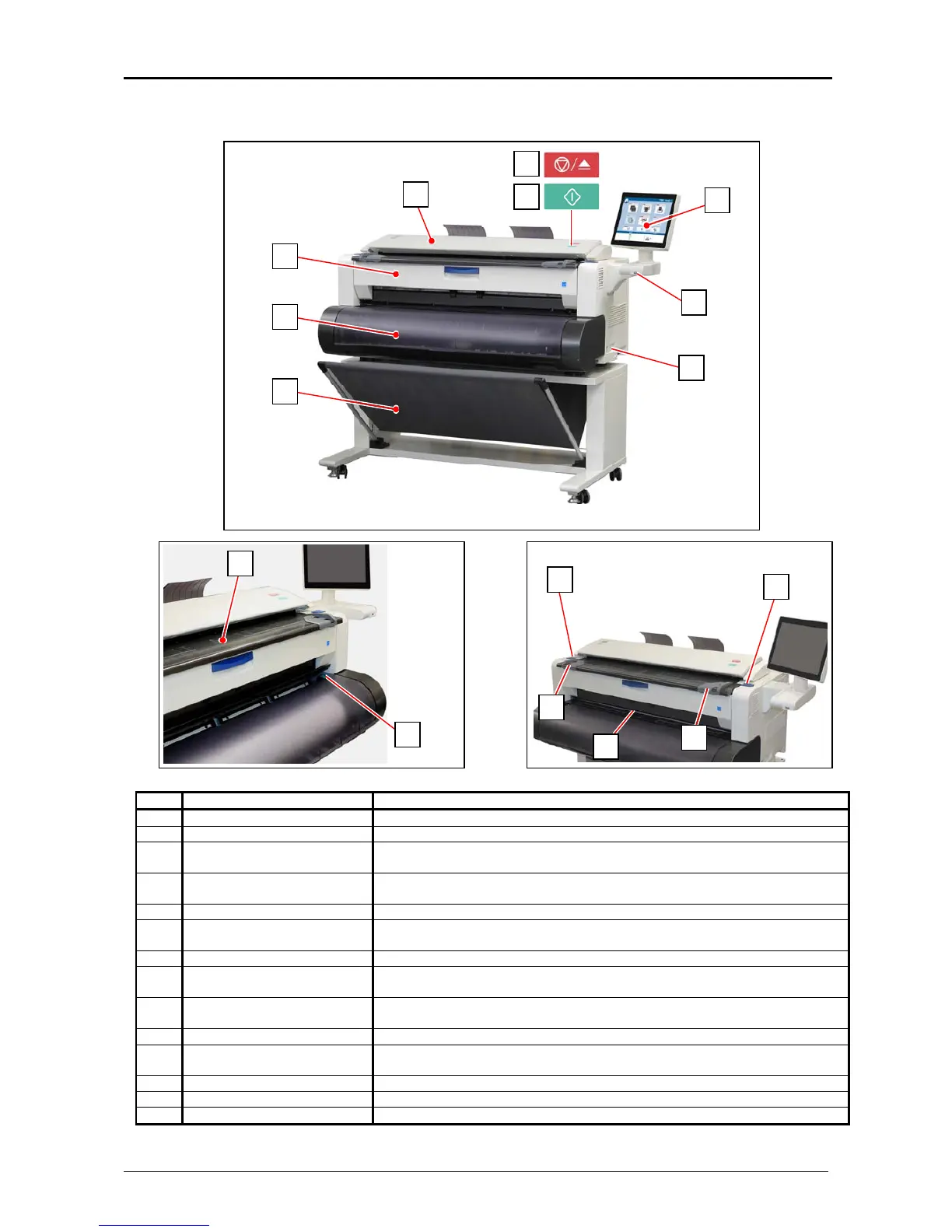
1. 5 Appearance
1. 5. 1 Front view
7
7
2
2
8
No. Name Function
1 Main Switch You can turn on/off the KIP 770.
2 Original Guides Feed the original under the Scanner Unit along the Original Guides.
3 User Interface This is a Touch Screen, and many kinds of user operation are available.
PLEASE DO NOT push the LCD area too strong.
4 USB port Your USB flash memory storage can be installed here.
5VDC max.
5 Scanner Unit Read the original with this unit when you make scan or copy.
6 Original Table Place the original here and then feed it into the Scanner Unit when you make
scan or copy.
7 Engine Unit Open Lever Push down these blue levers when you open the Engine Unit.
8 Manual Feeder Feed a cut sheet paper from the Manual Feeder.
Open here to access Initial Cut Button.
9 Roll Deck Cover Lift up to open the Roll Deck.
A roll media can be loaded in the Roll Deck.
10 Print Basket Receives ejected printed.
11 Scan Abort Button While scanning: emergency stop
At Standby position: eject
12 Start Button Starts scanning if the controlling software requires user intervention.
13 Fuser Cover Can access a mis-feed print inside the Fuser Unit.
14 Initial Cut Button Push this button to trim the leading edge of the loaded roll media.
6
14
4
3
5
13
9
10
1
11
12



 To Next Page