Chapter 3 Error Correction 3-11
3. 1. 5 Door Open while printing
When opening the Fuser Cover, the Manual Feeder Table or the Upper Unit while printing, the
printer stops feeding the media and the media is stuck in the machine. Please remove the stuck
media by the followings.
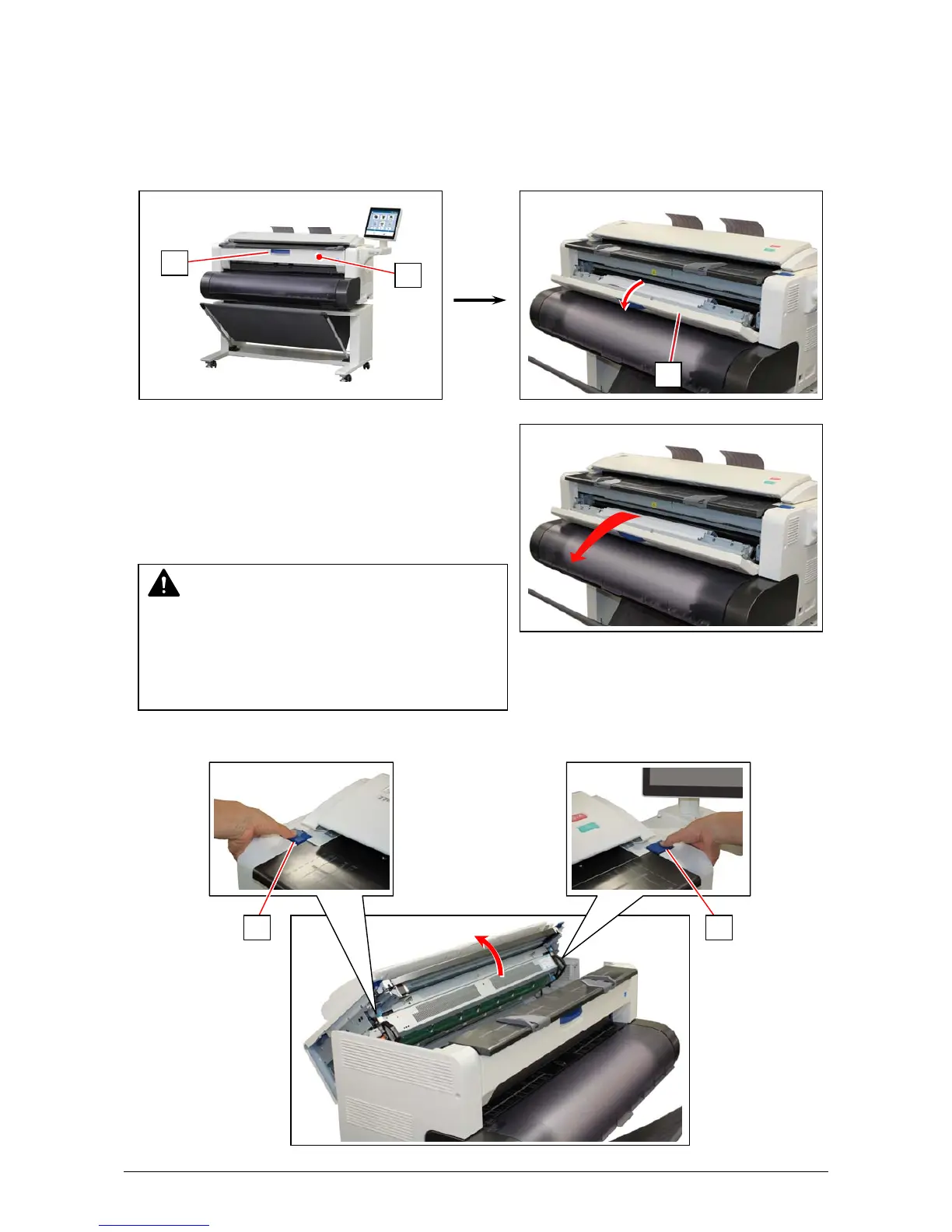
1. Hold the blue handle (1) and open the Fuser Cover (2).
2. If it is possible, pull and remove the mis-feed media.
If little amount of the leading edge area is coming
to the Fuser and you cannot pull it out,
or if the trailing edge remains deep to be caught in
the printer, do not pull it by force.
Leave it there and go to the next step.
3. Press down the blue levers (3) on both sides to unlock and open the Upper Unit.
3 3
WARNING
There are extremely hot parts inside the Fuser
Unit. Do not touch any parts in the Fuser Unit, or
you will be burnt.
Also the mis-fed media can be very hot. Be
careful not to get burnt when you remove it.
2
1
2



 To Next Page