40
4.7 RAISING THE PLATFORM
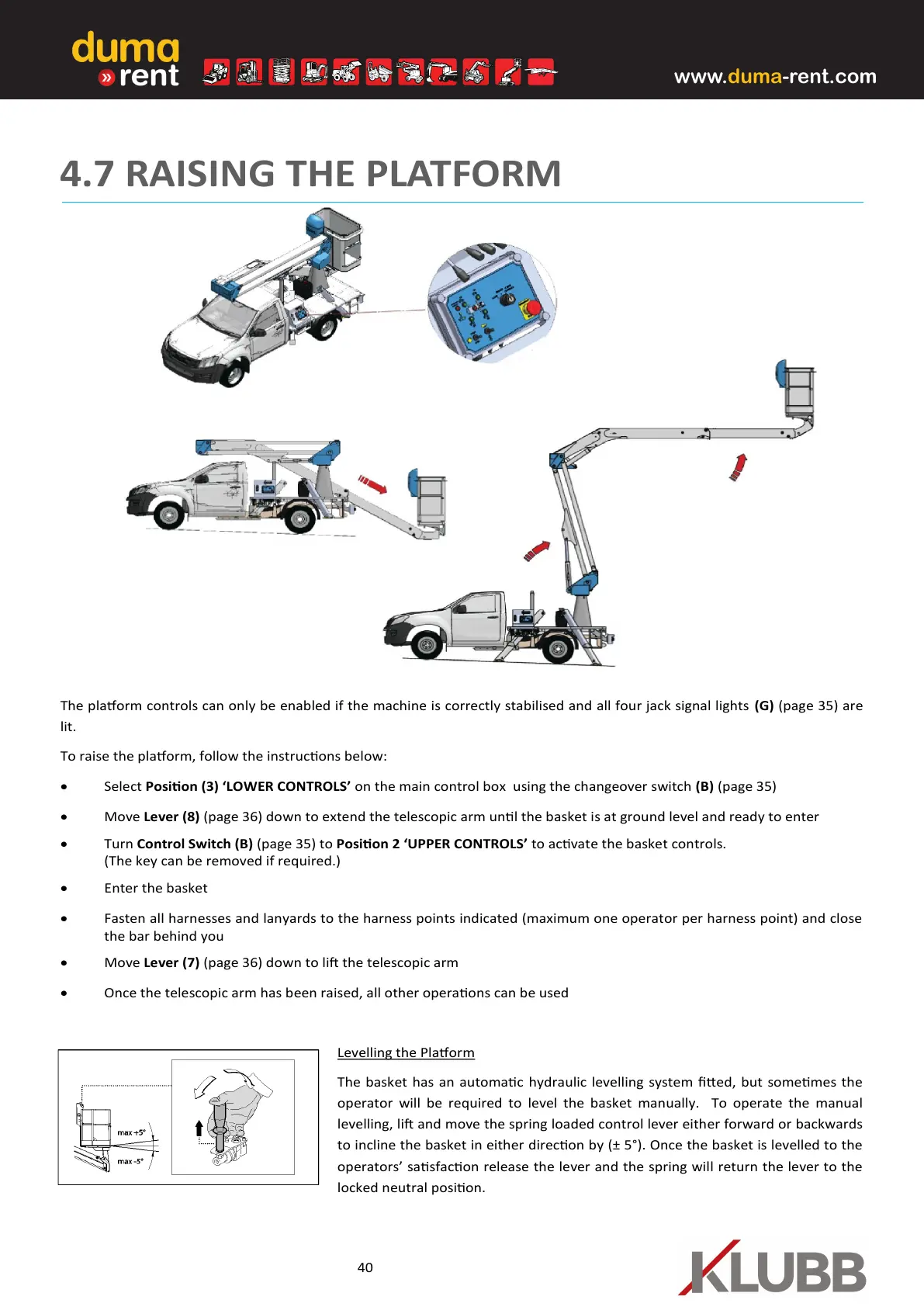
The plaorm controls can only be enabled if the machine is correctly stabilised and all four jack signal lights (G) (page 35) are
lit.
To raise the plaorm, follow the instrucons below:
• Select Posion (3) ‘LOWER CONTROLS’ on the main control box using the changeover switch (B) (page 35)
• Move Lever (8) (page 36) down to extend the telescopic arm unl the basket is at ground level and ready to enter
• Turn Control Switch (B) (page 35) to Posion 2 ‘UPPER CONTROLS’ to acvate the basket controls.
(The key can be removed if required.)
• Enter the basket
• Fasten all harnesses and lanyards to the harness points indicated (maximum one operator per harness point) and close
the bar behind you
• Move Lever (7) (page 36) down to li the telescopic arm
• Once the telescopic arm has been raised, all other operaons can be used
Levelling the Plaorm
The basket has an automac hydraulic levelling system ed, but somemes the
operator will be required to level the basket manually. To operate the manual
levelling, li and move the spring loaded control lever either forward or backwards
to incline the basket in either direcon by (± 5°). Once the basket is levelled to the
operators’ sasfacon release the lever and the spring will return the lever to the
locked neutral posion.


 To Next Page