EasyManua.ls Logo

Kodak 8000C - User Manual

Kodak 8000C
53 pages
Print Icon
To Next Page IconTo Next Page
Loading...
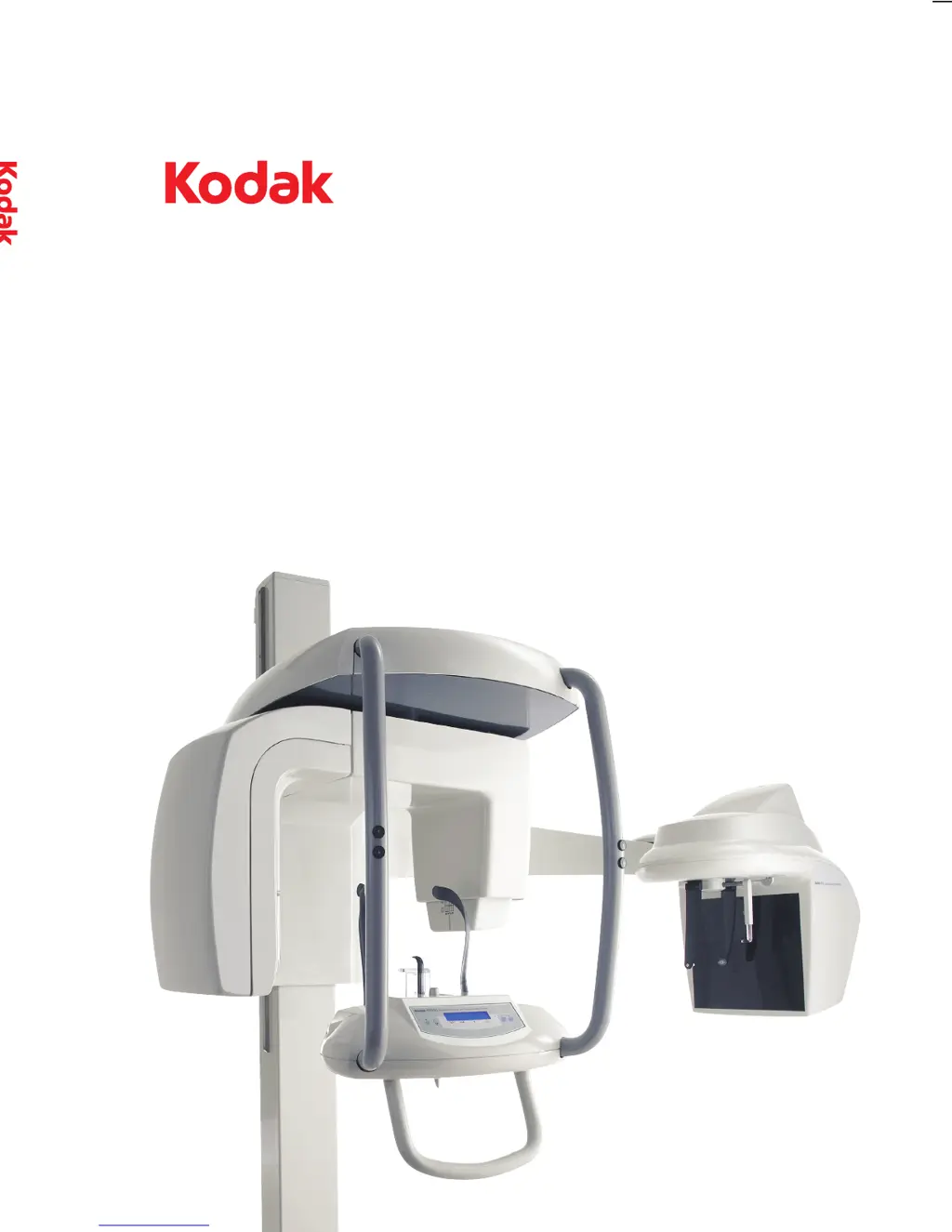
Digital Panoramic and Cephalometric System
8000C
User’s Guide
8000C System
User’s Guide
©Carestream Health, Inc., 2010.
The Kodak trademark and trade dress
are used under license from Kodak.
SM735 Ed02 03/2010
For more inFormation, visit: ww w.kodakdental.com
Trophy
A Subsidiary of Carestream Health, Inc.
4 rue F. Pelloutier – Croissy-Beaubourg
77435 Marne la Vallée Cedex 2 (France)
+ 33 1 64 80 85 00

Table of Contents

Other manuals for Kodak 8000C

Questions and Answers

  • F
    Francisco WagnerAug 17, 2025
    What to do if the Kodak Medical Equipment interface is inactive?
    • M
      Matthew GarciaAug 17, 2025
      If the interface of your Kodak Medical Equipment is inactive: 1. Ensure the unit is powered on. 2. Allow time for the unit and PC to establish a connection. 3. Verify that the Acquisition Window is not hidden behind another application; if so, close the obstructing application.
  • M
    Melinda LambertAug 19, 2025
    What to do if Kodak 8000C displays 'X-Ray tube cooling'?
    • T
      timothyatkinsAug 19, 2025
      If your Kodak Medical Equipment displays 'X-Ray tube cooling', wait until the Generator Cooling Indicator on the Acquisition Window reaches zero.
  • M
    Michelle HansonAug 22, 2025
    What to do if Kodak 8000C displays 'Thermal security'?
    • T
      Taylor HartAug 22, 2025
      If the Kodak Medical Equipment displays 'Thermal security', wait until the Generator Cooling Indicator on the Acquisition Window reaches zero.
  • C
    christine12Aug 26, 2025
    What to do if Kodak 8000C displays 'Release handswitch'?
    • N
      natalie22Aug 26, 2025
      If your Kodak Medical Equipment displays 'Release handswitch', release the exposure button of the x-ray remote control.
  • C
    Christopher HowardAug 28, 2025
    What to do if Kodak Medical Equipment displays 'Collimator position'?
    • N
      Nathan JensenAug 28, 2025
      If the Kodak Medical Equipment displays 'Collimator position', reposition the collimator.
  • L
    Lisa FisherAug 30, 2025
    What to do if Kodak 8000C Medical Equipment displays 'Cooling Ceph sensor'?
    • S
      Sean WhiteAug 30, 2025
      If your Kodak Medical Equipment displays 'Cooling Ceph sensor', wait until the Ready Indicator LED turns green.
  • A
    Amanda NavarroSep 2, 2025
    What to do if Kodak Medical Equipment displays 'Wrong rotative arm position'?
    • L
      Lisa CraigSep 2, 2025
      If your Kodak Medical Equipment displays 'Wrong rotative arm position', press the button to reset the rotative arm to its starting position.
  • J
    James PattersonSep 5, 2025
    What to do if Kodak Medical Equipment displays 'Ceph sensor position'?
    • T
      tyler88Sep 5, 2025
      If the Kodak Medical Equipment displays 'Ceph sensor position', correctly position the sensor for: • LA, for lateral position • AP/PA, for all other radiological programs.
  • C
    Christopher DavisSep 7, 2025
    What to do if Kodak Medical Equipment displays 'Head clamps position'?
    • H
      Henry BaileySep 8, 2025
      If your Kodak Medical Equipment displays 'Head clamps position', manually position the head clamps for the selected exam.
  • T
    Thomas RussellSep 12, 2025
    What to do if Kodak Medical Equipment displays 'Raise sensor'?
    • R
      Robin GeorgeSep 12, 2025
      If your Kodak Medical Equipment displays 'Raise sensor', check that the panoramic sensor is fully retracted and locked in the upper position.

Summary

KODAK 8000 C UNIT OVERVIEW

Control Panel

Describes the alphanumeric, digital soft touch console for unit functions.

IMAGING SOFTWARE OVERVIEW

Computer System Requirements

Specifies minimum computer requirements for the imaging software.

Cephalometric Acquisition Window Overview

Details the main cephalometric interface and its functions.

Cephalometric Parameter Pane

Details choosing exposure parameters and saving custom settings.

GETTING STARTED

Switching on the Unit

Provides steps for powering on the unit and PC, including an important note.

Starting the Imaging Software

Guides on how to launch the imaging software from the desktop or start menu.

Accessing the Cephalometric Acquisition Window

Instructions on how to navigate to the cephalometric acquisition interface from the Imaging Window.

ACQUIRING CEPHALOMETRIC IMAGES

Preparing the Unit and Setting the Acquisition Parameters

Details setting parameters and positioning the unit for a lateral exam.

Launching the X-ray

Instructions for initiating the x-ray acquisition using the remote control.

TROUBLESHOOTING

Quick Troubleshooting

Provides information on error codes, messages, and actions for common malfunctions.

Kodak 8000C Specifications

General IconGeneral
BrandKodak
Model8000C
CategoryMedical Equipment
LanguageEnglish

Related product manuals