25
2
2
3
3
4
4
5
5
6
6
A
B
C
D
Gizem 14.10.202
Designed by Checked by Approved by
DateDate
1
1
2
2
3
3
4
4
5
5
6
6
A A
B B
C C
D D
Gizem 14.10.2021
Designed by Checked by Approved by
Date
1 / 1
Edition Sheet
Date
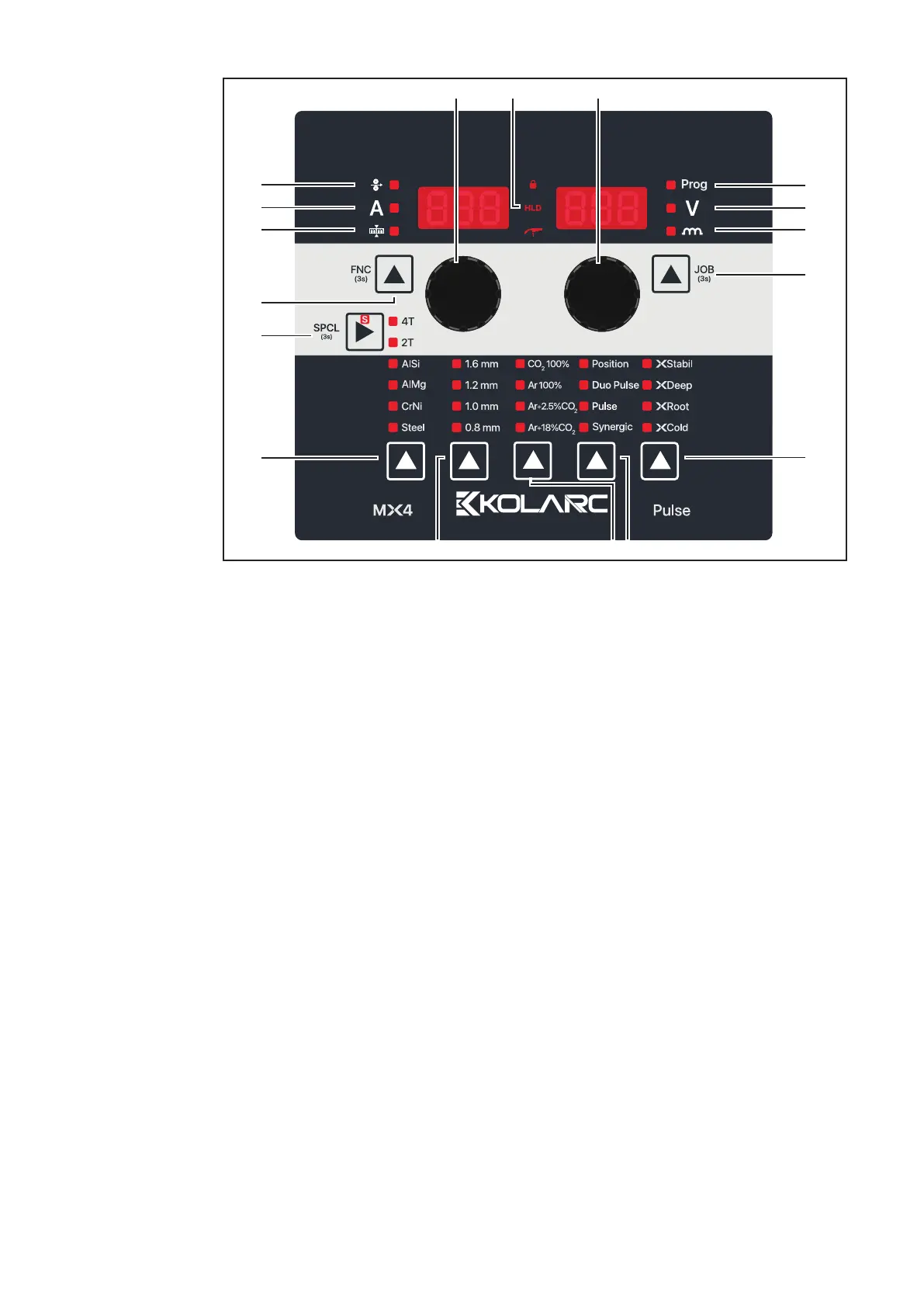
Control panel
(1) Selection Knob (left)
For changing the sheet thickness, welding current, and wire speed parameters rotate the black knob
(2) Wire Feed Speed
It is used to control the wire feed speed (meter/minute)
(3) Welding Current
Obtained from parameters set before the start of welding. The reference value is automatically
displayed during the welding process besides it actual value is displayed. (Synergic-Pulse)
(4) Material Thicknes selection
In cases where the welding current to be used is unknown, the parameters are adjusted automatically
by entering the material thickness (mm)
(5) Function List selection
Enables fine tuning for background functions (see Function List given on page 26)
(2)
(11)
(5)
(7)
(8)
(9)
(13)
(12)
(14)
(10)
(15)
(17)
(16)
(6)
(4)
(3)
(1)


 To Next Page