6-5
Placing the Original on the Machine
The RADF and platen glass can be used to scan originals with this machine. When an original is
placed in the RADF, the original is automatically fed through the RADF and scanned.
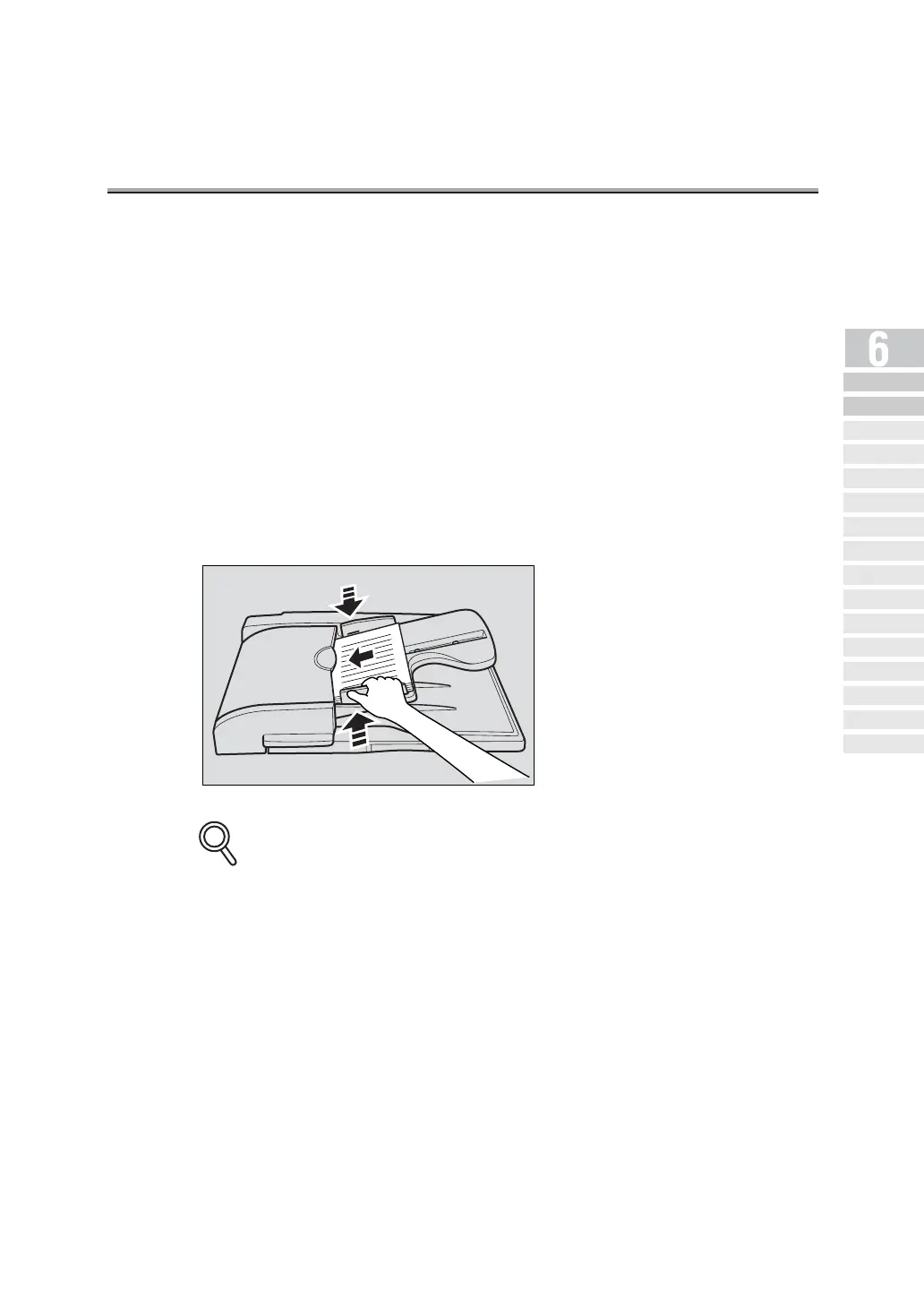
Using the RADF
When using the RADF, multiple originals can be scanned automatically. In addition, two-sided
originals can be sent.
1. Close the RADF.
2. Align the originals starting with the first page.
3. Place the originals in the RADF with the side to be scanned
facing up.
4. Adjust paper guides.
In Mixed original mode, extend the paper guides to fit the largest paper size, and place the
remaining originals aligned in the top left corner.
DETAILS
Simple FAX
Transmission
Placing the Or iginal
on the Machine
Setting Transmission
Conditions
Selecting a
Remote Station
Sc anni ng
Tran smit ti ng
Reserving
Transmission
Manua l Tra nsmi ssi on
Cancelling
Transmission
Co nfi rming Re se rved
Do cum en ts
Confirming
Communication Results
Memo ry
Transmissions
Total Page Set
Timer
Transmission
International
Communica tion
Sender
Information


 To Next Page