44
Global Parameters
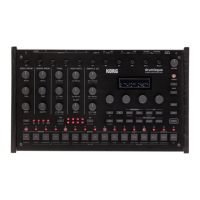
Press the LIVE buon while holding down the SHIFT buon to enter Global mode.
In Global mode, you can make seings related to the input/output and hardware
of this unit.
EXPANDSHRINKGROOVE
GLOBAL
CLEAR ALLAUDIO IN CHOKE RAND.PART CLEAR PART COPY PARTSYNC POLY RAND.PART CLEAR PART
PATTERN
KIT MOTION
CLEAR ALLON/OFF CLEAR STEP CLEAR PART CLEAR ALL INIT
1632
YES NO
8 TRIP.
PATTERN EDIT
ANALOG DIGITAL
MULTI
EFFECTS
1 2 3 4 5 6 7 8 9 10 11 12 13
14 15 16
DELAY
BD S D HT CH RS CP SP 1 SP 2 VPM NOISE USER
REVERB MASTER
SHIFT
OHLT
LIVE ACCENTLOOP STEP MOTIONCHAIN
TIME
><
OPERATIONS
UI DEFAULTS
METRONOME
INDIV. OUT1
INDIV. OUT2
MIDI ROUTING
MIDI RX
MIDI TX
SYNC IN
SYNC OUT
CLOCK SOURCE
HW SETTINGS
OPERATIONS (Button 1)
QUEUE (QUEUE MODE) [BAR, SEQ]
If you load a program or drum kit (QUEUE operation) while holding down the
SHIFT buon during paern playback, set the timing for switching between the
program and drum kit.
BAR: The next program or drum kit is loaded when the bar changes.
SEQ: After the previous rhythm paern is played back to the last step, the next
program or drum kit is loaded.
SAVE KIT (SAVE KIT WITH PROGRAM) [OFF, ON]
When you save the program, set whether to save the drum kit being edited at the
same time.
OFF: Saves only the bank and kit number of the drum kit you want to use when
you save the program.
ON: Saves the parameters of the drum kit you are editing when you save the program.
The drum kit in use is overwrien. Be careful when using a single drum kit
with multiple programs.
TEMPO [PROG, LOCK]
Set whether to use the tempo specied for each program or to inherit the current tempo.
PROG: Uses the tempo specied for each program. The tempo changes when you load
the program.
LOCK: The current tempo is maintained even if the program is switched.
QUANT (QUANTIZE) [NONE, 32ND, 16TH, 8TH]
When real-time recording is performed, the rhythm is quantized with the accuracy
specied here.
NONE: The input timing is recorded as it is without any quantization.


 To Next Page