Connection of additional components
1 12345678910111213141516
© 2022 KOSTAL Solar Electric GmbH52
5.2Installation of optional push-button
The wallbox does not have a push-button as standard.
Certain operating modes can only be switched via the KOSTAL Smart Energy Meter
(KSEM) using an activation code.
So that this does not always have to be done via the KOSTAL Smart Energy Meter, an op-
tional push-button can be installed on the underside of the housing. You will find a descrip-
tion of the function in
Operating modes,Page22.
FunctionKSEMPush-button
Lock Mode (lock wallbox)YesNo
Enable wallboxYesNo
Power Mode (simple charging)YesYes
Solar Pure Mode (solar charging)YesYes
Solar Plus Mode (solar-optimised charging)YesYes
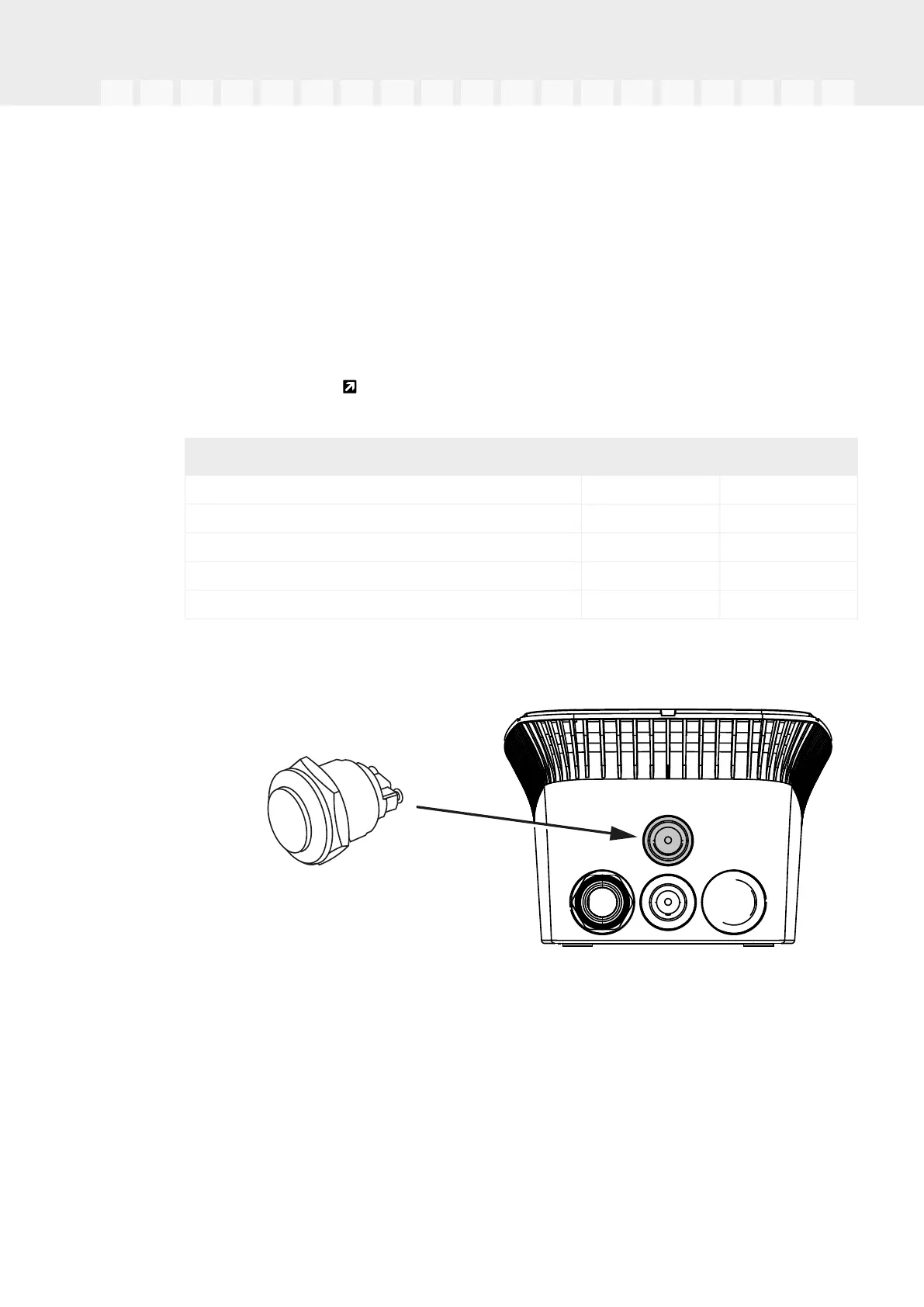
Installing push-button
The push-button is installed on the underside of the wallbox.
1.22 mm vandalism-protected push-button with sealing ring available from accessory
suppliers.
2.Use a suitable tool to cut/drill the required 22 mm opening out of the wallbox.
3.Install the push-button with sealing ring.
Push-button connection
The push-button is connected to the terminal.


 To Next Page