8
2
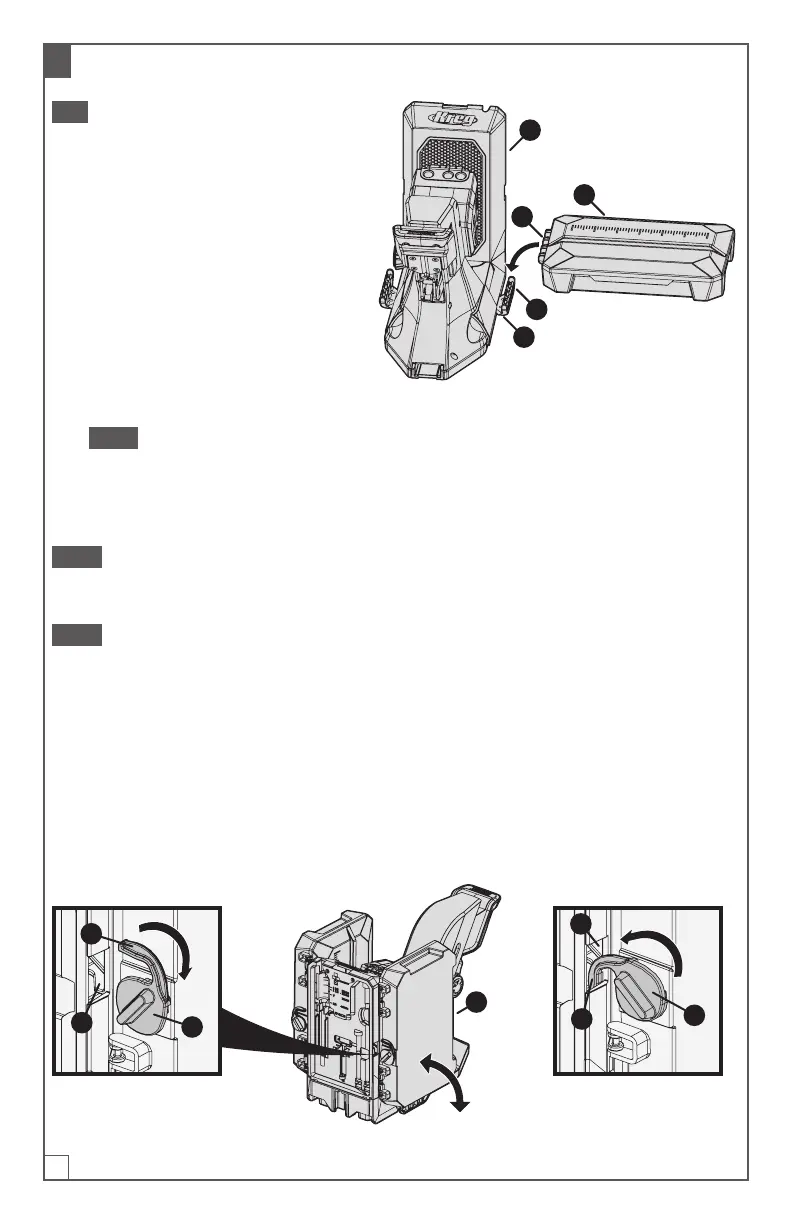
Connect the Material Support Wings to the Dock Adapters
Tip The material support wings also
serve as storage boxes.
a. Hold a material support wing (I)
right-side up (so that the lid of
the storage box is facing up and
opens away from you).
b. Align the connector (1) on the side
of the material support wing (I)
with the connector (2) on the dock
adapter (H) that extends from the
side of the jig (A); then press the
material support wing (I) down
rmly so that the connectors snap together.
Note The bars on the material-support-wing connector (1) snap into the
grooves on the dock-adapter connector (2).
c. Repeat these steps to connect the other material support wing (I) to the dock
adapter (H) on the opposite side of the jig (A).
Note You can fold the material support wings up to the vertical position to save
space when the jig is not in use, or to make it easier to move the jig from one location
to another. Always fold the material support wings down before using the jig.
Note If you use the dust collection accessories (page6), you must remove them
from the jig in order to fold the material support wings up.
To fold up the material
supportwings:
■ Fold the material support wing (I) up
to a vertical position.
■ Rotate the wing lock (1) inward until
the latch (2) engages securely in the
notch (3) on that side of the jig.
To fold down the material
supportwings:
■ Rotate the wing lock (1) outward until
the latch (2) disengages from the
notch (3) in the side of the jig.
■ Fold the material support wing (I)
down to the horizontal position.
1
2
3
I
1
2
3
I
1
2
H
A


 To Next Page