4
Assembly: For 500-Series Jig
This section describes how to assemble the KPHA750 Pocket-Hole Jig Docking Station for use
with a Kreg 500-Series Jig.
1
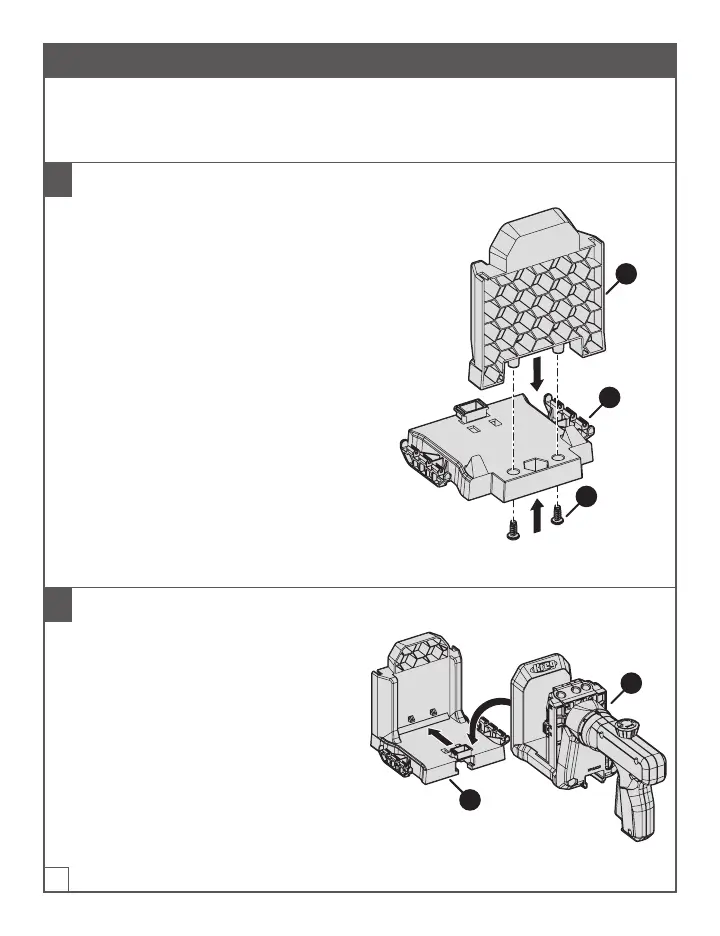
Assemble the Dock Base
a. Remove the two screws (C) taped to the
dock-base platform (B).
b. Insert the dock-base back (A) into the
dock-base platform (B):
■ The honeycomb side of the dock-
base back (A) faces away from the
dock-base platform (B).
■ The two connectors that protrude
from the bottom of the dock-base
back (A) t into the corresponding
holes in the dock-base platform (B).
c. For each connector: Insert a screw (C)
into the connector from the underside
of the dock-base platform(B); then use
a #2 Phillips screwdriver to tighten the
screw (C).
A
B
C
2
Connect the 500-Series Jig to the Dock Base
a. Place the assembled dock base (1) on a
at surface.
b. Slide the 500-Series Jig (2) onto the dock
base until the jig (2) reaches the back of
the assembled dock base (1) and snaps
into position.
2
1


 To Next Page