7
Assembly: For 700-Series Jig
This section describes how to assemble the KPHA750 Pocket-Hole Jig Docking Station for use
with a Kreg 700-Series Jig.
1
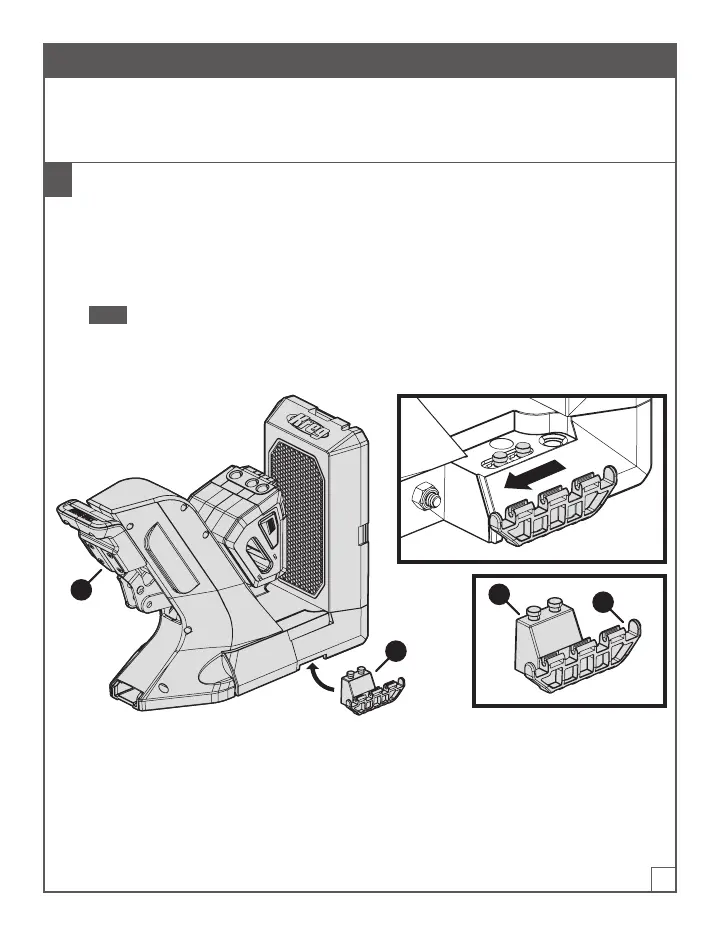
Connect the Dock Adapters to the 700-Series Jig
a. Place the 700-Series Jig on a at surface.
b. With one hand, lift one side of the 700-Series Jig slightly.
c. With your other hand, place a dock adapter (D) under the jig so that the attachment pins(1)
t into the corresponding hole on the underside of the jig; then slide the dock adapter (D)
toward the jig handle (3) to lock the dock adapter (D) into position.
Note One side of a dock adapter (D) has attachment pins (1) that t under the jig; the other
side has a connector (2) for a material support wing (not shown). Ensure that the wing-
connector side (2) of the dock adapter (D) extends out from the side of the jig.
d. Repeat steps b and c to connect the other dock adapter (D) on the opposite side of the jig.
D
1
2
3


 To Next Page