5.5.4 RS485 Communication connection
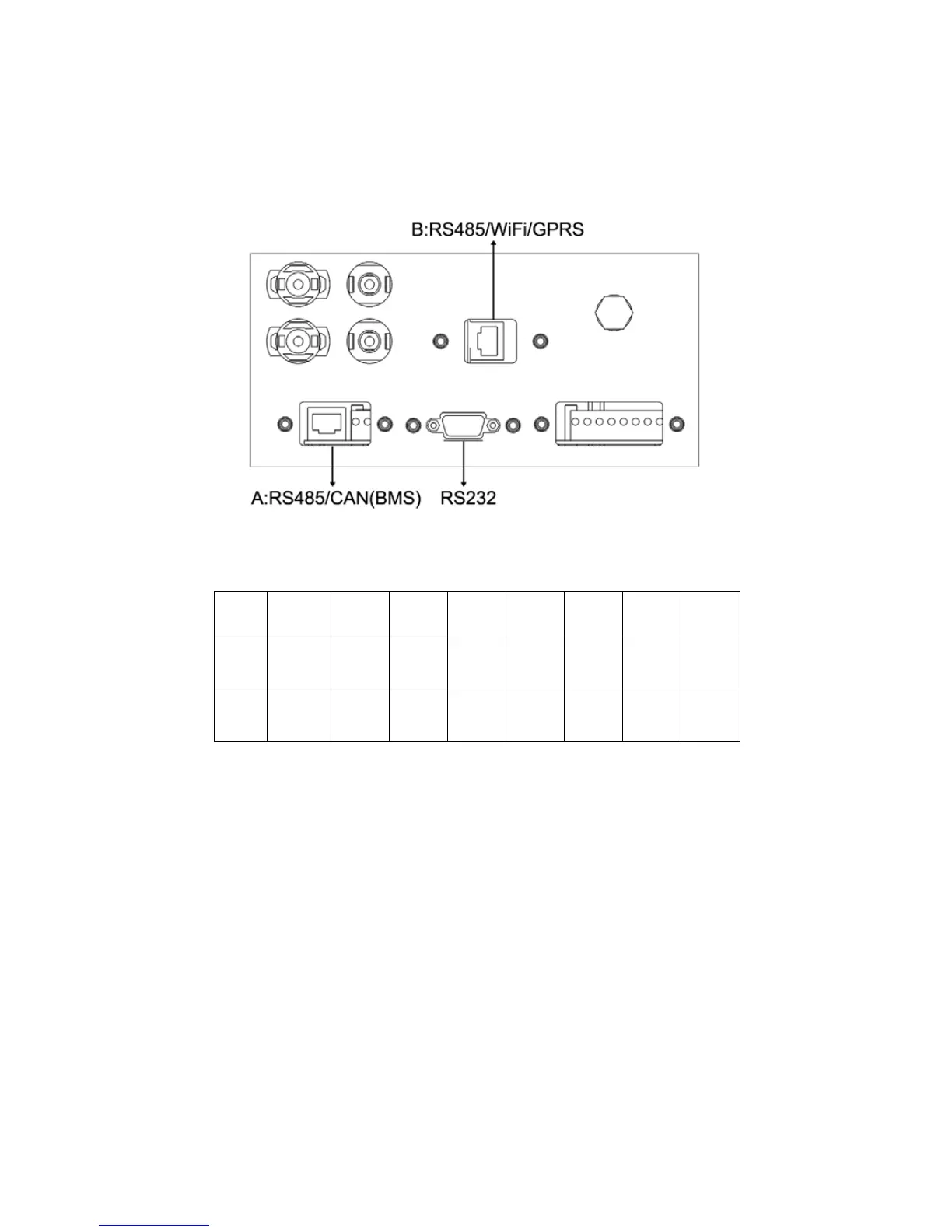
The power storage inverter contains two 485 interfaces, with one for external WiFi and
GPRS communication, and the otherfor lithium battery communication.
Please connect the RS-485 communication following the below steps:
(1)
Remove the water-proof components of RS-485 with screwdriver.
(2)
Loosen the nut.
(3)
Disassemble the single-aperture sealing ring.
(4)
Pass the cable successively through the nut, single-aperture sealing ring, insulator and she
Figure 23), and then clamp with tools.
(6)
Connect the crystal head that is clamped to RS-485 port in the inverter.
(7)
Attach the water-proof component of RS-485 to the inverter.
(8)
Tighten the nut.
1 2 3 4 5 6 7 8
A
485+ 485- Null CAN+ CAN- GNDS GNDS 5.0VS
B 485+ 485- Null Null GNDS GNDS 5.0VS 5.0VS
Figure 22



 To Next Page