7 / 10 © 2016 Spectrum Brands, Inc.Kwikset: 1-800-327-5625 • www.kwikset.com
1
24
3
5
6
79
8
0
0 0 0 0 0
1
24
3
5
6
79
8
0
6
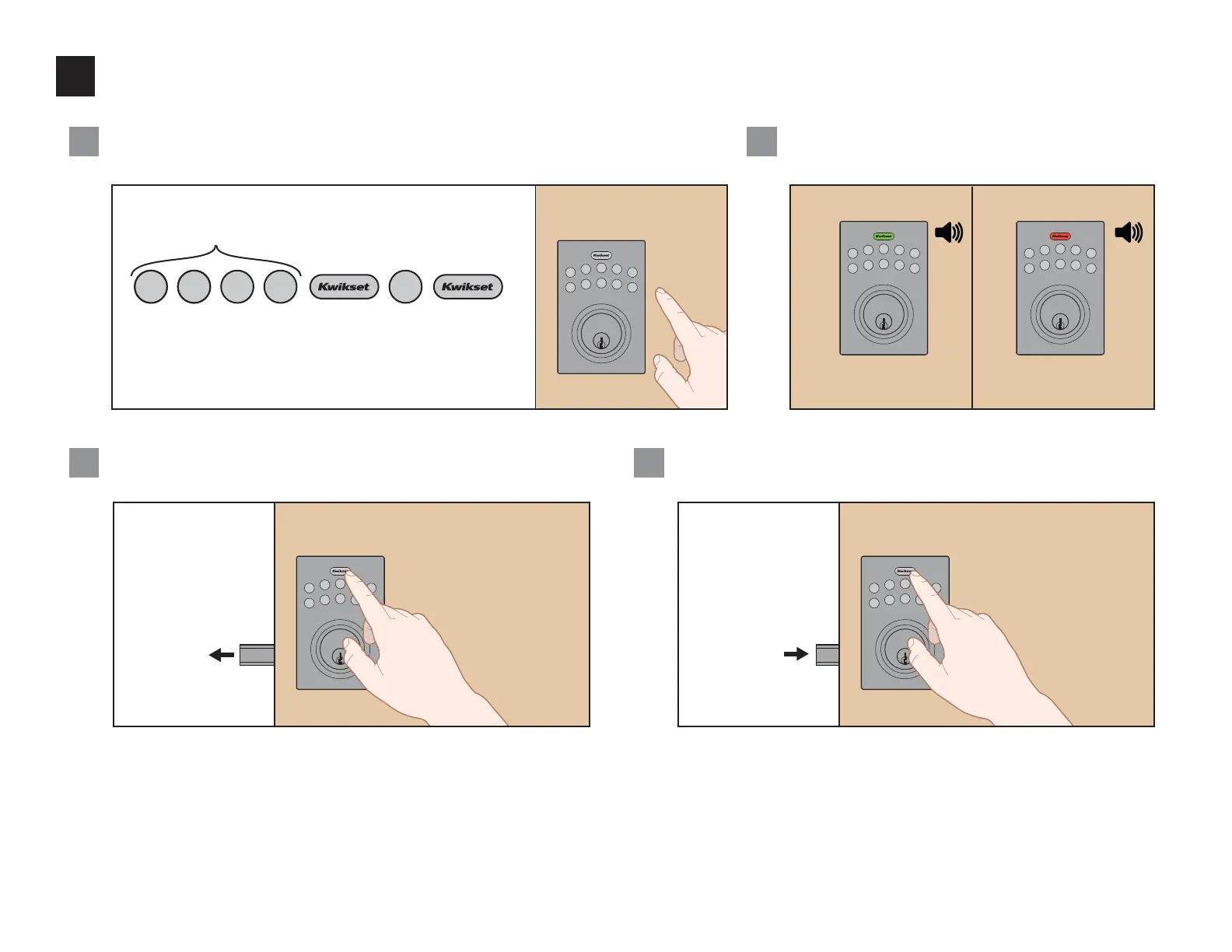
Enter door handing code and test lock
While the door is OPEN and UNLOCKED, enter the following code
to teach the lock the orientation of the door:
If successful, press the Kwikset button.
The latch bolt will extend to lock.
If successful, the Kwikset button will lash green 2 times and you
will hear 2 beeps. If unsuccessful, the Kwikset button will lash red
3 times, and you will hear 3 beeps.
Note: The keypad will light up in blue when pressed.
This is your default
Programming Code (PC).
A
C
B
1
24
3
5
6
79
8
0
1
24
3
5
6
79
8
0
Successful Unsuccessful
Make sure the door is
unlocked and that you are
using a fresh set of batteries.
2x 3x
1
24
3
5
6
79
8
0
Enter the default User Code (1234), then press the Kwikset button.
The latch bolt will unlock.
Installation is complete. It is recommended that you replace the default Programming
Code and default User Code with codes of your own. See page 8.
During normal operation,
press the Kwikset button to
lock the door.
D
1
24
3
5
6
79
8
0
During normal operation,
enter a User Code, then
press the Kwikset button to
unlock the door.


 To Next Page