
 Need help?
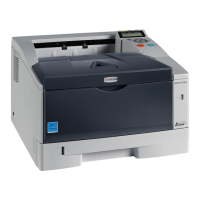
Do you have a question about the Kyocera ECOSYS P2135dn and is the answer not in the manual?
 General
| Brand | Kyocera |
|---|---|
| Model | ECOSYS P2135dn |
| Category | All in One Printer |
| Language | English |
Identifies physical components located on the front of the printer.
Identifies physical components located on the rear of the printer.
Details the printer's control panel, including displays, buttons, and indicators.
Provides advice on selecting and using paper for optimal printer performance and longevity.
Offers guidelines on paper condition, composition, sizes, smoothness, weight, and thickness.
Lists supported paper types and their compatibility with different paper sources.
Instructions on fanning and straightening paper before loading to prevent jams.
Step-by-step guide for inserting paper into the printer's paper cassette.
Instructions for loading paper into the printer's multi-purpose tray.
Details on connecting the printer via USB, network, and power cord.
Configuration of network settings like TCP/IP, security, and protocols.
Guide for installing printer drivers on Windows and Macintosh systems.
Explains the printing procedure using application software and KX Driver.
Information on printing from iOS and Mac OS devices without drivers.
How to monitor printer status, view jobs, and check toner/paper levels.
Details on Low Power Mode and Sleep Mode for reducing energy consumption.
Overview of basic maintenance tasks like toner replacement and periodic cleaning.
Instructions on how to replace the toner container and check toner status.
Procedures for cleaning the printer's interior, drum, and charger wire.
Guidelines for storing and safely moving the printer.
Basic troubleshooting steps for common printer issues like poor print quality or missing text.
Identifies print quality issues and provides corrective actions.
Lists common error messages and their corrective actions.
Detailed instructions for removing paper jams from various printer locations.
Overview of configuring the printer using the operation panel and other utilities.
Explanation of the operation panel's display, keys, and indicators.
Guide on navigating and using the printer's menu system for settings.
How to print various reports like menu maps, status pages, and font lists.
Settings for using USB memory, including printing files and removing the device.
How to view the printer's page count.
Configuration of paper size and type for MP tray and cassettes.
Adjusting print parameters like paper source, quality, orientation, and duplex printing.
Configuration of network protocols like TCP/IP (IPv4/IPv6) and related settings.
Setting up security functions to protect printer operation and print data.
Managing administrator ID, password, and user settings for security.
Procedures for restarting the printer and accessing maintenance menus.
Overview of available optional accessories for the printer.
Details on installing expansion memory modules to increase printer performance.
Information about the optional paper feeder that adds more paper cassettes.
Details on the high-speed network interface kit for connectivity.
Information on the wireless network interface kit for Wi-Fi connectivity.
Explains USB and network interface connector specifications.
Details on USB interface specifications, connectors, and signals.
Features and specifications of the printer's network interface, protocols, and OS support.
Lists detailed technical specifications of the printer, including paper handling and performance.
Details the printer's compliance with environmental standards and energy saving features.








 To Next Page