Page 64
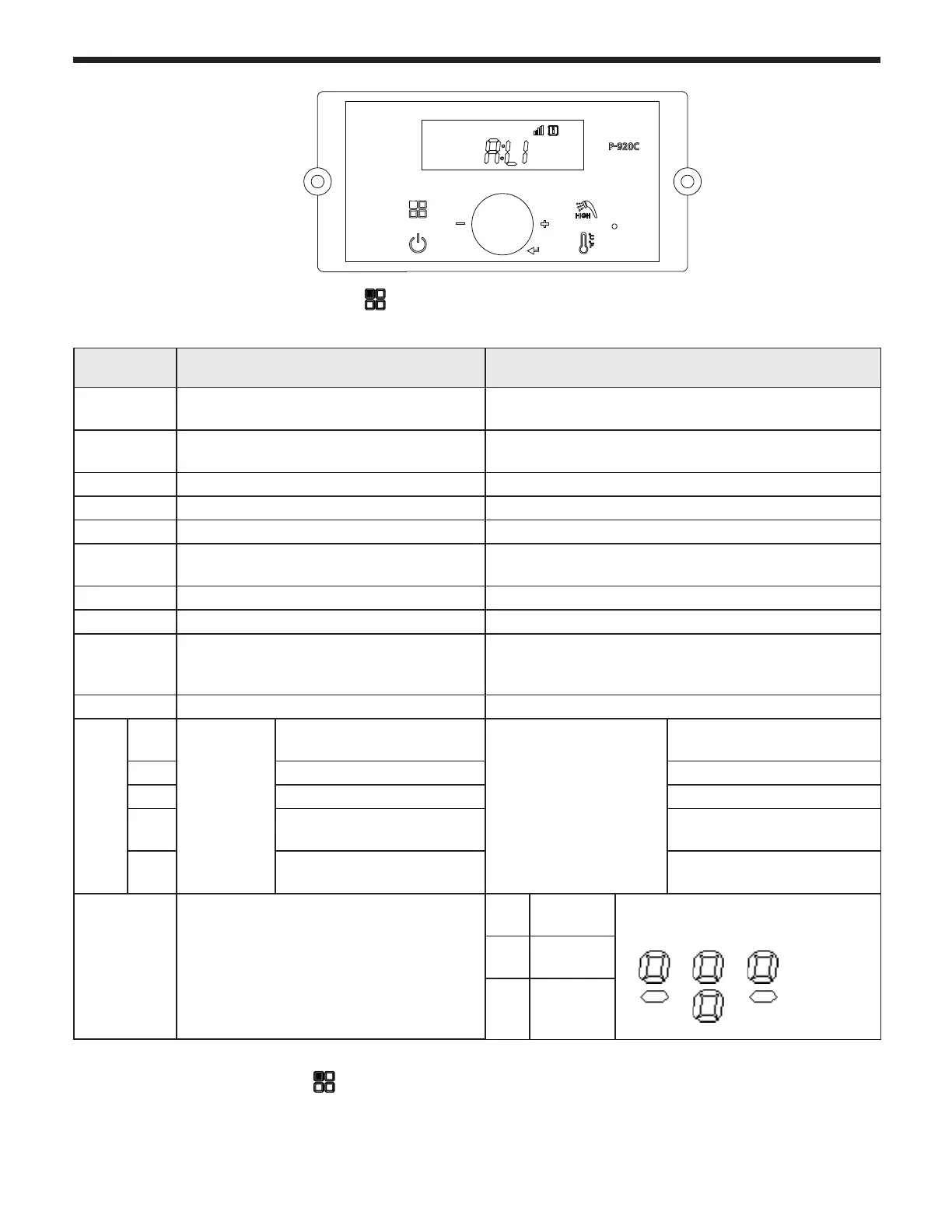
5.4 Status Display Mode
Digital
Display
Status Display Parameter Description
O:ot
Outdoor temperature (when --- is
displayed, no outdoor sensor is connected)
Current outdoor sensor temperature
A: Li or A:
GA
DHW Flow Rate Current DHW Flow(Li: L/m, GA: GPM)
b: It CH Return Water Temperature Current Return Water Sensor Temperature
C: Fr Fan rpm Current FAN speed ( RPM)
d: Lc Lock mode Lock mode ON/OFF
E: oP
CH supply temperature (Operating
temperature)
Current Boiler Supply temperature
F: dH DHW temperature (Operating temperature) Current DHW temperature
H: Eh Exhaust gas temperature Current exhaust gas temperature
I : St
DHW Recirculation temperature (when 0
F is displayed, no DHW Recirc sensor is
connected)
Current DHW Recirc water temperature
J: oH CH Overheat Temperature Current CH Overheat Temperature
L: rt
1:
PH
Burner
Operation
Time
Time for supply power
L: rt on display
on sub menu
Unit : 1000hour
2: rh Time for burner operation Unit : 1hour
3: rH Time for burner operation Unit : 1,000hour
4: It Cycle for ignition
Cycle: 10 times the
displayed unit
5: IH Cycle for ignition
Cycle: 10,000 times the
displayed unit
P: Ou PUMP Operation
CP1
System
PUMP
Current PUMP Operation
(CP1) (CP2) (CP3)
All Activate
CP2 activate
CP2
Boiler
PUMP
CP3
DHW
Recirc
PUMP
E
B C
A D
1. STATUS DISPLAY MODE (When button is pressed for 5 seconds When power to display panel is ON , status
display will be activated)
To view any of the above listed Status Parameters,
Press and Hold Button B to get into the Status Display Mode.
Rotate Dial E until you nd the Parameter that you wish to view. Tap Dial E to enter that Parameter.
Adjust to the setting that you require and then press (tap) Dial E to save and to Exit.



 To Next Page