LaCie Wireless Space • DESIGN BY NEIL POULTON LaCie Network Assistant
User Manual page 28
3.4. LaCie Network Assistant
IMPORTANT INFO: You must run the Wireless Space Setup Wiz-
ard before installing LaCie Network Assistant.
LaCie Network Assistant is a convenient software that detects all
LaCie network attached storage on your home or business network.
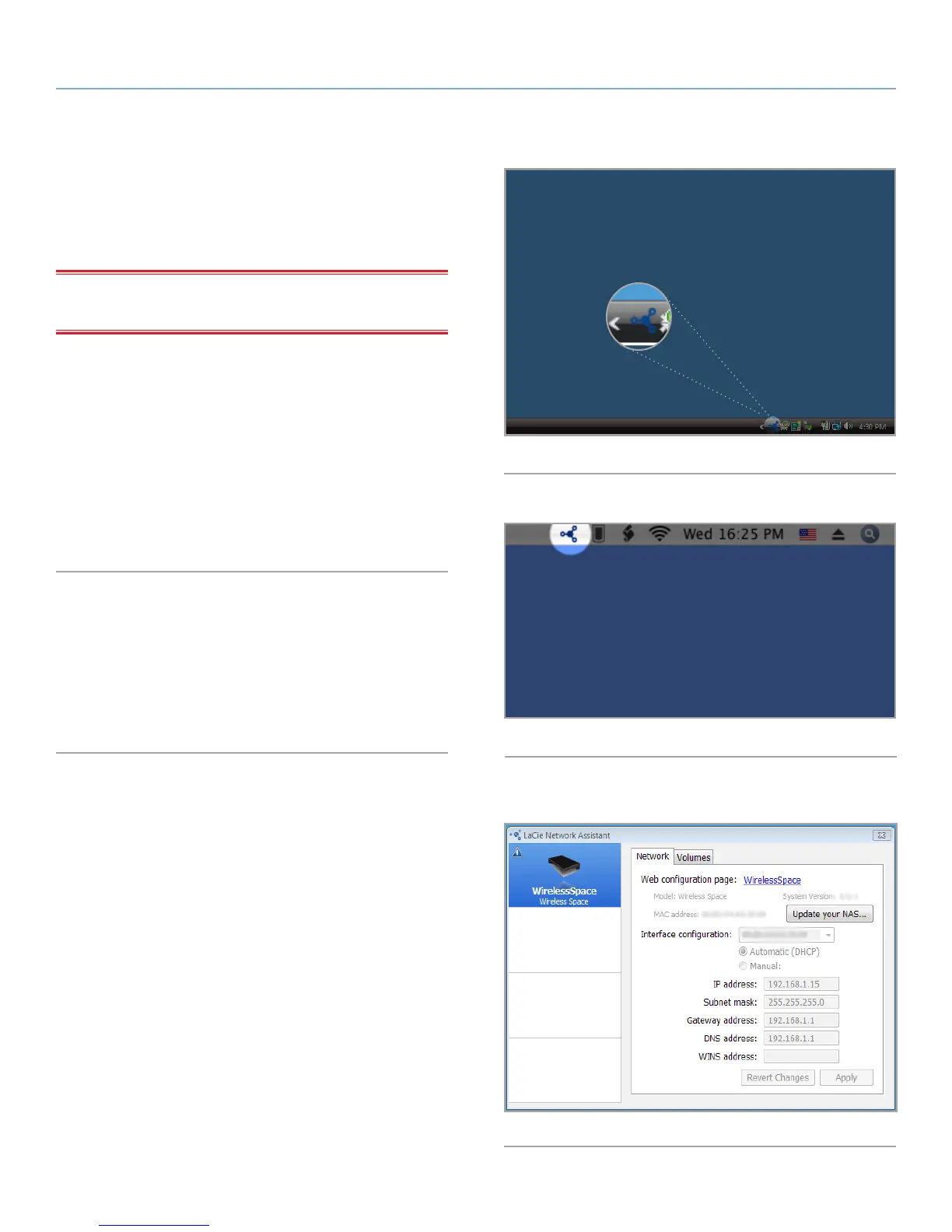
Once installed and running, LaCie Network Assistant will appear in
the system tray (Windows, Fig. 23) or the menu bar (Mac, Fig. 24).
LaCie Network Assistant automatically searches for LaCie network
storage devices and the icon will blink if a new device is found,.
When LaCie Network Assistant finds your Wireless Space, you can
view information about the device (i.e. network addressing) or con-
nect to any of its Shares (volumes) (Fig. 25).
Install LaCie Network Assistant:
1. Insert the LaCie Wireless Space CD-ROM into your computer’s
CD-ROM drive.
2. Launch the LaCie Network Assistant Setup when prompted.
3. Follow the Wizard to complete installation.
Fig. 23
Fig. 24
Fig. 25















 To Next Page