Fusion 3 Table Saw \ Setup \ Rear Rail
NOTICE!
After completing step two, there should be two through holes in the middle of the front rail bracket which have not
been used yet. These should be empty as they will be used later to mount the right extension table (shown above as red
circles)
Attaching
the Left Rear
Rail
Bracket and
Rear
Bracket to
the Table:
1.
Align the left rear rail bracket’s threaded bolt holes with the bolt holes located on the far left of the table saw.
2.
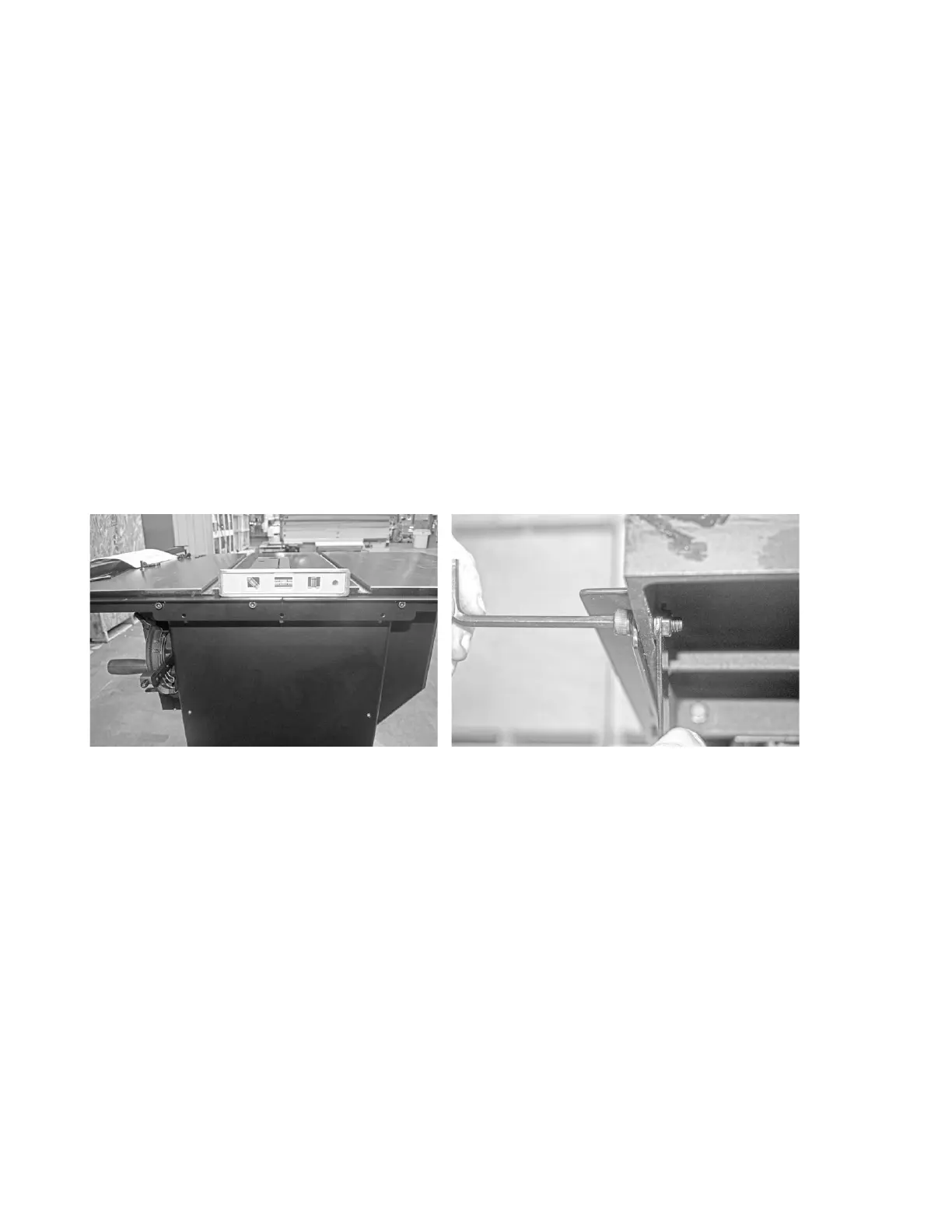
Place the rear rail bracket over the right and left rear rail brackets. (pictured below).
3.
Align the rear rail’s bolt holes with the left and right rear rail’s bolt holes as shown.
4.
Thread socket head cap screws and lock washers through the rear rail assembly.
5.
Thread flat washers and hex bolts on to the back of the socket head cap screws, make sure the rails are level to the
table, and tighten to secure all brackets to the table.
NOTICE! Ensure that the through holes (not the threaded holes) on the rear rail brackets are used for this step. The
threaded holes will be used later to attach the rear extension table to the table saw.
Leveling:
Bolt Tightening and arrangement: Bolt, lock washer
//
flat washer, nut


 To Next Page