2.3 FLOW RATE CHECK
The Dispenser’s water ow rate can be checked/calibrated using the on board computer as a timer.
To check/adjust ow rate:
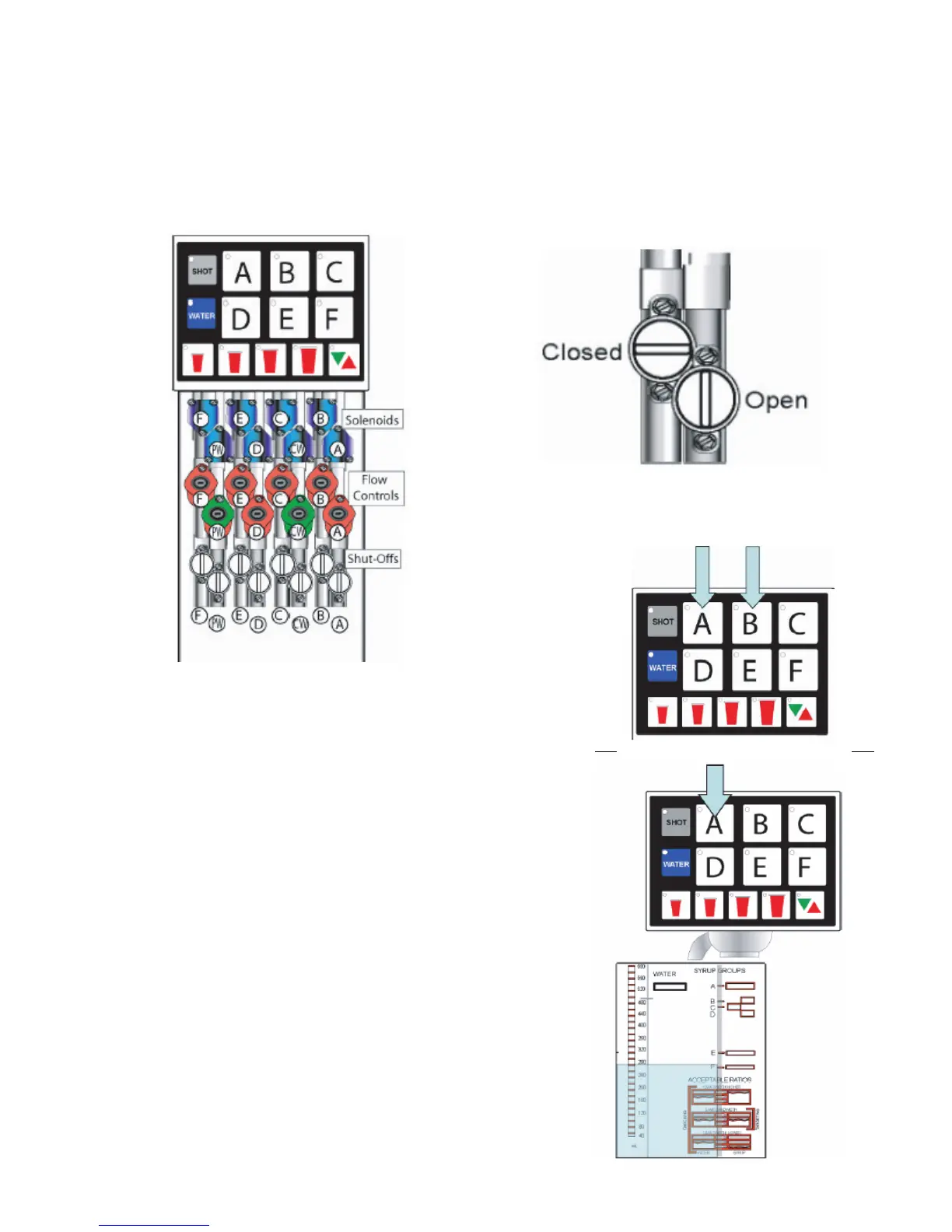
A. Remove splashguard and module cover to expose ow controls and solenoids.
1. All active brands should have their shutoffs in the open position as illustrated below.
CW = Carbonated Water (sparkling)
PW = Plain Water (still)
B. Press the A and B buttons at the same time for ve
seconds.
1. The Pour/Cancel button will illuminate and the
shot LED will blink 5 times.
C. Remove outer nozzle and insert syrup separator.
1. This is important to do during ow rate check so
you can determine if the separator has been
properly installed.
NOTE: Water will leak through to the syrup chamber
if not properly installed.
D. Place a ratio cup under the nozzle and press a
brand button.
1. The brand’s water module will open and pour for
four seconds.
NOTE: Only water will pour during the ow rate check.
E. Check for 10 oz of water in the ratio cup.
1. If above or below 10 oz, adjust the water ow
control (shown on previous page) and recheck.
13




 To Next Page