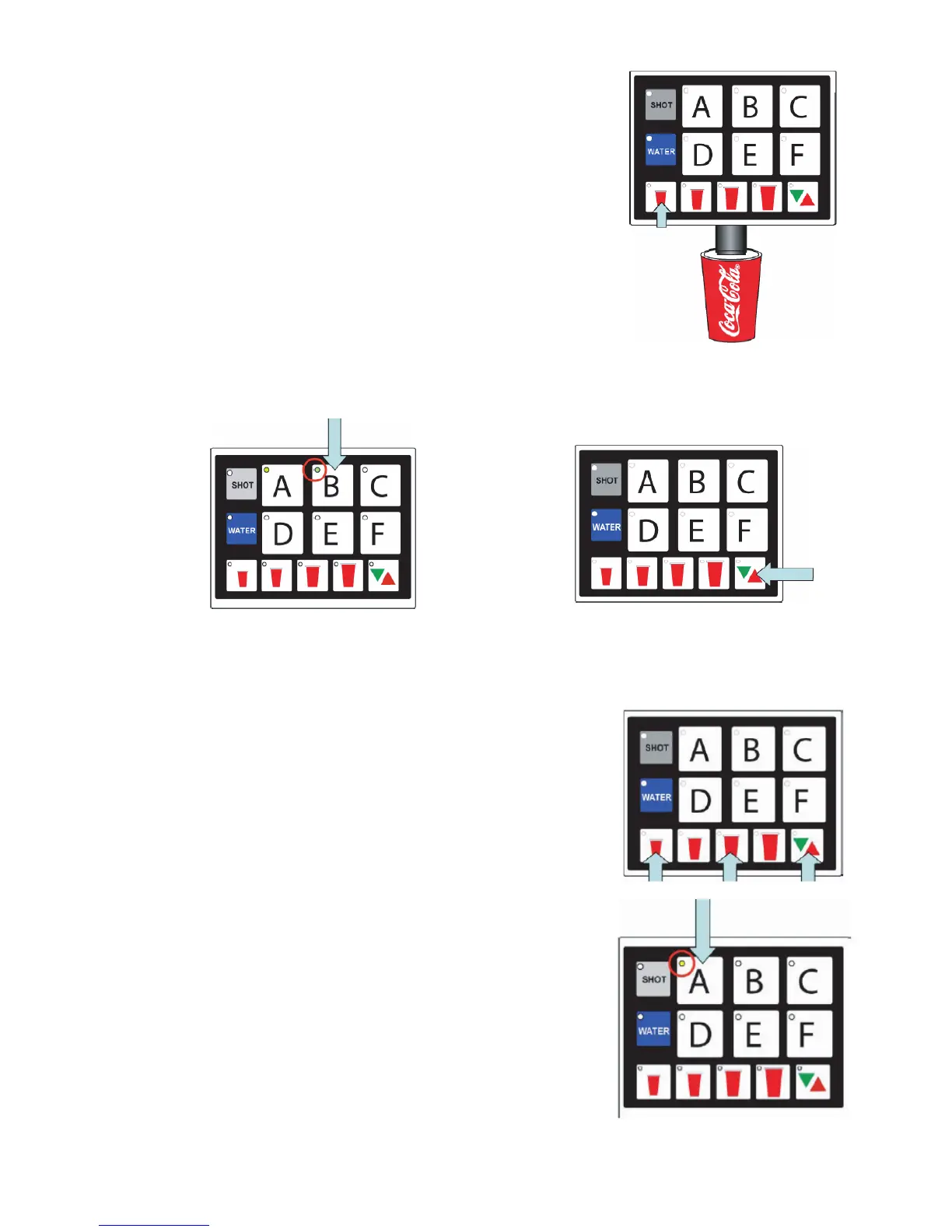
C. Fill cup 1/3 full with ice and place under the nozzle,
push and hold a drink “size” button until the cup is
full.
1. Once the pour is completed, the LED will blink
slowly to indicate that a new pour duration has
been programmed for that key.
D. Repeat this step for each of the other size cups.
E. Select other brands and repeat these steps for
each.
F. Press the “Pour/Cancel” button to save
programming.
NOTE: The program will save automatically in 60 seconds if no additional changes are made in that
time frame; however, you can exit any time within the 60 second window by pressing Pour/Cancel.
The changes you’ve made will be saved.
2.6 PORTION CONTROL PROGRAMMING WITH
TOP-OFF (MVU)
A. Press the S, L, and Pour/Cancel buttons at the
same time for two seconds to enter portion setting
mode.
1. The pour/Cancel light will illuminate and the shot
light will blink three times. B. Press the brand
button.
B. Press the brand button.
1. The selected brand’s LED will illuminate.
2. Multiple brands can be programmed at the same
time to pour the same amounts for each size
during this step. Do this by selecting several
brand buttons; however, the rst button selected
will illuminate and only its beverage will pour.
The other brands selected will ash slowly.
3. If multi-brand programming, do not set
carbonated drinks and non-carbonated drinks at
the same time because carbonated drinks tend
to pour faster.
15




 To Next Page