EasyManua.ls Logo

Laser Technology TruPoint 300 - Personalized Favorites; Illumination; Touch Screen ON;OFF

Default Icon
54 pages
Print Icon
To Next Page IconTo Next Page
To Previous Page IconTo Previous Page
Loading...
Laser Technology Inc. - TruPoint
™
300
18
ENSettings
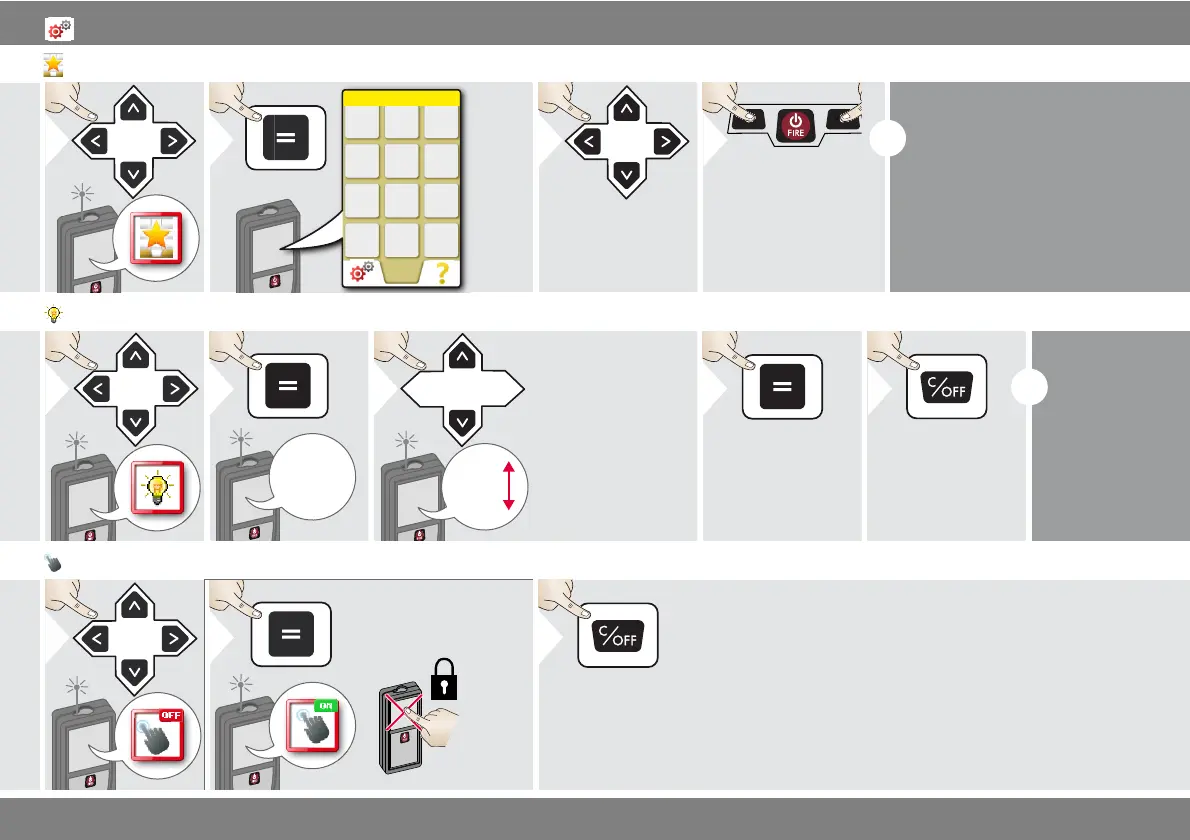
Personalized favorites
1
Favorite
2
3
Select favorite
function.
4
Press selection
key left or right.
Function is set as
favorite above the
corresponding se-
lection key.
i
Select your favorite functions for
quick access.
Short cut:
Press 2 sec on a selection-key in
the measuring mode. Select your
favorite function and press again
short on the corresponding se-
lection key.
Illumination
1
1/6
2
1/6
2/6
3/6
4/6
5/6
6/6
3
Select brightness.
4
Confirm setting.
Exit settings.
5
i
To save
power re-
duce bright-
ness if not
necessary.
Touch Screen ON/OFF
1
OFF
2
To deactivate, repeat
procedure.
ON
Exit settings.
3

Table of Contents