Laser Technology Inc. - TruPoint
™
300
27
ENFunctions
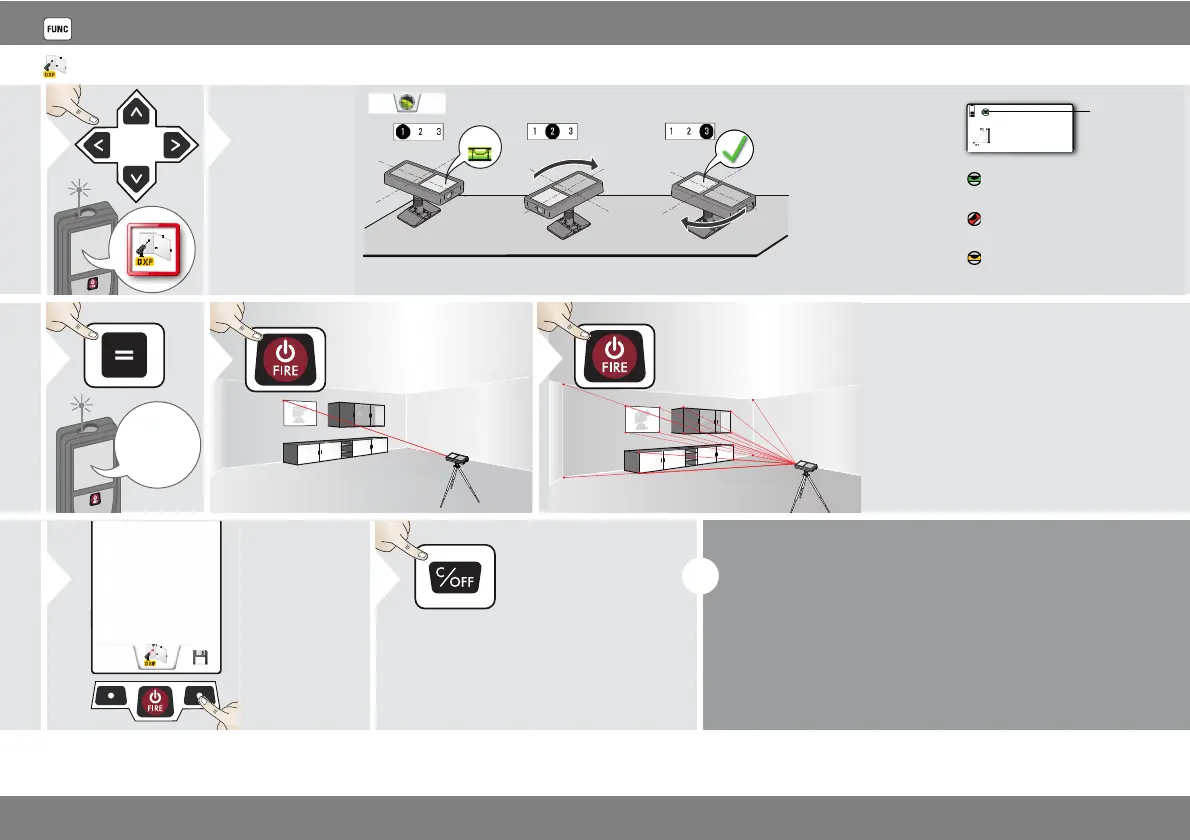
DXF data capture
2
Levelling is man-
datory!
For levelling,
Smart Base has
to be folded out
and device
needs to be in
an inclination
range of +/-5°.
Check
status
line:
indicates proper levelling
indicates insufficient level-
ling
Rotate the device
two times clockwise
90°. Follow the in-
structions on the dis-
play. Levelling is
finished when OK
icon appears on the
display.
Do not move device after levelling!
indicates that smart base was
tilted and can affect measur-
ing accuracy
5
Aim at additional
points (max. 30)
6
Stops DXF
capture and
saves data.
7
Leave actual
function, go to
default opera-
tion mode.
2x
Max. 20 DXF files can be generated (with 30 meas-
uring points/photos each).
If pointfinder is switched on, the corresponding
photos are saved with a resolution of 300 x 400 dpi.
Do not forget to save your data!












 To Next Page