BLU-BD1000 USER MANUAL
16
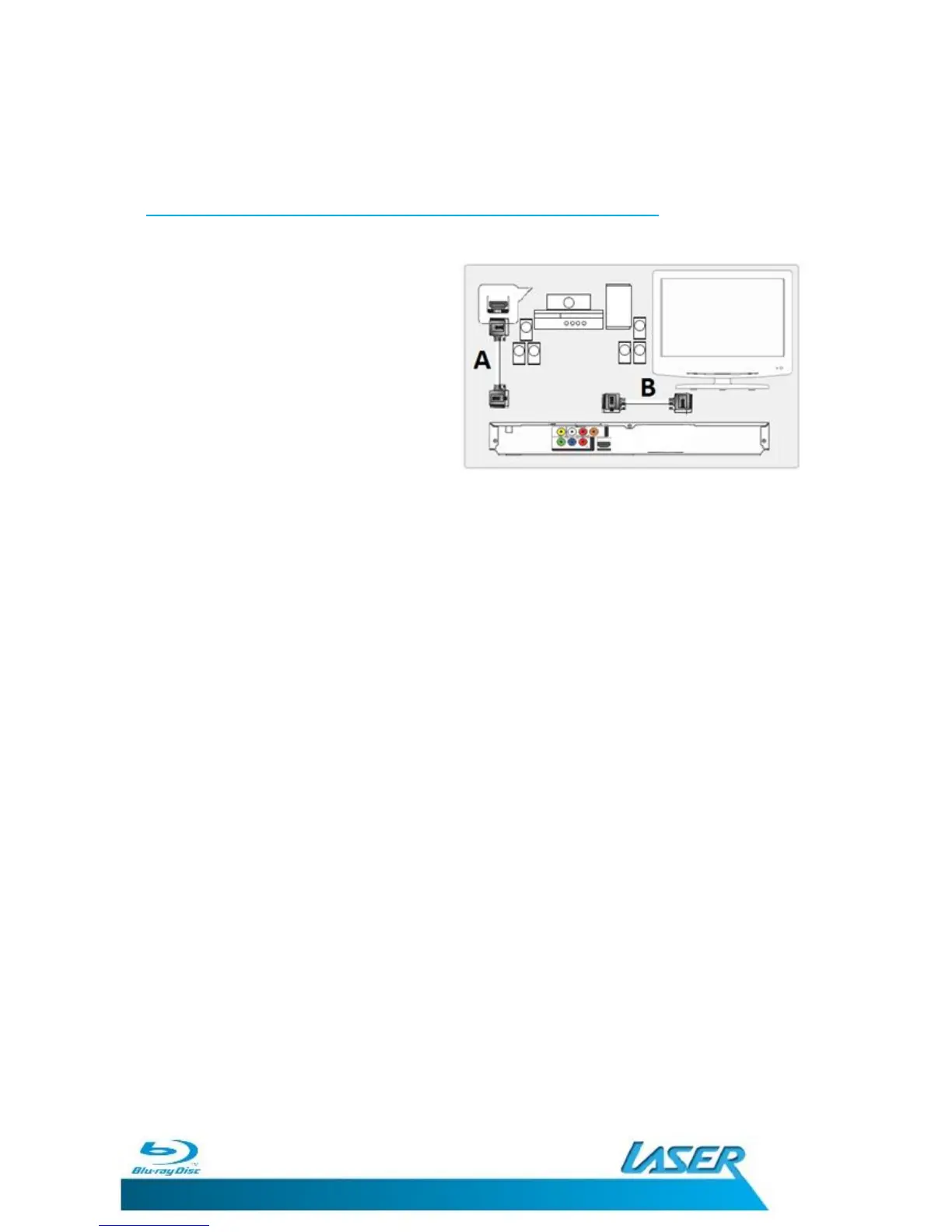
BEST: Connecting the HDMI cable to a Home Theatre system
Requires 2 x HDMI V1.3 cables (not included).
1. Plug the first HDMI cable (A) into
the
HDMI OUTPUT
on
the player
and into the HDMI input on the
Home Theatre System.
2. Plug the second HDMI cable (B)
into
the
HDMI OUTPUT
on
the
Home Theatre System and into the
HDMI input on the
t
elevision.
NOTE: If you have connected the BLU-BD1000 to a Home Theatre System
using the Coaxial Digital Audio cable you may need to also connect the RCA
Stereo Connection to your TV To allow Audio to be heard through the TV
when it is not convenient to have the Home Theatre System turned on.
Combinations of Audio and Video Connections are possible depending on the
equipment the player is to be connected to. Please refer to the equipment
user manual to determine the method or combination that best suits your
needs.


 To Next Page