BLU-BD1000 USER MANUAL
26
SETUP MENU
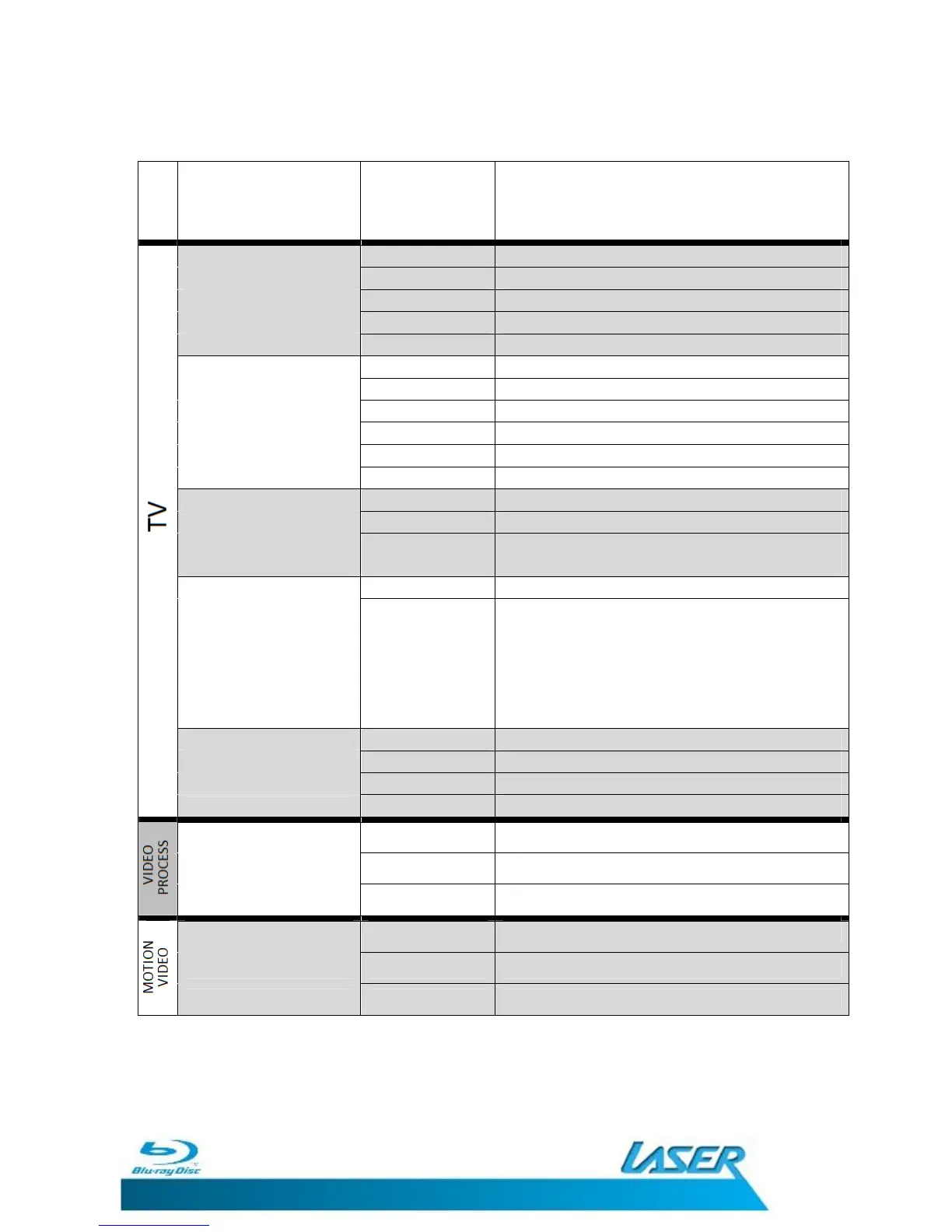
Menu
Feature Option Description
16: FULL Scales image to fill 16:9 screen
16:9 NORMAL Shows image without distortion
TV SCREEN 4:3 PAN&SCAN Scales image to fill the 4:3 screen
4:3 LETTERBOX Shows image without distortion
Some content
may appear distorted due to the original
AUTO Resolution is set by TV with HDMI cable only
480I/576I 720x480/576 Interlaced image
Resolution 480P/576P 720x480/576 Progressive Scan image
720P 1280x720 Progressive Scan image
1080I 1920x1080 Interlaced image
1080P 1920x1080 Progressive Scan image
NTSC Output is in NTSC
TV System PAL Output is in PAL
Multi
Both formats are permitted.
Must be support by TV
YCbCr
The HDMI output uses YCbCr 4:4:4 colour space.
Colour Space
(For TVs with this feature)
YCbCr 422
The HDMI output uses YCbCr 4:2:2 colour
space. Generally this is the colour space that is
closest to the colour space encoded on the
discs. (All discs are encoded in YCbCr 4:2:0
colour space and the video decoder decodes it
into YCbCr 4:2:2.)
30 bits Use the 30-bit per pixel Deep Colour mode.
HDMI Deep Colour 36 bits Use the 36-bit per pixel Deep Colour mode
48 bits Use the 48-bit per pixel Deep Colour mode
(For TVs with this feature)
OFF Do not use HDMI Deep Colour
High Sets the edge level detail to high
Sharpness Middle Sets the edge level detail to medium
Low Sets the edge level detail to low.
Standard
Sets the display to standard
Video Mode Vivid Brightens the video Display
Smooth Set the colour transitions to Smooth
Note: Please note that some of the Display Settings require a compatible
television or monitor and connection method that supports those features.
Please see the rear of this manual for more detailed information on some of
the features and settings that are available.


 To Next Page