BLU-BD1000 USER MANUAL
30
ON SCREEN CONTROL
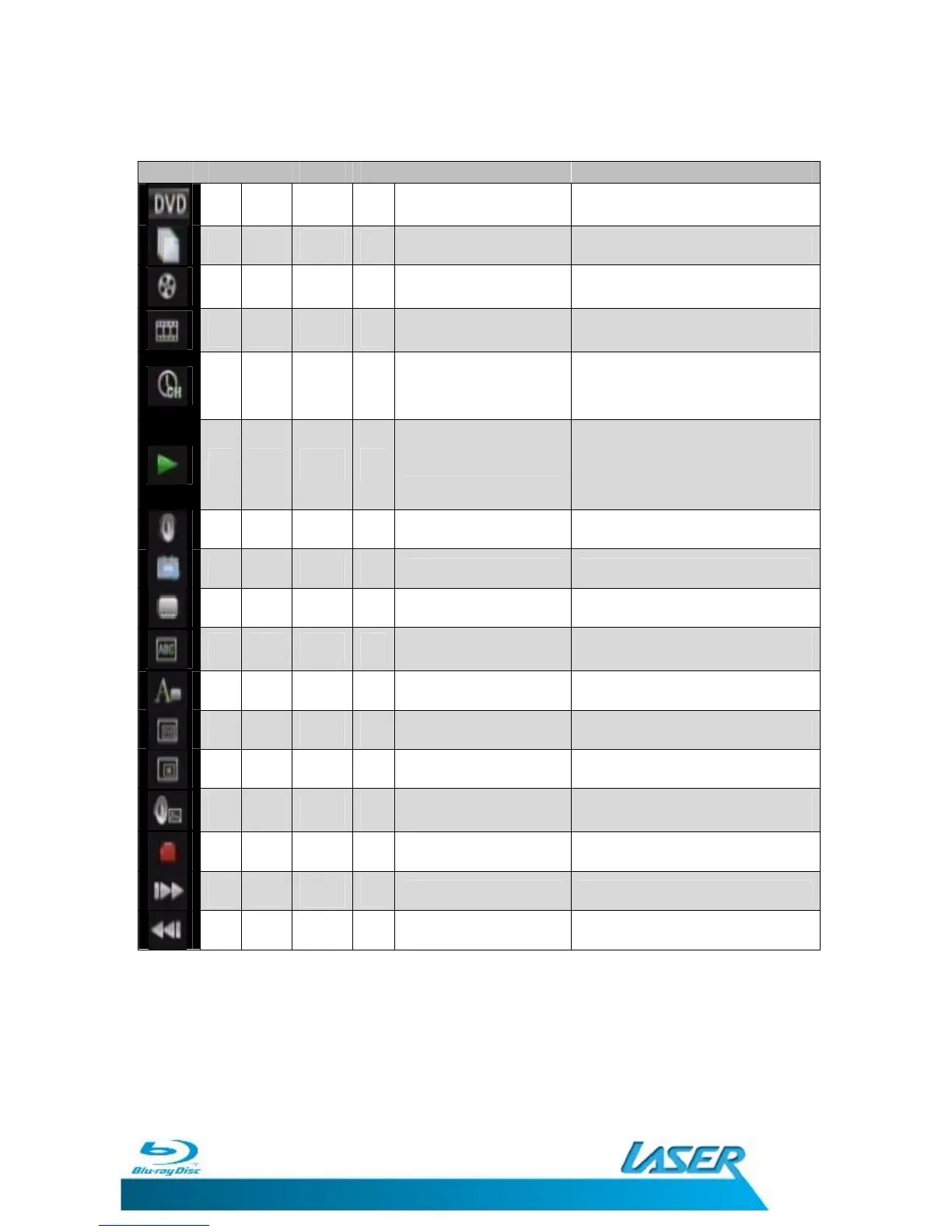
Icon BD DVD CDDA MC Description OPTION
Current File Select another file to player
Current title or track
number
Select a title or track to skip
directly to.
Current Chapter
number
Select a chapter to skip directly
to
Playback time
Current
Chapter remaining
Title remaining
Playback type
Normal
Random Chapter
Random Title
Random All
Audio track Disc content dependant
Angle Disc content dependant
Subtitle Disc content dependant
Code Page
Displays Code page of current
file.
Subtitle Style Disc content dependant
Second Video (PIP) Disc content dependant
Second Audio Disc content dependant
Audio/Video Bitrate
Toggle between Audio or Video
Bitrate display
Still Off Disc content dependant
INS Search* Fast forward at 2 x.
INS Replay* Fast rewind at 2 X.
BD=Blu-ray Disc; DVD = DVD; CDDA= CD Audio discs; MC = Media Center
*Press the PLAY button to resume normal playback.
Note: Not features or options shown here may be available for all discs or
files. Some features require the disc or file to contain extra content for these
features. Please check the disc case or file source to determine if the feature
are available.


 To Next Page