BLU-BD1000 USER MANUAL
37
GETTING THE BEST FROM THE PLAYER
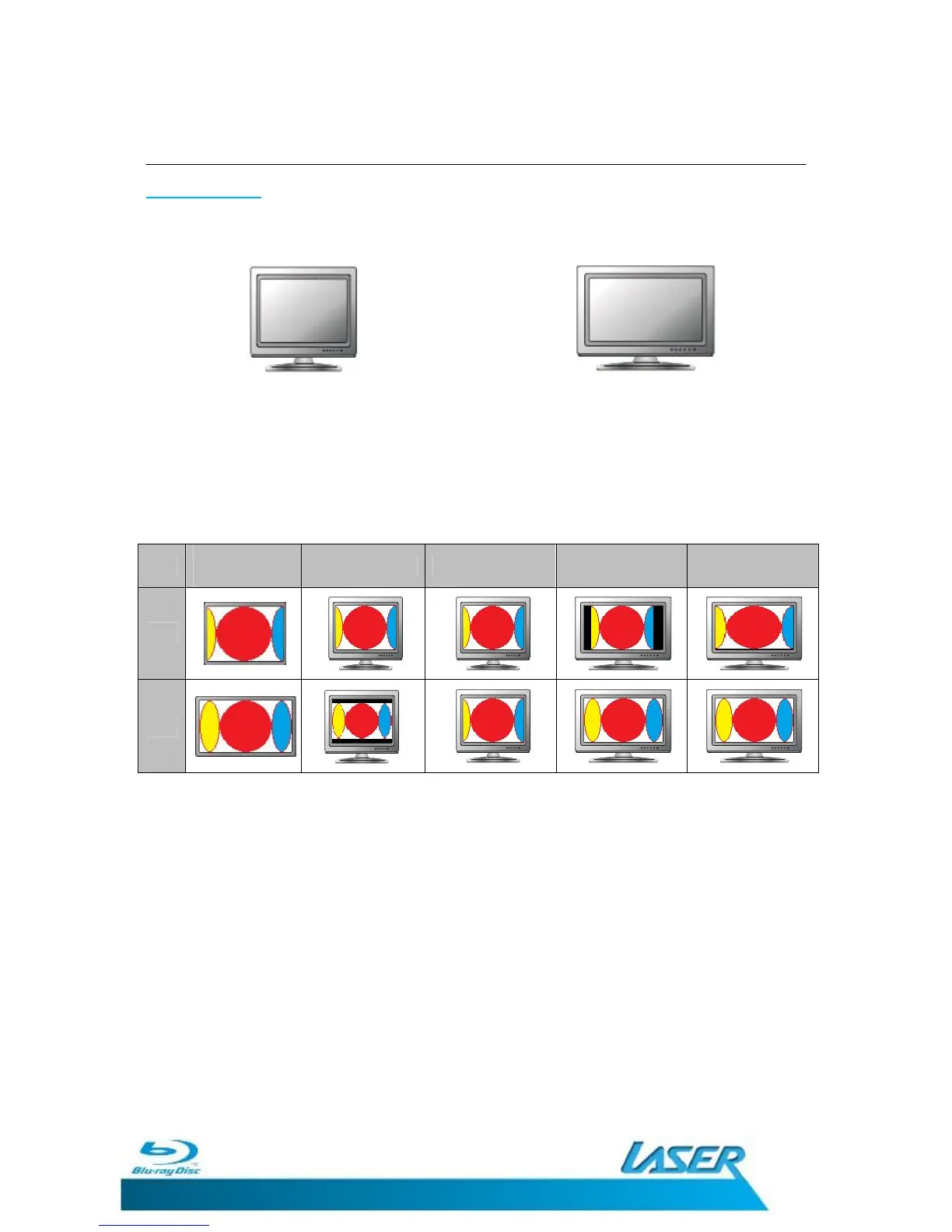
Aspect Ratios
The Picture Aspect Ratio can be changed not only to suit the Display type but the content
being played as well.
4:3 or Standard Aspect Ratio TV 16:9 or Widescreen Aspect Ratio TV
You can set the way that a Wide screen image will be displayed on the display device.
Setting the Aspect ratio as described in the main Set-Up menu allows you to adjust the way
that you view the video from your BLU-BD1000 player. Please see below to see an indication
of how different content is displayed.
Original
content
4:3 Letterbox 4:3 Pan & Scan 16:9 Normal 16:9 Full Screen
Note: Some movies are presented in 2:35.1 ratio to preserve the Theatrical
release originality of the movie. These movies will present with a black bar
across the top and bottom of the picture during playback. This is normal for
these movies.
Some early DVD titles prior to main stream Widescreen television use a 4:3
non-anamorphic widescreen aspect ratio. When played on a 16:9 display, the
content is shown in a small window with black borders on all four sides.
The top and bottom borders are encoded into the video. The left and right
borders are added by the player to maintain the correct aspect ratio. For this
type of discs the “Full Screen” zoom mode can be used to eliminate the
borders.
Please check the original disc case to determine the aspect ration the movie is
presented in.


 To Next Page