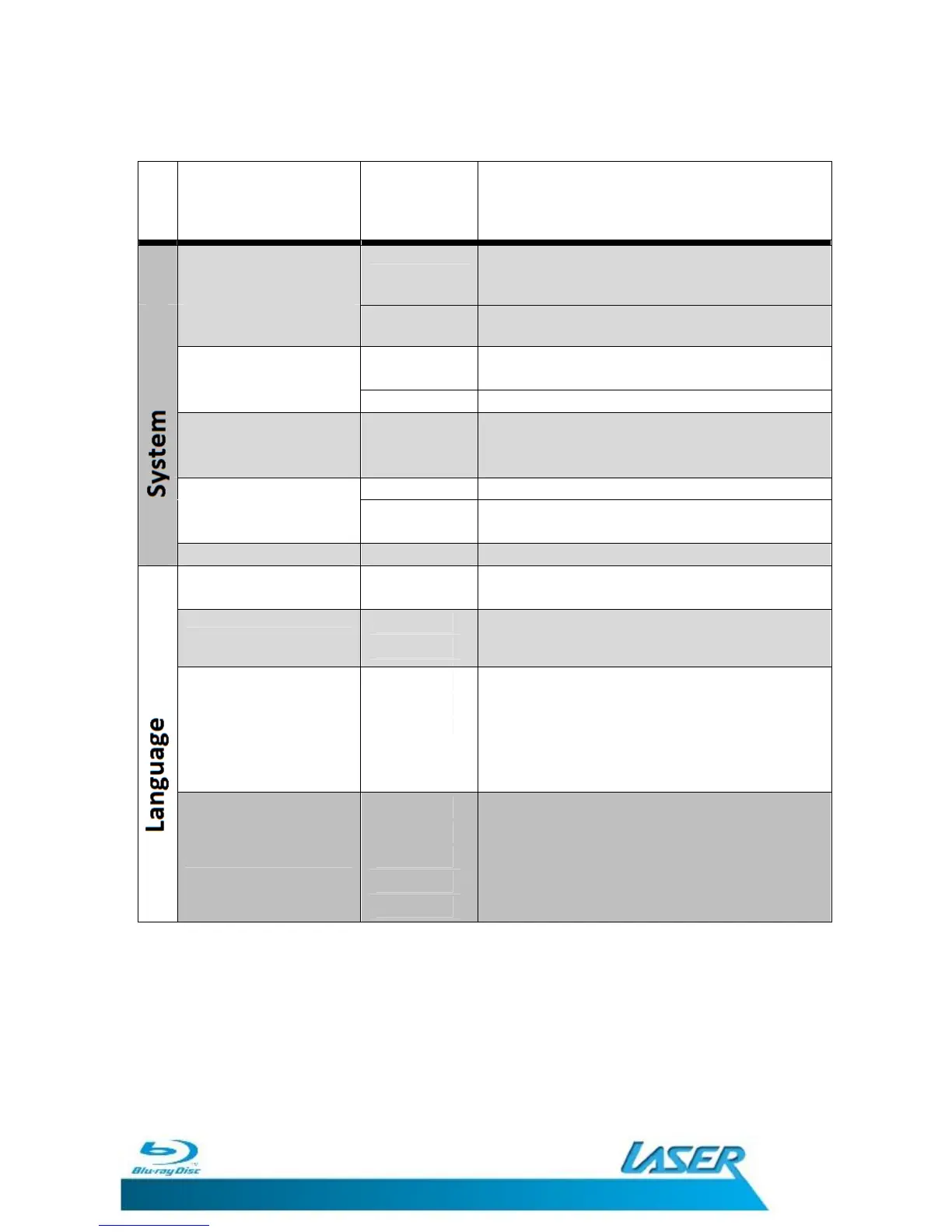
Screen Saver
ON
Starts Screen saver if no video is being played
or not used for 60 seconds.
OFF Turns Screen Saver feature OFF
Disc Auto Playback
ON
Playback of recognised discs starts when
inserted.
OFF Playback of disc to be started manually.
Load Default
Restores All settings on the BLU-BD1000 to
factory default and launches the START-UP
WIZARD
DISC Upgrade Player firmware By CD
Upgrade USB
STORAGE
Upgrade Player Firmware by USB device
Easy Setup Launches STARTUP WIZARD
OSD (On Screen Display) ENGLISH
The Menu Language for the BLU-BD1000 is set
at English only.
MENU
ENGLISH
SPANISH
DUTCH
SWEDISH
KOREAN
Select the language you wish the Disc menu to
automatically be displayed in.
Select the language you wish the Disc audio to
automatically be played in.
Note: Selected language must be available on
the disc being played.
Other language options also available.
SUBTITLE
ENGLISH
SPANISH
DUTCH
SWEDISH
KOREAN
Select the language you wish the movie
subtitles to automatically be displayed in.
Note: Selected language must be available on
the disc being played.
Other language options also available.
SETUP MENU


 To Next Page