BLU-BD1000 USER MANUAL
31
DVD PLAYBACK
Creating and Using Bookmarks
(BD & DVD only)
The bookmark feature works for DVD and Blu-ray discs only.
1. Follow the instructions for Playing a Disc.
2. Press the BOOKMARK button on the remote control to bookmark the current point in the
playing disc. You can create up to 12 bookmarks.
3. To access saved bookmarks, press and hold the BOOKMARK button for 5 seconds.
The on-screen bookmark menu will appear.
4. Use the NAVIGATION buttons on the remote to select and view a saved bookmark and
press the enter button to confirm the selection.
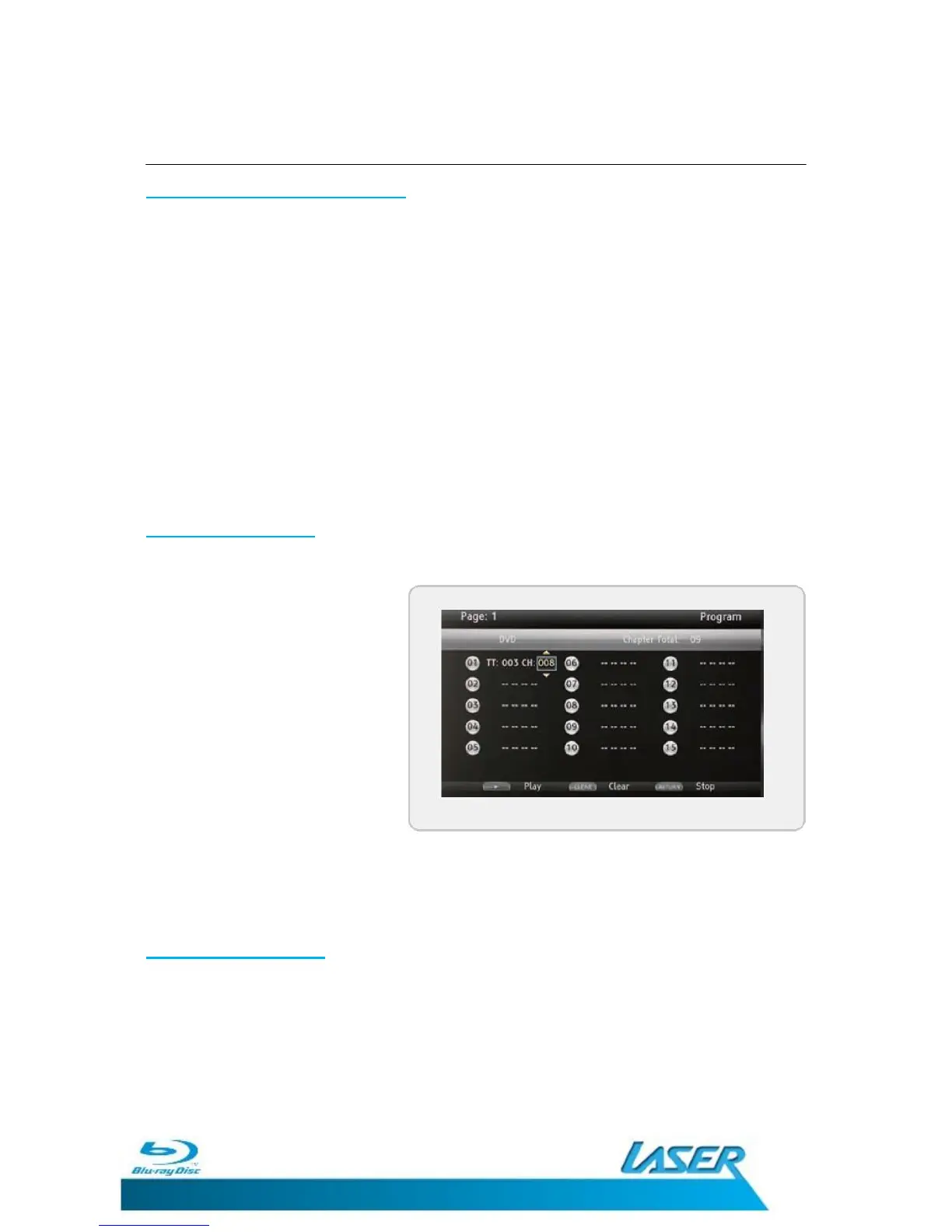
Programming a Disc
(DVD & CD audio only)
1. Follow the instructions for
Playing a Disc.
2. While the disc is playing,
press the PROGRAM
button on the remote
control. A program menu
will appear on the
television.
3. Press the ENTER button.
4. Use the ARROW buttons to select a title and chapter. Press the ENTER button.
5. Press the PLAY button to begin playing the programmed disc.
Cancelling a Program
(DVD & CD only)
1. While the disc is playing, press the PROGRAM button on the remote control.
2. Press the RETURN button on the remote control to clear the set program


 To Next Page