Home
Lattec
Farm Equipment
Herd Navigator
Page 86
Lattec Herd Navigator - Page 86
108 pages
Manual
Save Page as PDF
To Next Page
To Next Page
To Previous Page
To Previous Page
Loading...
April 8, 2011
HN FAQ Memo, Version 2.0
Page 86 of 108
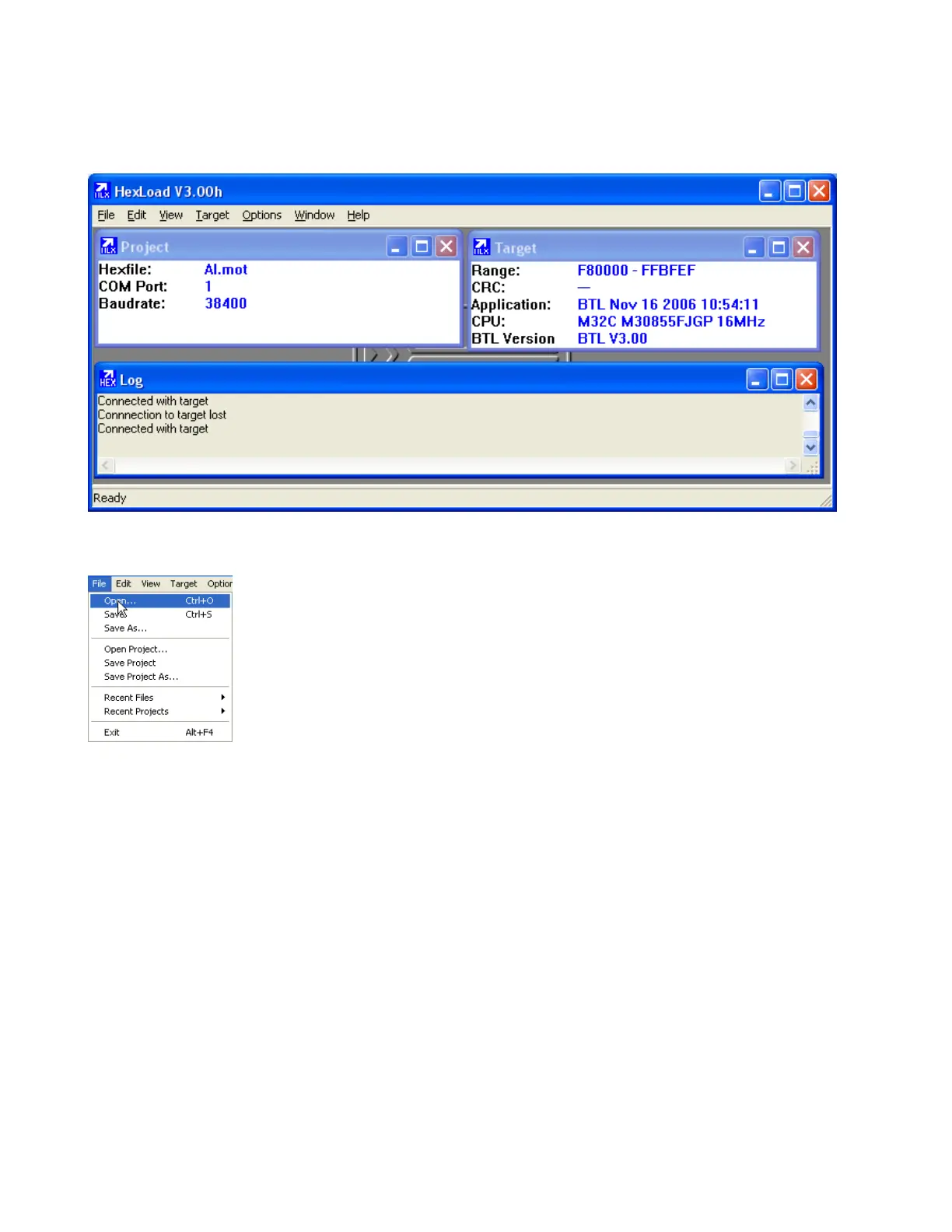
If power is on at the unit it will show up in Target
Then Open file from the File Menu.
Chose the latest software version for the given unit ( AC,SI,AI ).
85
87
Table of Contents
Main Page
Default Chapter
2
Table of Contents
2
1 Introduction
4
Revision History
4
2 Trouble Shooting
6
HSM Error Messages
6
AI State = Wait
6
Dosagelineopentimeout
6
Dosagemissed
6
Bd1Posttimeout
6
Bd5Postsampletimeout
7
Bd5Presampletimeout
7
BD3 Air
7
Bd3Presampletimeout
7
El_Ac_Off_External_Bus
7
Heart Beat : AC
8
Heart Beat : AI
8
Heart Beat : si
8
Heart Beat : DSM
8
Heart Beat: PC
8
Incubator 90% RH / or Visible Signs of Liquid in the IM
8
Quarantine
9
VMS and VMS Sampler Errors in HSM
10
Trouble Shooting on Samplers
12
Using the "Sample All" Function in the AC
14
3 Best Practices / How Do I
15
Sample Intake
15
Activate Sample Simulation in SI. (Parlour Only and Needs Vacuum)
15
How to Simulate Samples Trough si
17
How to Manually Test Safty/Flush and Filter Valve in si (Needs Vacuum)
18
Start Cleaning from si Menu
19
Adjustment of Index on si Multivalve
20
Mounting the Tube for Milkpump in the Sample Intake
23
Correct Mounting of the Air Detector Assembly, BD1,BD5,BD3 and BD4
27
Analyzer Instrument (AI)
36
Procedure for Complete Cleaning of Milk Transport System between si and AI
36
Measuring the Water Amounts During AI Cleaning
45
Adjustment of Dosage Needle Clean Position
48
Howto - Close Hatch Manualy
52
Replacing Flow and Dosage Module + 2 Years AI Service
55
HN and Delaval C200 Parlour Cleaning
58
Abbreviations
58
Herd Navigator and C200 Installation in the Parlour
58
C200 and HN Cleaning Sequence
59
C200 Parametre
60
AC and SC Parameters
60
Parameter
61
C200 Parameters from Diff. HN Farms
62
Sampler
64
Recalibration of Sampler Transfer Time
64
4 Info
65
Menu Overview for the Sample Intake, (SI)
65
Menu Overview for the Analyser Instrument (AI)
67
Menu Overview for the Analysis Controller (AC)
72
Connecting AI to the Drain with Pn:60045416
74
Tube Connections on Sampler Version II
75
Replacing the CIP Box in the Parlour/Vms Sample Intake (Upgrade)
77
5 Appendices
79
Remote Connection to AI or si Trough AC Whit Ethernet
79
AC Basis Settings IP Address (Reset / New Instalation) (VMS / Parlour)
80
Update Orders in AC / HN Service Controller
81
Updating Firmware in HN Units
83
Tools Needed
83
Preparation and Connection to the Unit
83
Programming the Unit
85
Updating the AC, AI, or si Boards with New Version of the Bootloader
89
Sampler Programming Guide
92
Decimal - Hexadecimal Conversion Table
98
Updating FPGA Software on HN2 AI
99
HN2 AI Startup Settings
102
Step 1 : Connect AI to the Ethernet
102
Step 2: Entering the Rest of the Ethernet Settings in the AI Configuration
103
Step 3 : Use the Ac"S Web Interface to Setup AC to Use HN-2 AI
105
Step 4 : Setup the Alcom Address for the AI in Sample Intake to same Address as the AC
108



 To Next Page