(d) VOLUME INDICATOR
The volume indicator goes from -100dB to 0dB, minimum and maximum respectively zone
volume. If a zone is selected , the current volume level will be displayed, and will be updated
while you make the settings. If you have made a multiple selection, any value will be shown,
until a setting is made. In this case, only the setting made will be display.
(e) ROUTED SOURCE
This field will show the audio source routed to the selected zone.
(f) VOLUME ADJUSTMENT BUTTONS
The volume adjustment window has two buttons to adjust " +" and "- ", each time you press
one of them, it will be increased or decreased , as many decibels as the " Gain Step Setting"
is displaying. To carry out this setting, select the zone/zones on which you would like to
perform the adjustment , change the value of the volume, and confirm by pressing " OK".
To cancel, press the " BACK" button. If there is no selection of zone/zones , the settings will
be applied to all zones.
NOTE: If you make a multiple selection of zones, it is possible to apply a relative increase or
decrease in volume. The maximum value that can reach the group is determined by the zone,
within the selected group, which has a the highest volume. So when it reaches the 0dB
(maximum), or the set step is greater than the difference between 0dB and the current value
will not be allowed to continue to increase the volume. The same happens in the case of the
minimum volume.
3.5.2 ROUTE SOURCES
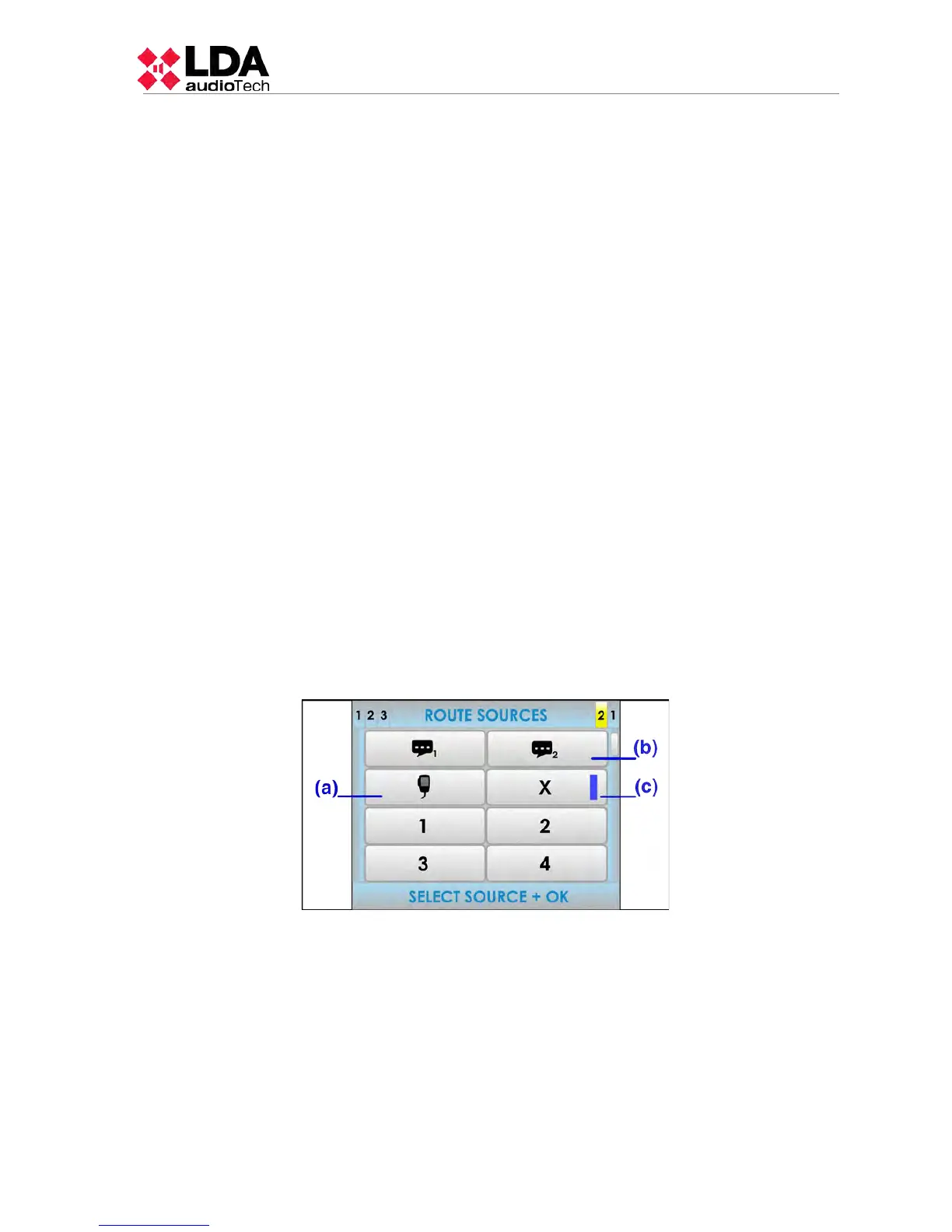
To route any available audio source to any of the zones or group of zones, press the
button “ROUTE SOURCES”. The following window will appear:
(a) EMERGENCY MICROPHONE
On special occasions, you can use the emergency microphone to make announcements by
one or more zones in PA mode. Once the audio source routing is concluded, use the PTT
button on the microphone to make the announcement .
(b) PRE-RECORDED MESSAGES
From this menu you can select one of the two pre-recorded message player sources
integrated in the equipment. To play the message, once the routing a message player is done,
you must access the pre-recorded message window in the advanced menu (see 3.5.1) and
play the selected message.
LDA Audio Tech - Severo Ochoa Nº 31- 29590 MÁLAGA, ESPAÑA. Tlf: +34 952028805
23



 To Next Page