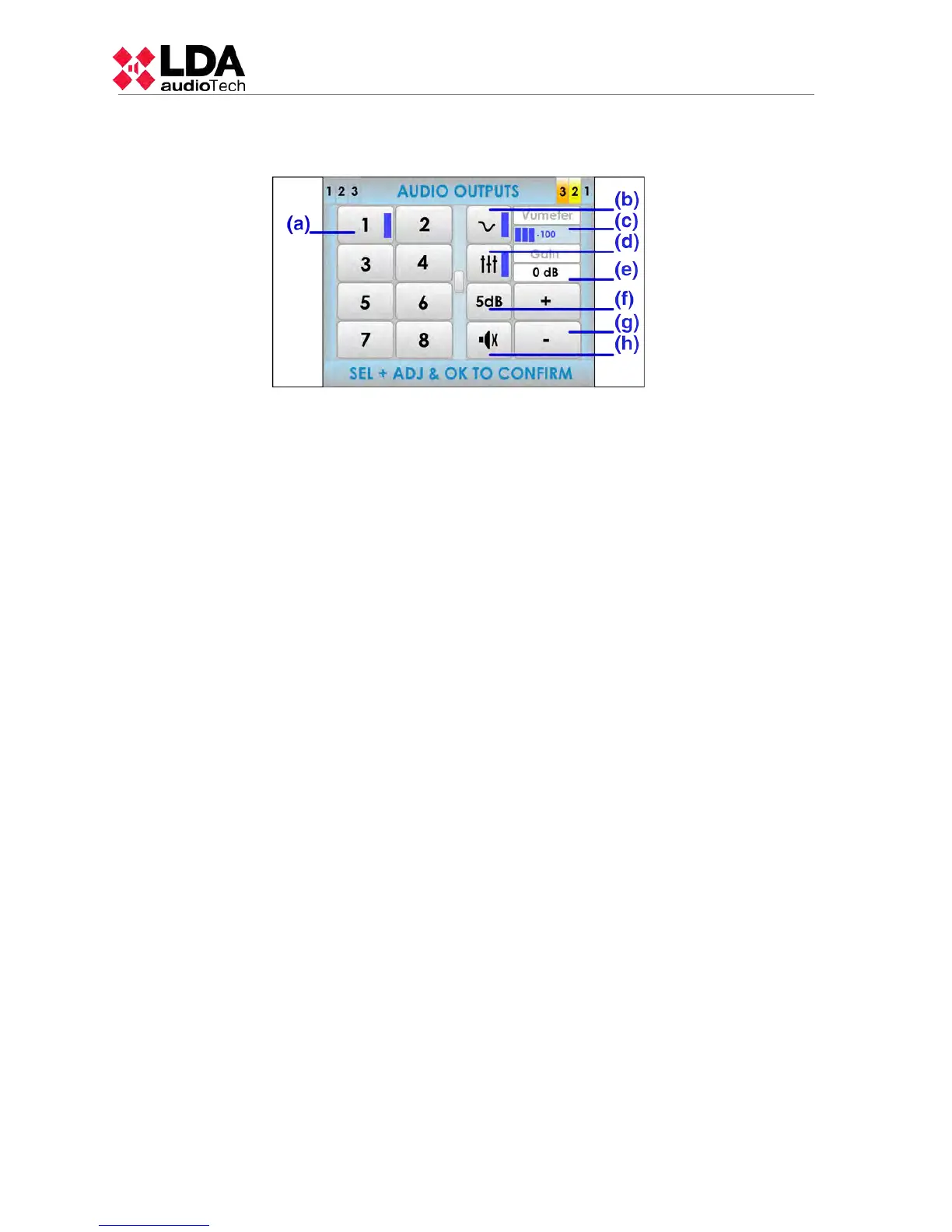
3.5.5 AVANCED OPTIONS. AUDIO OUTPUT.
(a) AUDIO OUTPUT SELECTION BUTTONS
In the left half of the screen, there are the audio outputs (output channel for amplifier). Click on
the desired output. If the progress indicator appears (see 2.2.6), use the scroll control to
display the rest of outputs available.
(b) LOUDNESS BUTTON
Press to turn on loudness compensation. Loudness compensation introduces dynamic
equalization which is applied depending on the gain applied to the output channel. If the gain
is at maximum, it has no effect. If the level is different from the maximum, a compensation will
be introduced in the bass and treble levels so that you get an excellent perception of the
sound being played.
(c) VUMETER INDICATOR
Displays the signal level that is being detected in the output. Between -100dB to 0dB.
(d) EQUALIZER BUTTON
Press to activate the equalizer memory configured using the configuration application.
(e) GAIN INDICATOR
Displays the gain setting for the output selected on the volume of the zone.
(f) GAIN STEP SETTING BUTTON
The gain step setting button, allows the selection of the amount of increment/decrement to be
performed in the audio output when you press on the volume adjustment buttons. You can
select from the following options, pressing consecutively : 1dB , 5dB , 10dB.
(g) VOLUME ADJUSTMENT BUTTONS
There are two buttons to adjust " +" and "- " the gain or volume. Each time you press one of
them, it will be increased or decreased , as many decibels as the " Gain Step Setting" is
displaying. This adjustment is relative to the volume of the zone, therefore, if several output
channels are grouped in a zone, it will be possible to adjust as many dB as the volume of the
zone of the selected channel. To carry out this setting, select the output on which you would
like to perform the adjustment, change the value of the volume, and confirm by pressing " OK".
To cancel, press the " BACK" button. When the gain to be applied to the output will reach its
top or bottom limit (0dB or -100db), it will be blocked. As a result, an output with a theoretical
gain of -5dB that belongs to a zone with the volume adjusted to -10dB, it will display an
effective gain of -15dB. When increasing the output gain, it will get blocked when reaching the
value -10dB, that corresponds to 0dB of output gain (maximum value).
(h) MUTE BUTTON
The mute button allows a radical decrease of the volume of the output to a minimum. When
the mute is disabled, the output will recover the volume it had before being silenced.
26
www.lda-audiotech.com



 To Next Page