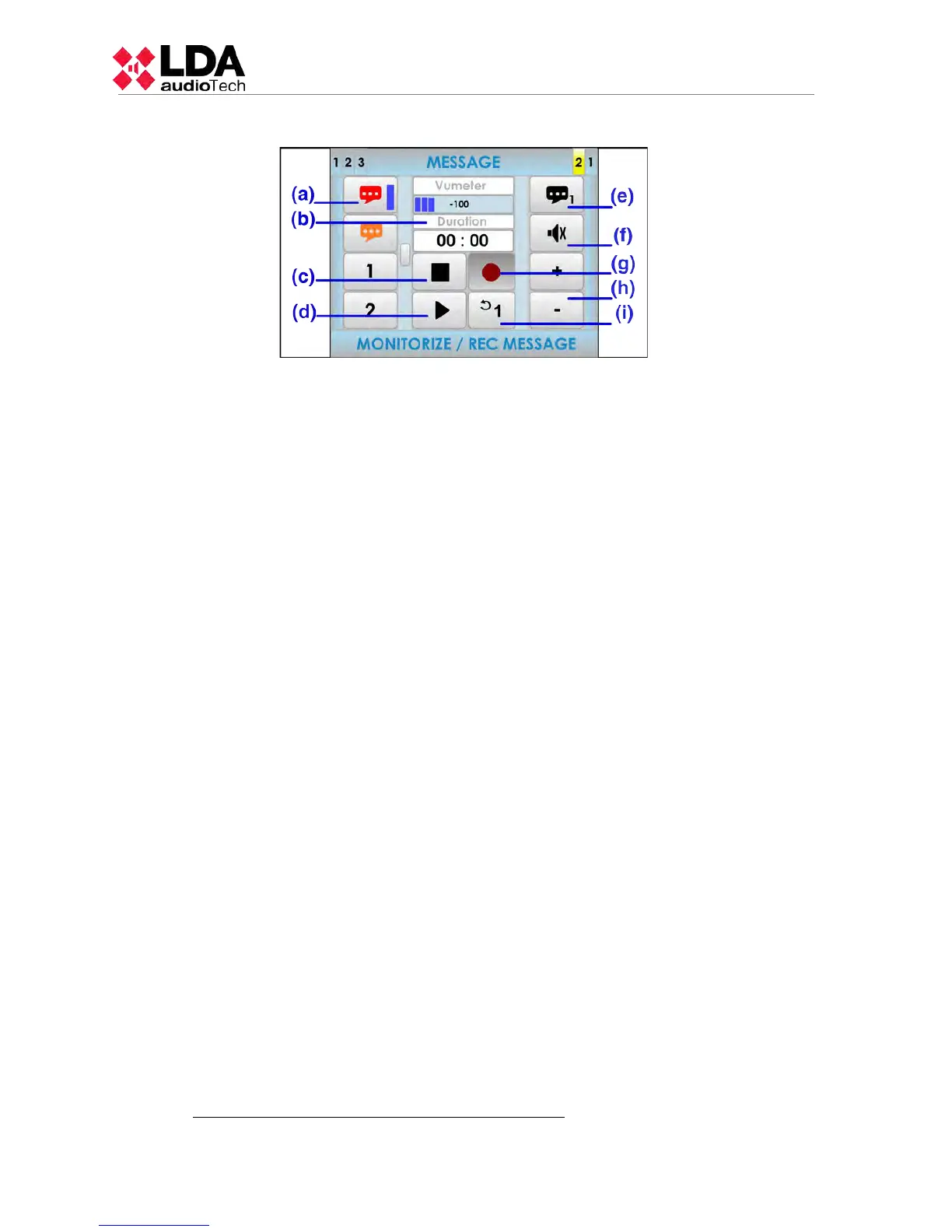
3.5.1 AVANCED OPTIONS. MESSAGES.
(a) MESSAGE LIST
In the left column of the screen, you can find the list of pre-recorded messages. If the progress
indicator is present (see 2.2.6), use the scroll control to display the remaining messages
available. To select one, press its corresponding button in the list and a selection band will
appear in the button.
(b) MESSAGE DURATION INDICATOR
Displays the message duration in minutes and seconds when the message is selected . When
the message is playing, it will display a countdown of duration equal to the duration of the
message.
(c) STOP BUTTON
The stop button allows to stop the playback completely. The duration indicator shows the length
of the selected message. Once the action has stopped, both the playback or recording should be
started from the beginning of the message. A selection band will appear when the message is
stopped.
(d) PLAY/PAUSE BUTTON
This button starts the playback of the message. When the message is being played, it will pause
the playback of the message.
(e) MESSAGE PLAYER SELECTOR
Selects the message player to use. The system has 2 pre-recorded message players.
(f) MUTE BUTTON
The mute button allows a radical decrease of the volume of the input to a minimum. When the
mute is disabled, the input will recover the volume it had before being silenced.
(g) REC BUTTON
The rec button starts the recording over the selected pre-recorded message.
NOTE: If this button is in gray colour, the system does not allow this function or it is not
implemented.
(h) VOLUME ADJUSTMENT BUTTONS
The window has two buttons to adjust volume " +" and "- " , each time you press one of them,
the volume of the monitor speaker will be increased or decreased by 1 dB.
(i) LOOP BUTTON
Allows an automatic repetition of the message. It is possible to select either 1, 2 or 3
repetitions of the message or loop mode for an indefinitely number of repetitions.
NOTE: if the message players requires the use of the pre-recorded message player will clear
this command.
USE OF THE PRE-RECORDE MESSAGE PLAYER
28
www.lda-audiotech.com



 To Next Page