EasyManua.ls Logo

Leibinger JET2 neo - Page 61

Leibinger JET2 neo
64 pages
Print Icon
To Next Page IconTo Next Page
To Previous Page IconTo Previous Page
Loading...
Group 6 Operation – Elements and procedures Page 59
JET2 neo Release R1.07 en
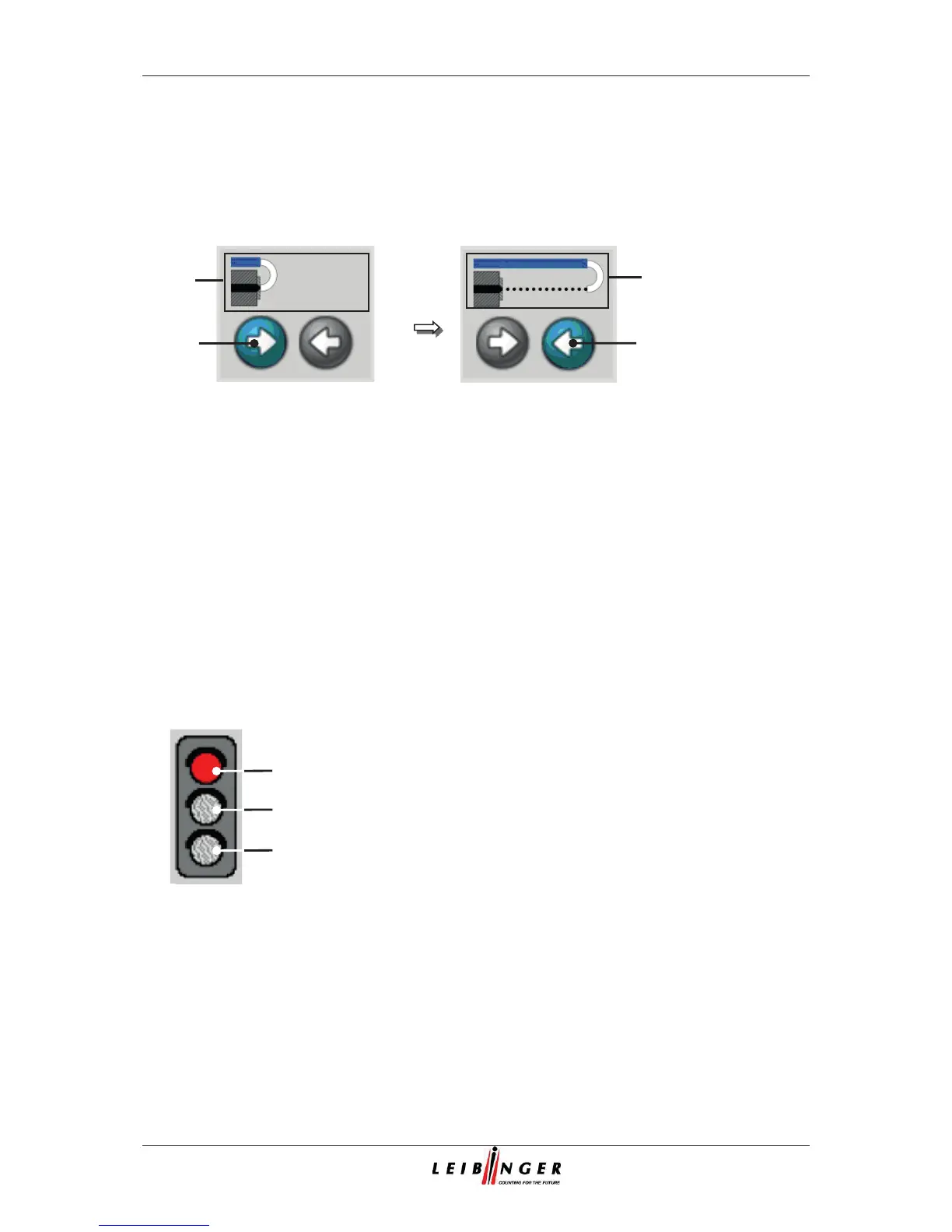
Status field <Nozzle> (8): This field enables the opening or closing of the nozzle
and shows additional the current operating condition of the nozzle by an active
visualization graphic.
Figure 18
Status field <Nozzle>
1 – Button <Opening nozzle>
3 – Visualization field
2 – Button <Closing nozzle>
With the buttons <Opening nozzle> (1) and <Closing nozzle> (2) you can open or
close the nozzle. The executable button is backgrounded blue-grey.
Device status (traffic light) (9): The status traffic light visualizes the current
condition of the JET2 neo.
Figure 19
Status traffic light
1 – red LED
2
–yellow LED
3
– green LED
1
2
3
1
2
3
3

Table of Contents

Related product manuals