20
Instructions for Use, V 2.2 RevI – 09/2016
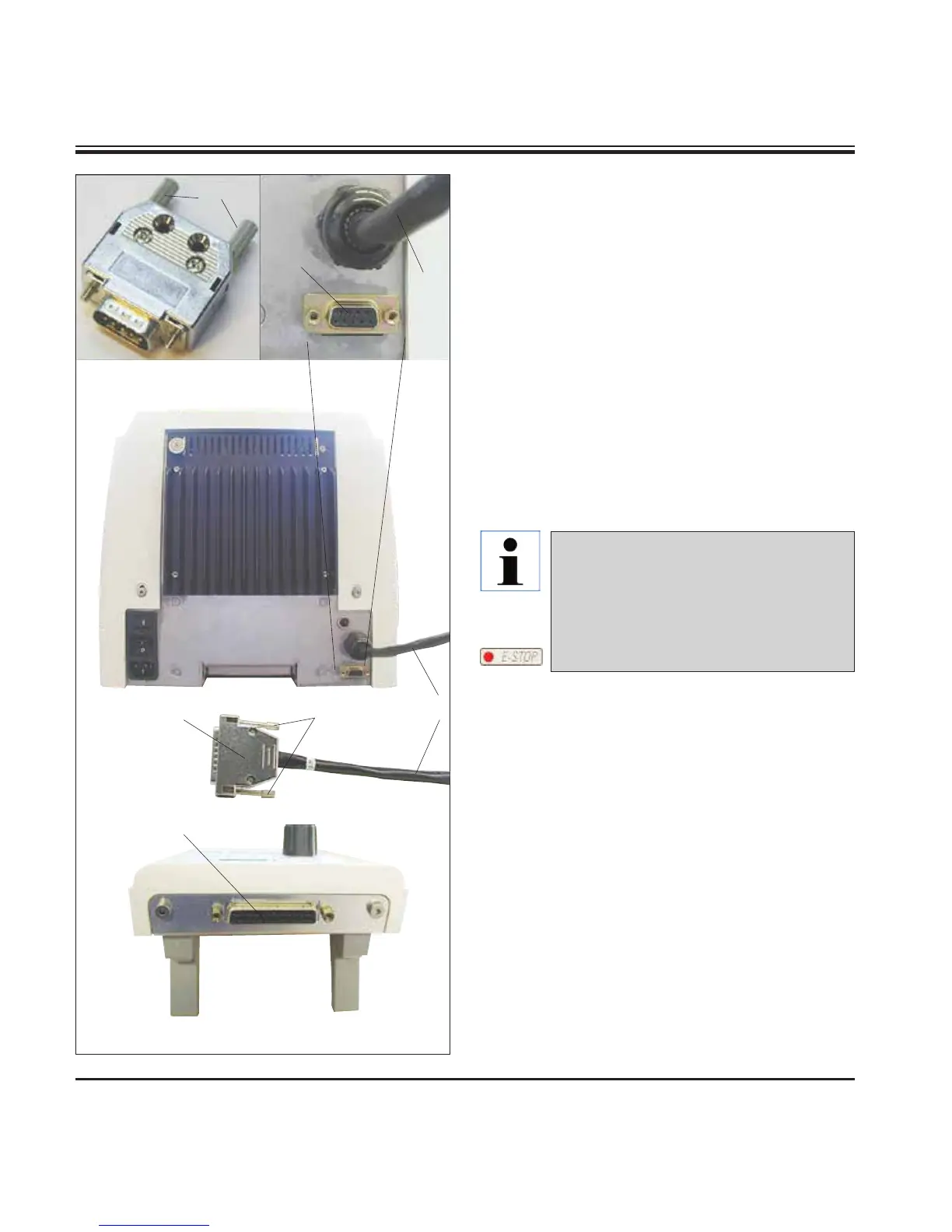
Fig. 13
4. Instrument Setup
Connecting the control panel
The connecting cable (15) of the control panel
is fixed to the microtome. It may not be discon-
nected.
• Insert the plug (14) of the connecting cable
(15) into the connecting jack (16) on the rear
of the control panel.
• To fasten the plug, tighten the two screws (17).
Connecting the dummy plug
• Insert the dummy plug provided (18) into the
connecting jack (19) on the rear of the instru-
ment and fasten it by tightening the screws
(20).
Connecting the foot switch (optional accessory)
• If a foot switch is to be used with the instru-
ment, attach it in the same way as the dummy
plug.
18
15
19
20
16
15
14 17
Caution!
If neither the dummy plug nor the foot
switch is connected, the instrument is
not ready for operation.
In this case, the E-STOP LED on the
instrument is illuminated.



 To Next Page