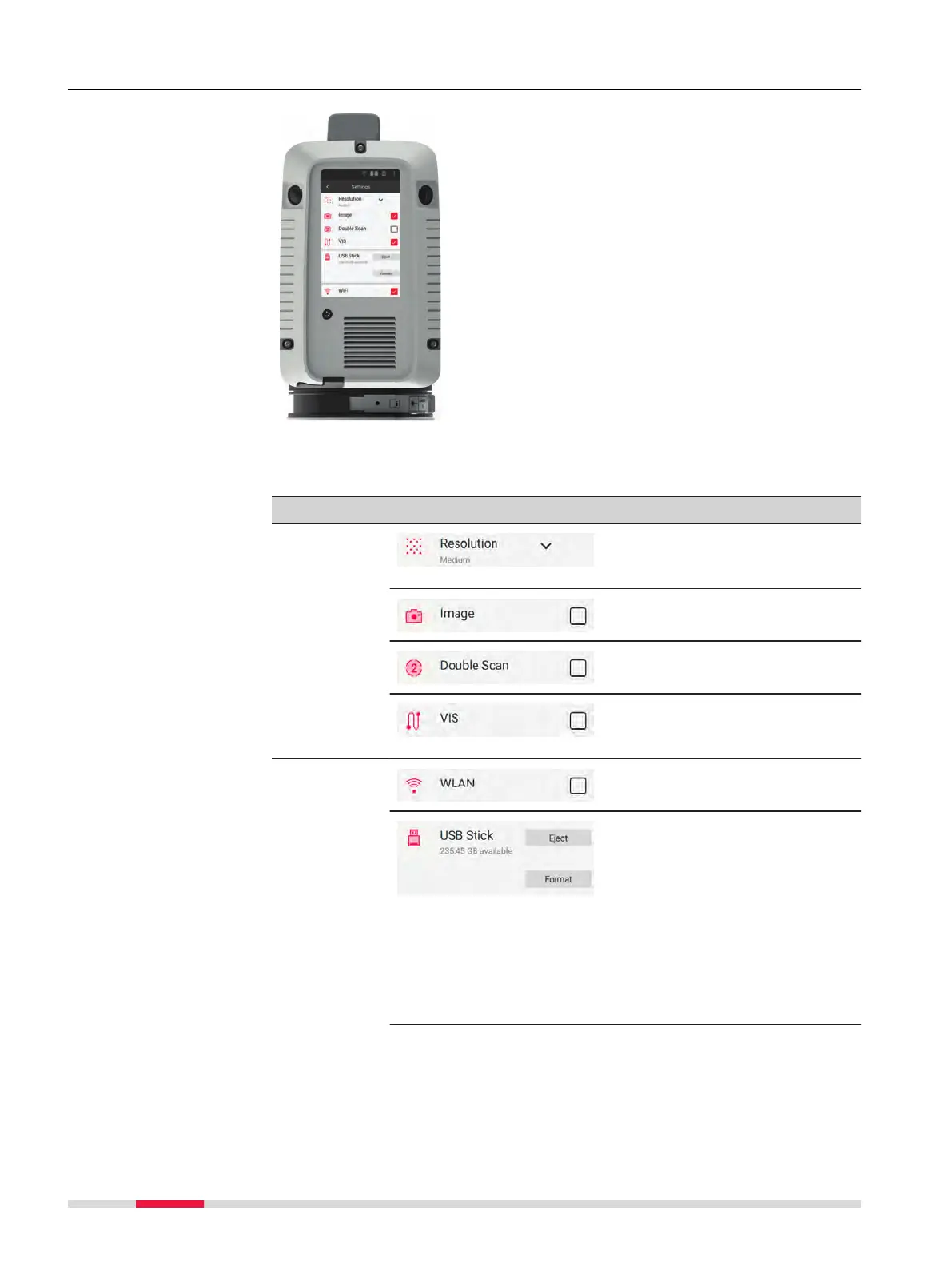
4.5.3 Settings
Setting options in Settings screen:
•
Scan settings
•
Instrument settings
•
Language
•
Date and Time
Further options:
•
Upload language les
•
Upgrade rmware
•
Transfer logles
•
Perform a Check & Adjust
View:
•
System information
•
Legal information
•
Regulatory information
•
US patents
To close the Settings screen tap the backwards
arrow.
Element Description
Scan
settings
Tap the arrow to select a scan
resolution (low, medium or high)
from the drop-down menu.
Tap the checkbox to enable HDR
image acquisition.
Tap the checkbox to enable
Double Scan.
Tap the checkbox to enable the
visual inertial system VIS
(RTC360 only).
Instrument
settings
Tap the checkbox to enable
WLAN.
The storage space available on
the USB stick is displayed.
•
Tap Eject to remove the
USB stick.
•
Tap Format to perform a
quick format of the USB
stick.
☞
In order to avoid loss of data, only remove the
USB stick when the Eject function has been com-
pleted.
About the Settings
screen
34 Operation



 To Next Page