EN
131
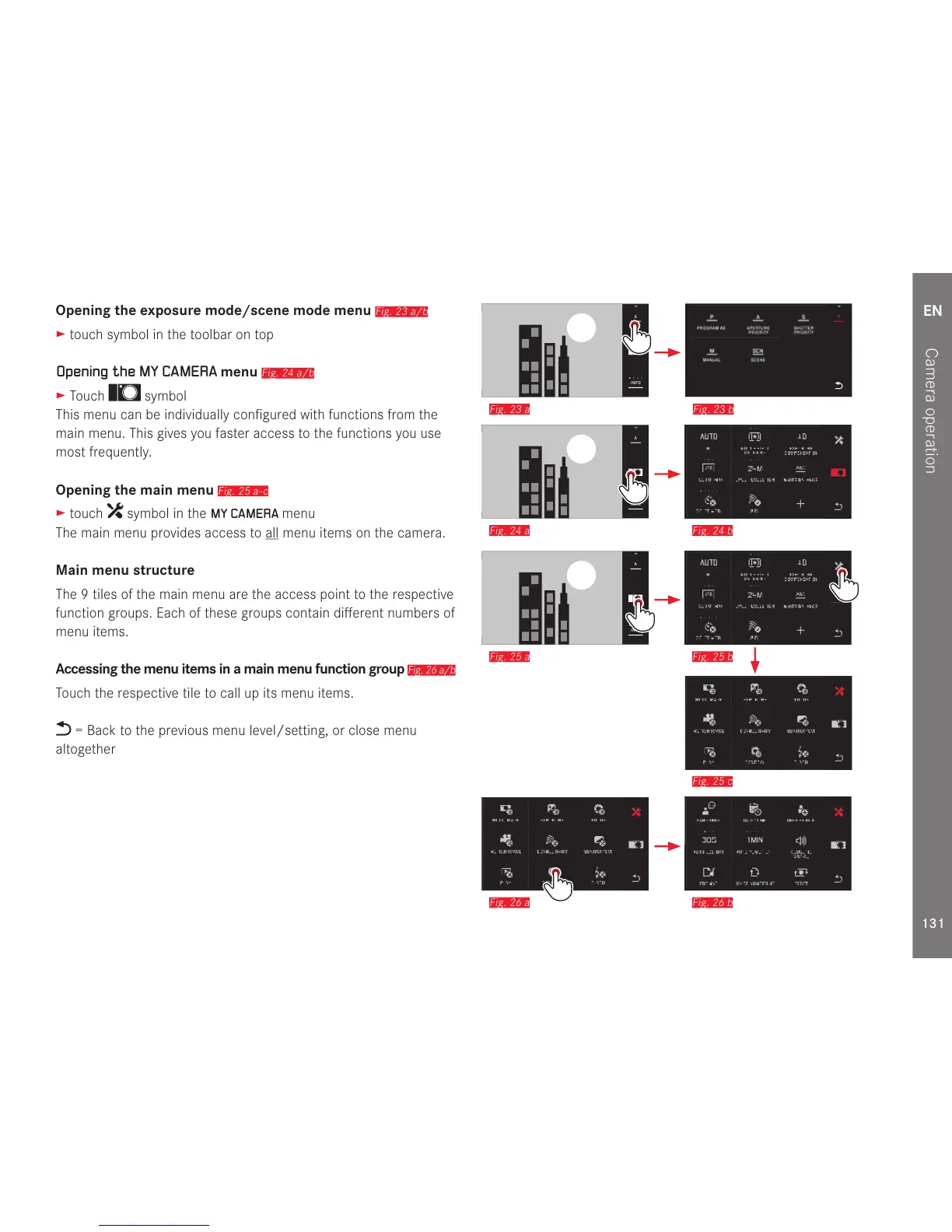
Opening the exposure mode/scene mode menu
Fig. 23 a/b
► touch symbol in the toolbar on top
Opening the MY CAMERA menu
Fig. 24 a/b
► Touch symbol
This menu can be individually configured with functions from the
main menu. This gives you faster access to the functions you use
most frequently.
Opening the main menu
Fig. 25 a-c
► touch symbol in the MY CAMERA menu
The main menu provides access to all menu items on the camera.
Main menu structure
The 9 tiles of the main menu are the access point to the respective
function groups. Each of these groups contain different numbers of
menu items.
Accessing the menu items in a main menu function group
Fig. 26 a/b
Touch the respective tile to call up its menu items.
= Back to the previous menu level/setting, or close menu
altogether



 To Next Page