EasyManua.ls Logo

Leica TL2 - Assigning Functions to Left Setting Dial

Leica TL2
107 pages
Print Icon
To Next Page IconTo Next Page
To Previous Page IconTo Previous Page
Loading...
EN
139
Camera operation
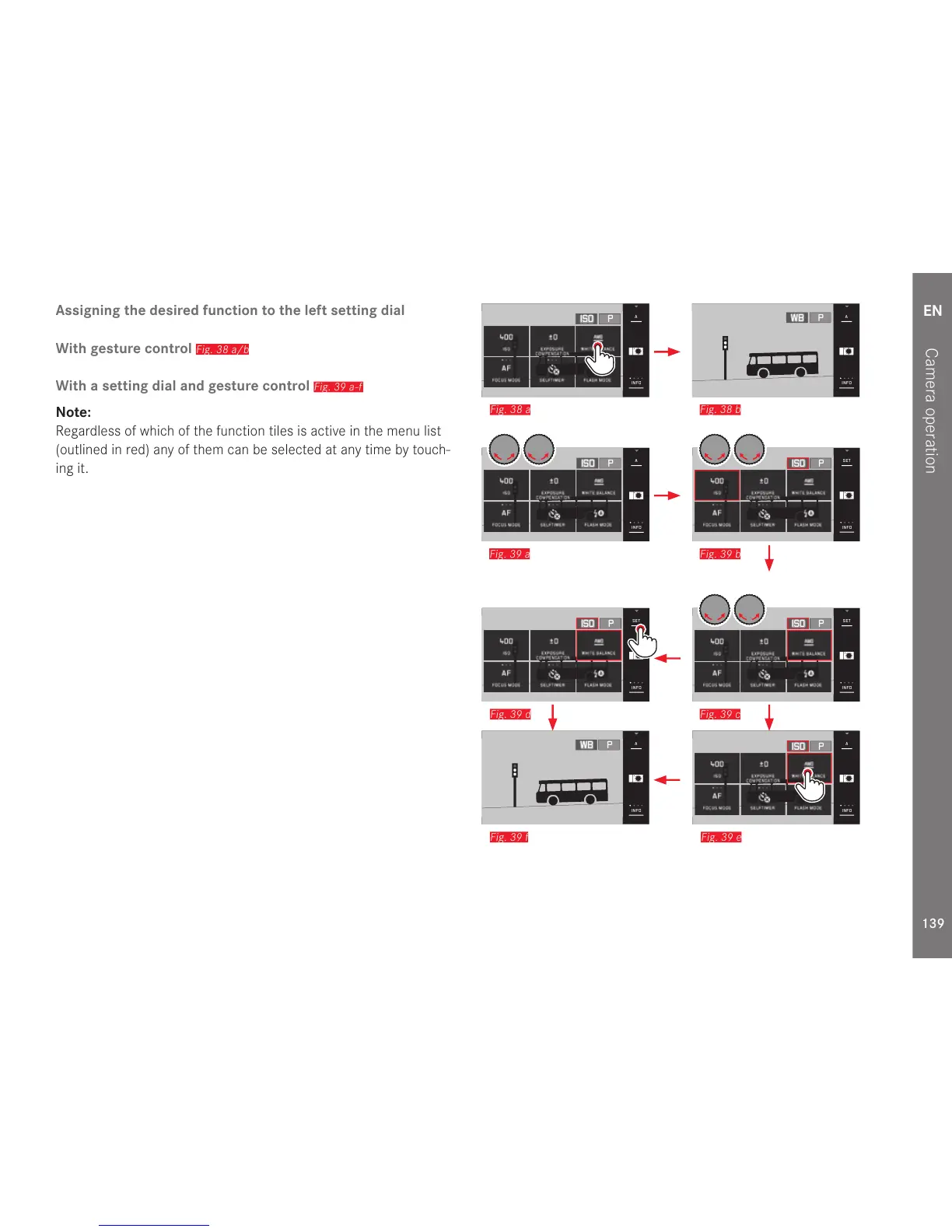
Assigning the desired function to the left setting dial
With gesture control
Fig. 38 a/b
With a setting dial and gesture control
Fig. 39 a-f
Note:
Regardless of which of the function tiles is active in the menu list
(outlined in red) any of them can be selected at any time by touch-
ing it.
INFO
1/80002.8F 12500ISO EV
A
-3 2 1 0 21 3+
823412MP
INFO
1/80002.8F 12500ISO EV
A
-3 2 1 0 21 3+
823412MP
ISO P
Fig. 38 a
INFO
1/80002.8F 12500ISO EV
A
-3 2 1 0 21 3+
823412MP
WB P
Fig. 38 b
INFO
1/80002.8F 12500ISO EV
A
-3 2 1 0 21 3+
823412MP
INFO
1/80002.8F 12500ISO EV
A
-3 2 1 0 21 3+
823412MP
ISO P
Fig. 39 a
INFO
1/80002.8F 12500ISO EV
A
-3 2 1 0 21 3+
823412MP
INFO
1/80002.8F 12500ISO EV
SET
-3 2 1 0 21 3+
823412MP
ISO P
Fig. 39 b
INFO
1/80002.8F 12500ISO EV
A
-3 2 1 0 21 3+
823412MP
INFO
1/80002.8F 12500ISO EV
SET
-3 2 1 0 21 3+
823412MP
ISO P
Fig. 39 d
INFO
1/80002.8F 12500ISO EV
A
-3 2 1 0 21 3+
823412MP
INFO
1/80002.8F 12500ISO EV
SET
-3 2 1 0 21 3+
823412MP
ISO P
Fig. 39 c
INFO
1/80002.8F 12500ISO EV
A
-3 2 1 0 21 3+
823412MP
WB P
Fig. 39 f
INFO
1/80002.8F 12500ISO EV
A
-3 2 1 0 21 3+
823412MP
INFO
1/80002.8F 12500ISO EV
A
-3 2 1 0 21 3+
823412MP
ISO P
Fig. 39 e

Table of Contents

Other manuals for Leica TL2

Related product manuals