EN
176
Review mode
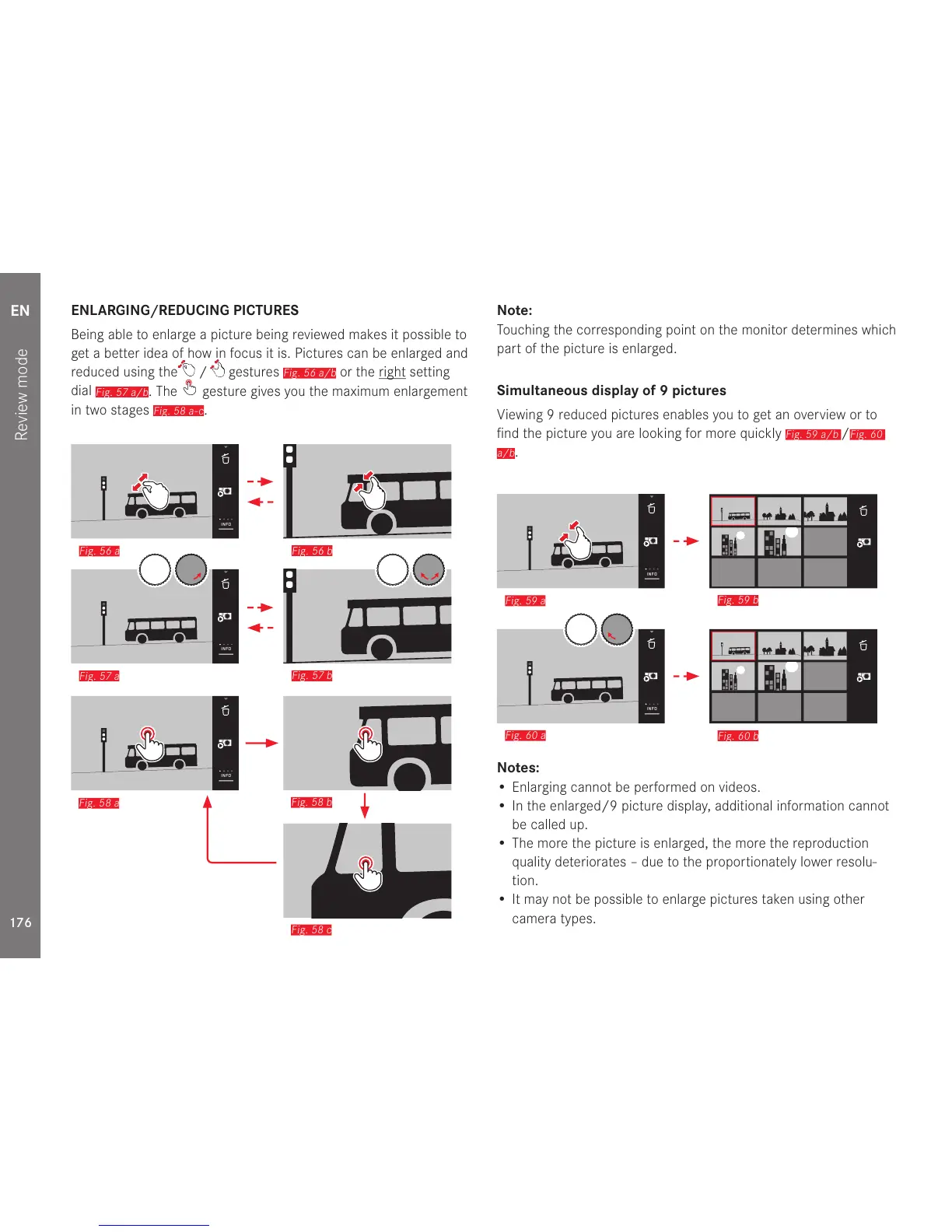
ENLARGING/REDUCING PICTURES
Being able to enlarge a picture being reviewed makes it possible to
get a better idea of how in focus it is. Pictures can be enlarged and
reduced using the
/ gestures
Fig. 56 a/b
or the right setting
dial
Fig. 57 a/b
. The gesture gives you the maximum enlargement
in two stages
Fig. 58 a-c
.
Fig. 56 b
Fig. 57 b
INFO
INFO
Fig. 56 a
Fig. 57 a
Fig. 58 b
Fig. 58 c
INFO
Fig. 58 a
Note:
Touching the corresponding point on the monitor determines which
part of the picture is enlarged.
Simultaneous display of 9 pictures
Viewing 9 reduced pictures enables you to get an overview or to
find the picture you are looking for more quickly
Fig. 59 a/b
/
Fig. 60
a/b
.
Fig. 59 b
Fig. 60 b
INFO
INFO
Fig. 59 a
Fig. 60 a
Notes:
• Enlarging cannot be performed on videos.
• In the enlarged/9 picture display, additional information cannot
be called up.
• The more the picture is enlarged, the more the reproduction
quality deteriorates – due to the proportionately lower resolu-
tion.
• It may not be possible to enlarge pictures taken using other
camera types.



 To Next Page