EN
133
Camera operation
Menu tiles
The main menu function groups as well as menu items are dis-
played in the form of tiles.
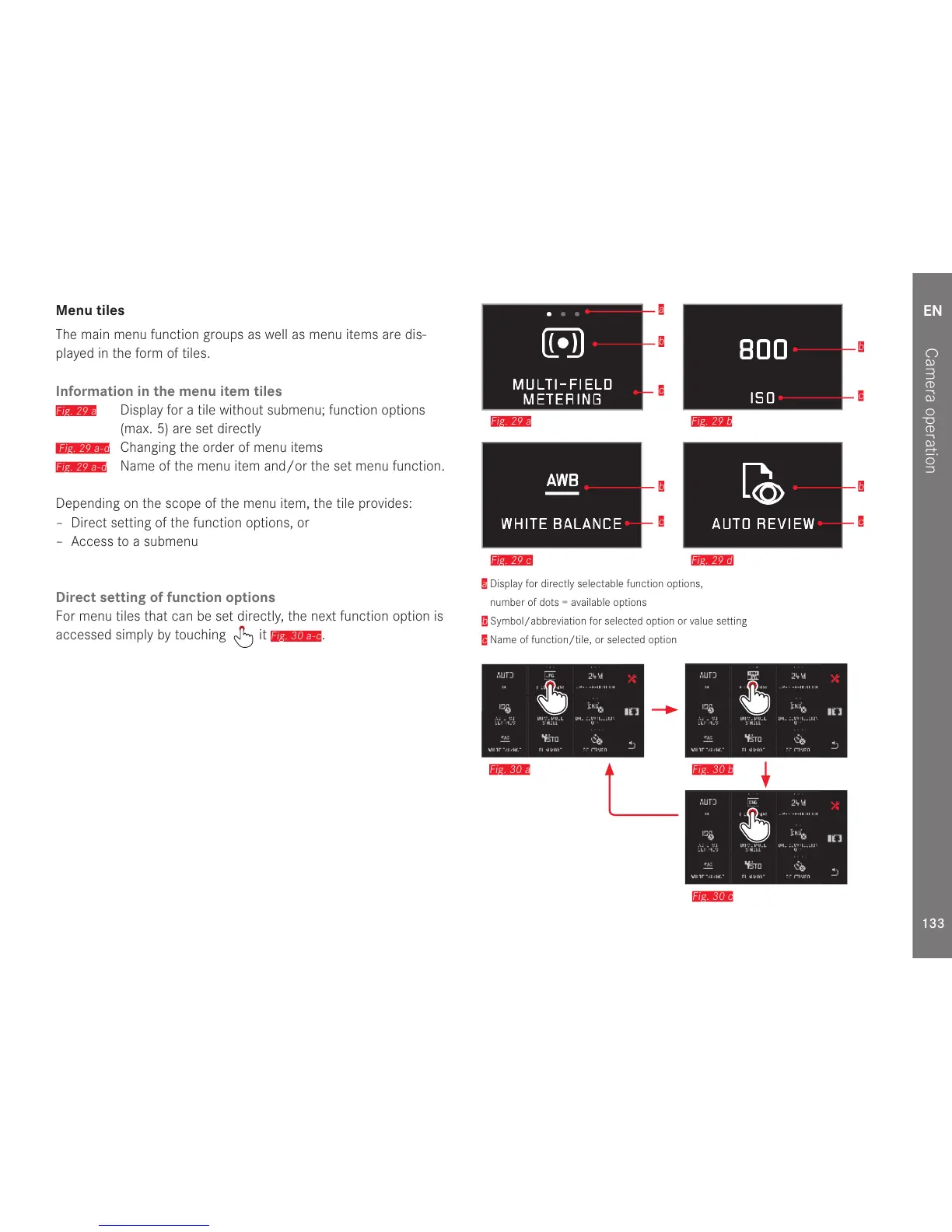
Information in the menu item tiles
Fig. 29 a
Display for a tile without submenu; function options
(max. 5) are set directly
Fig. 29 a-d
Changing the order of menu items
Fig. 29 a-d
Name of the menu item and/or the set menu function.
Depending on the scope of the menu item, the tile provides:
– Direct setting of the function options, or
–Access to a submenu
Direct setting of function options
For menu tiles that can be set directly, the next function option is
accessed simply by touching
it
Fig. 30 a-c
.
b
c
b
c
b
c
b
c
a
Fig. 29 c Fig. 29 d
Fig. 29 a Fig. 29 b
a
Display for directly selectable function options,
number of dots = available options
b
Symbol/abbreviation for selected option or value setting
c
Name of function/tile, or selected option
Fig. 30 a Fig. 30 b
Fig. 30 c



 To Next Page