EasyManua.ls Logo

Leica TL2 - Deleting Images

Leica TL2
107 pages
Print Icon
To Next Page IconTo Next Page
To Previous Page IconTo Previous Page
Loading...
EN
180
Review mode
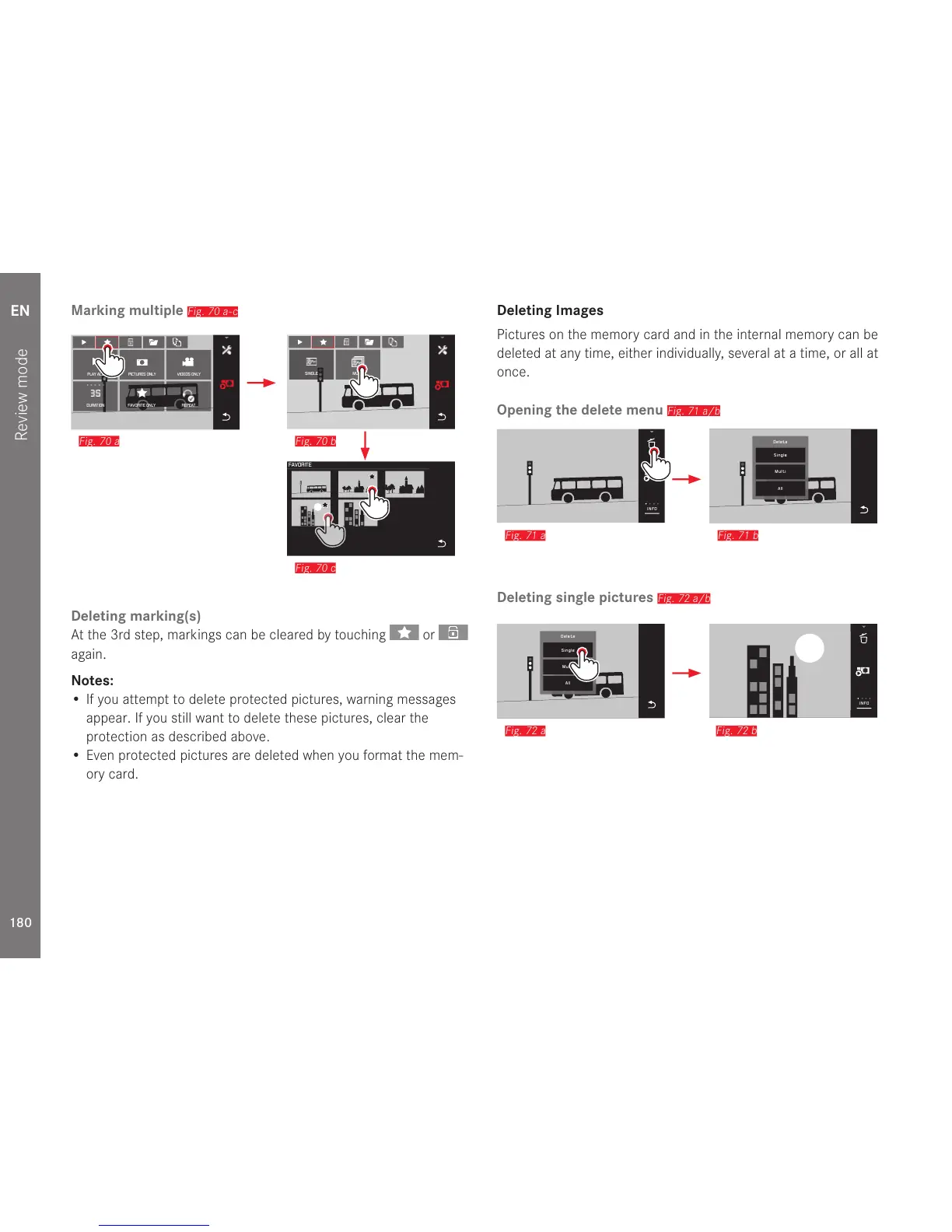
Marking multiple
Fig. 70 a-c
MULTISINGLE
Fig. 70 b
DURATION REPEAT
PLAY ALL
FAVORITE ONLY
VIDEOS ONLYPICTURES ONLY
Fig. 70 a
FAVORITE
Fig. 70 c
Deleting marking(s)
At the 3rd step, markings can be cleared by touching
or
again.
Notes:
If you attempt to delete protected pictures, warning messages
appear. If you still want to delete these pictures, clear the
protection as described above.
Even protected pictures are deleted when you format the mem-
ory card.
Deleting Images
Pictures on the memory card and in the internal memory can be
deleted at any time, either individually, several at a time, or all at
once.
Opening the delete menu
Fig. 71 a/b

INFO
Fig. 71 a
Delete
Single
Multi
All
Fig. 71 b
Deleting single pictures
Fig. 72 a/b
1/80002.8F 12500ISO EV
-3 2 1 0 21 3+
823412MP
INFO
Fig. 72 b
Delete
Single
Multi
All
Fig. 72 a

Table of Contents

Other manuals for Leica TL2

Related product manuals