EN
194
Miscellaneous
Access with the Leica TL App (APP Connection)
First of all, select the desired connection method in the camera
menu.
–For a direct connection to a smart phone or tablet:
► Select
DIRECT
► Then
APP Connection
► The network name -
SSID and the Password are displayed on
the camera monitor.
► Select the desired Leica TL2 from the network list on your
smartphone or tablet.
–For connection via an available WiFi network:
► Select
ROUTER
► Then
APP Connection
► Select the desired WiFi network from the list of available
networks
► Enter access data (user/password).
Subsequent connections are established automatically. If you want
to connect the app to another Leica TL2, select
DISCONNECT and
continue as described above to establish the new connection.
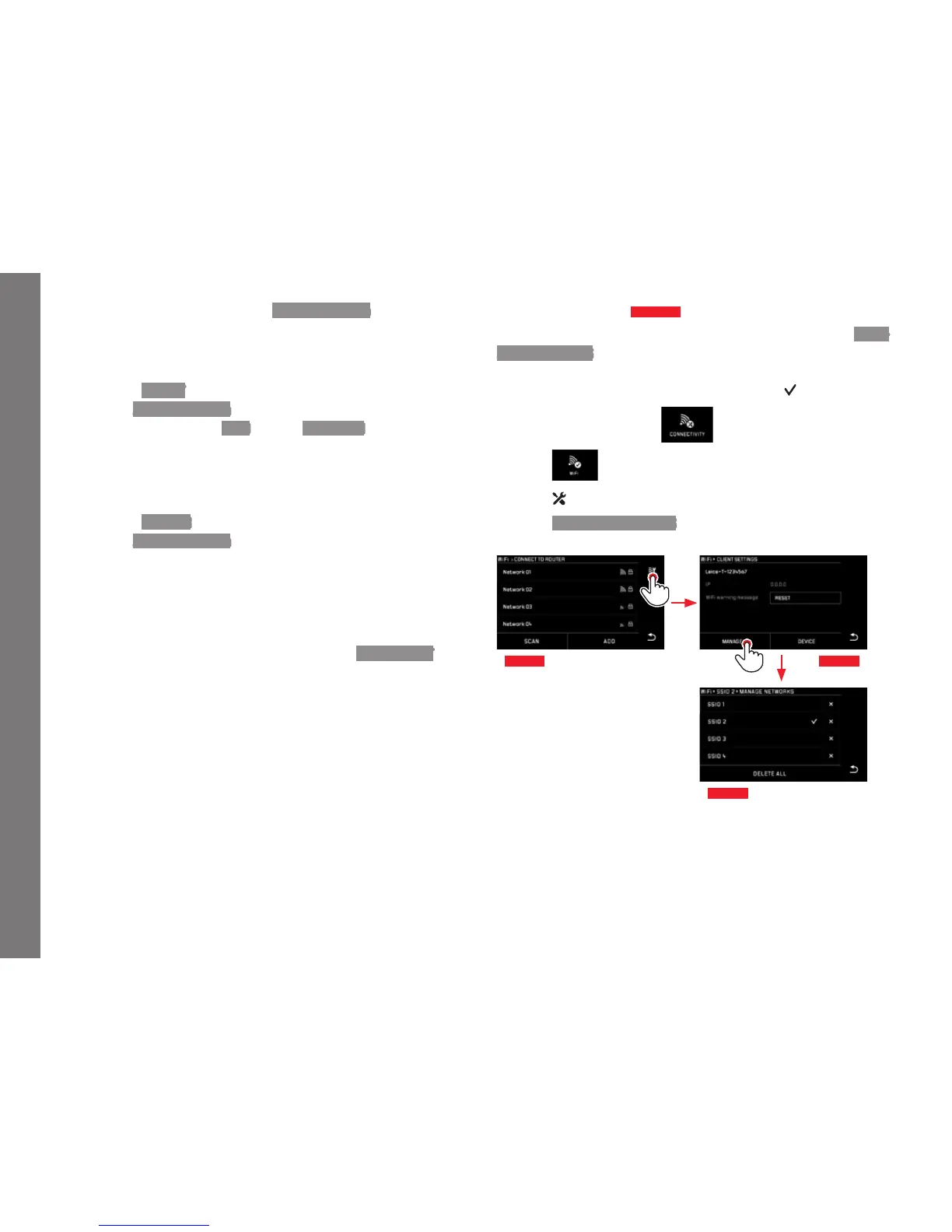
Managing networks
Fig. 91 a-c
The settings for different networks can be deleted using the MAN-
AGE NETWORKS option in the WiFi menu. This is recommended for
WLAN networks that you use infrequently or only once.
Connected networks are indicated by a symbol (
).
► In the main menu, select
►
Select
►
Select
in the submenu
► Select MANAGE NETWORKS
Fig. 91 a Fig. 91 b
Fig. 91 c



 To Next Page