10
lencomarine.com
Assist Callibration & Favorite Tab Positions
FAV 1 and FAV 2: Setting one,
or both, favorite tab positions
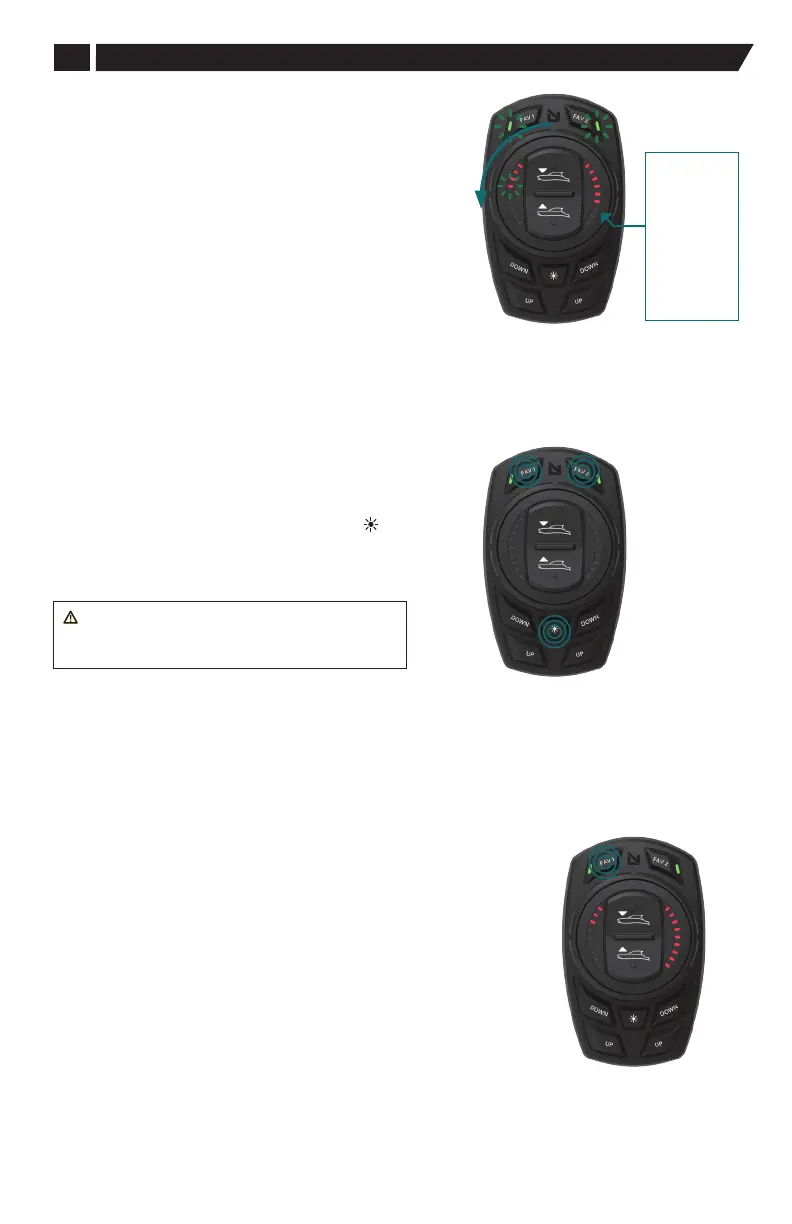
Calibration: 4. On Plane Transition Speed
• While still in calibration mode, rotate dial
counterclockwise until four left side LEDs are lit to set
the speed at which the holeshot sequence ends and the
vessel is considered “on plane”.
• This function automatically retracts the actuators to the
previously saved FAV 1 or FAV 2 position.
• Use the pitch Up/Down button to set the right hand LED
value for On Plane Transition Speed.
Note: A “FAV 1” or “FAV 2” setting must be saved for the
Holeshot mode to function. This is the position that the
actuators will default to when the vessel completes the
holeshot sequence and is on plane.
Example shown: the actuators will return to the extension
position that was saved in FAV 1 when the vessel reaches a
SOG of 18 mph.
• Selected value will auto save when exiting the menu.
Setting at least one favorite tab position is necessary for the Holeshot
feature to operate.
Two favorite positions may be saved, one per “FAV” button.
1. Using the dial, All Up or Down button on the dial, or the independent
lower buttons, or a combination of these, adjust the trim tabs for
the desired running boat orientation while the boat is on-plane.
2. Press the FAV (Left) button until the LED on the FAV button flashes
three times (3 seconds). The FAV green LED will become solid
when the tab position is saved.
When accelerating rapidly from a full stop, or very slow speed, the
Pro Control Assist system will automatically perform a Holeshot
operation. At least one FAV must be saved for Holeshot to operate.
A FAV can be saved without a Speed Over Ground (SOG) data input,
or GPS.
3. Press FAV (Right) button and hold until green LED flashes three
times. (3 second hold). The FAV green LED will become solid if saved.
Setting Favorite
Tab Position
Setting On Plane
Transition Speed
LED's
1 = 8 mph
2 = 10 mph
3 = 12 mph
4 = 14 mph
5 = 16 mph
6 = 18 mph
7 = 20 mph
8 = 22 mph
9 = 24 mph
Exit Calibration
Mode
Exiting Callibration Mode
• To exit the Calibration mode, press the DIM ( ), Fav 1, and
Fav 2 buttons at the same time together.
• At this point the Pro Control Assist system set-up is
complete and your boat is ready for normal operation.
WARNING: To save programmed settings,
the system must be shut down with the vessel's
ignition switch prior to powering batteries o.


 To Next Page