15
lencomarine.com
Auto Calibration & Sea Trial Commissioning
Calibration: Exit Calibration Mode
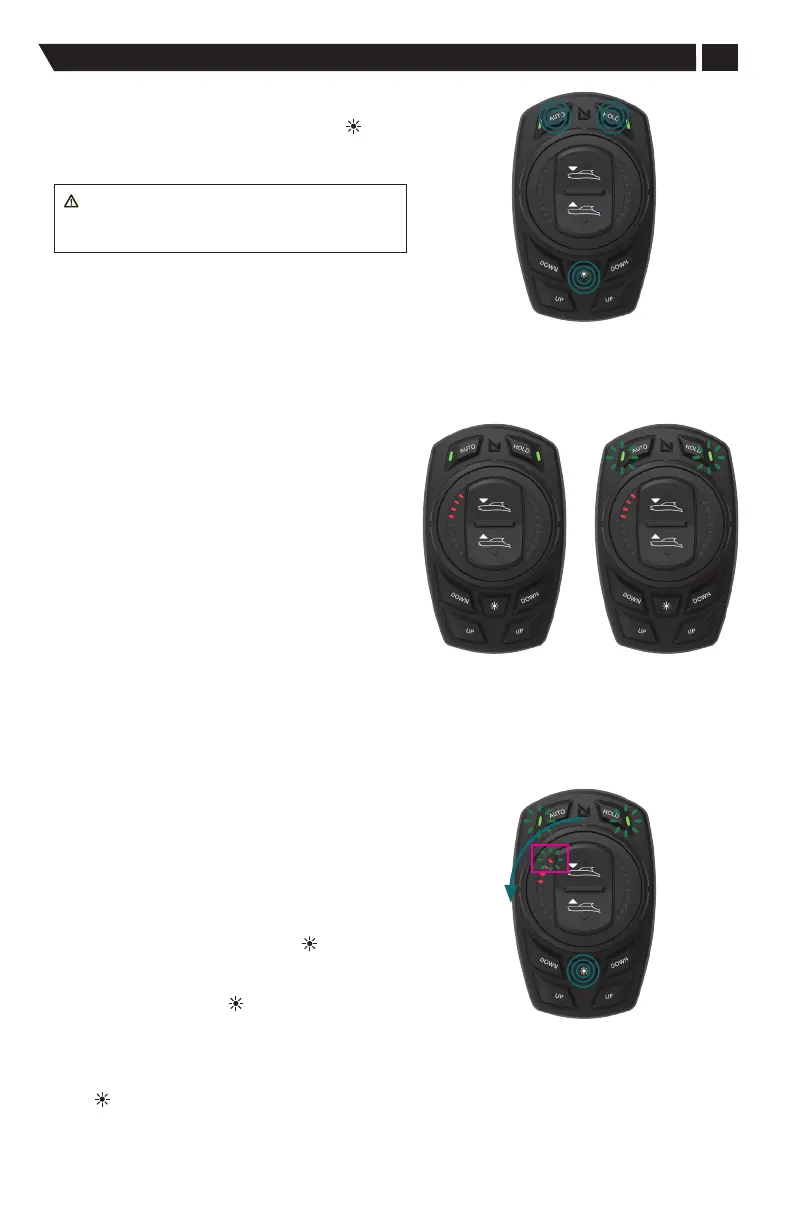
To exit the Calibration mode, press the DIM ( ), AUTO, and
HOLD buttons at the same time.
This function exits the Calibration mode.
WARNING: To save programmed settings,
the system must be shut down with the vessel's
ignition switch prior to powering batteries o.
Exiting
Calibration Mode
Pro Control Auto—
Sea Trial Commissioning
To enter the Pro Control Auto Commissioning
menu Press “Auto” and “Hold” simultaneously
until their status LEDs flash in sync.
AUTO and HOLD LEDs will flash together in
sync, fast.
Only one LED on left hand side of dial will be lit.
First time power-up after actuator locating and
calibration; this is an automatic commissioning
for the Pro Control Auto keypad, even if the system
is powered OFF and then back ON. This process
must be completed prior to normal operation.
Entering
Commissioning
Mode
In
Commissioning
Mode
1. Set idle Roll and Pitch target.
(on-water, at dock on calm seas)
a. Let the vessel sit idle for 3 minutes while the IMU
settles in.
b. Position vessel level to your desired target roll degree
by weight distribution on the boat.
c. Make sure to maintain this boat orientation and wait
10 seconds before holding DIM ( ) button to store value.
Do not cause, or allow, the boat to change roll during
this 10 second time.
d. Press and hold DIM ( ) button at least 1 second to
store target, both Left and Right-side LEDs will flash.
This indicates that the roll position has been stored.
e. If the boat rolls during this 10 second window wait another
10 seconds while the boat is stationary and press the DIM
( ) button again.
f. Rotate dial counterclockwise to next menu: The second
LED on the left side is lit.
Setting Idle Roll &
Pitch


 To Next Page