11
lencomarine.com
Auto Keypad Layout & Pro Control Auto Menus
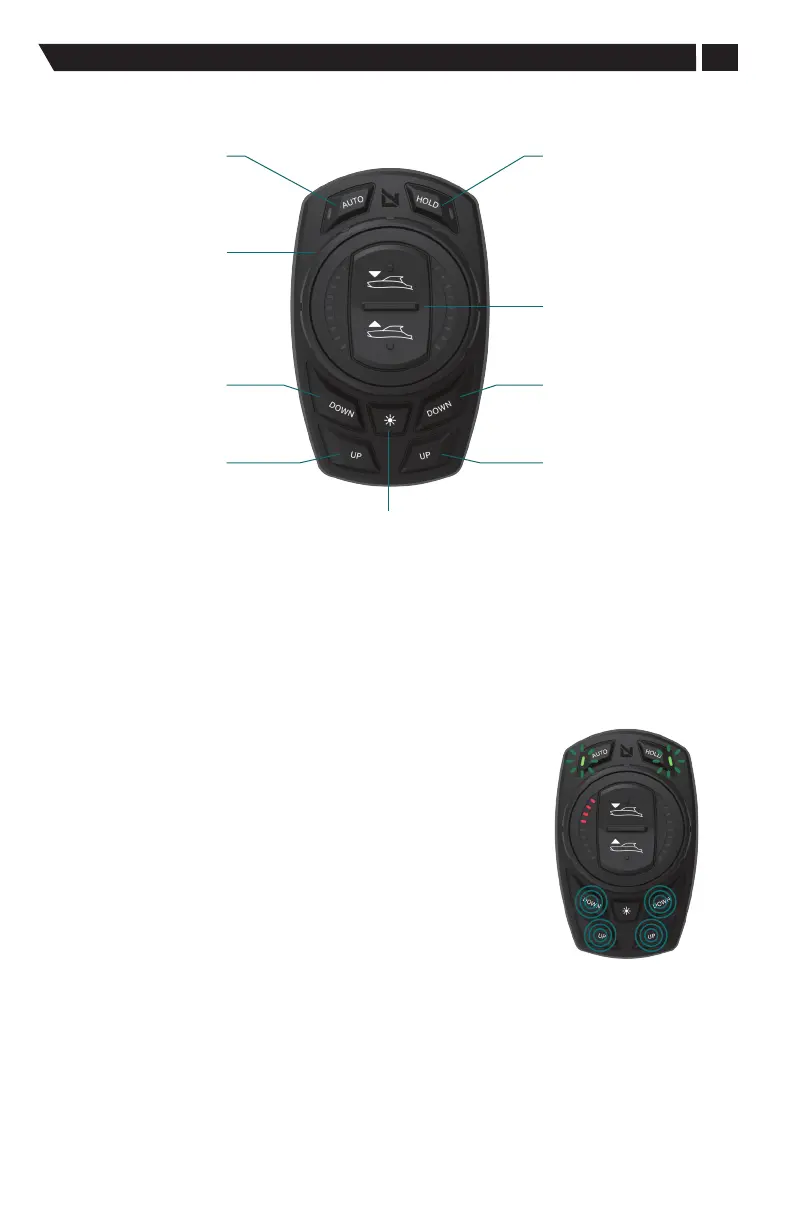
Pro Control Auto: Keypad Layout
Automatic
Mode
Dial Control
Port
Bow Down
Starboard
Bow Down
Port
Bow Up
Starboard
Bow Up
Pitch+Roll Hold
On-Demand Mode
All Up / All Down
DIM
Control
Pro Control Auto: Menus
Locating actuators: port; and starboard
The Pro Control system will automatically enter its commissioning
menu upon the initial powerup. Should you need to access
this manually, refer to the instructions below.
• To enter and exit Press all four lower up and down buttons.
• The AUTO and HOLD LEDs will both display constantly lit
when all four buttons are pressed correctly.
• The AUTO and HOLD LEDs will begin to flash alternating
when the four buttons are depressed for four seconds.
See the Pro Control Installation manual for instructions to locate
the actuators, port and starboard, on the boat.
Entering the
Locating Menu


 To Next Page