EasyManua.ls Logo

LENCO Pro Control - Troubleshooting Pro Control Auto

LENCO Pro Control
24 pages
Print Icon
To Next Page IconTo Next Page
To Previous Page IconTo Previous Page
Loading...
21
lencomarine.com
Troubleshooting: Auto
Troubleshooting Pro Control Auto
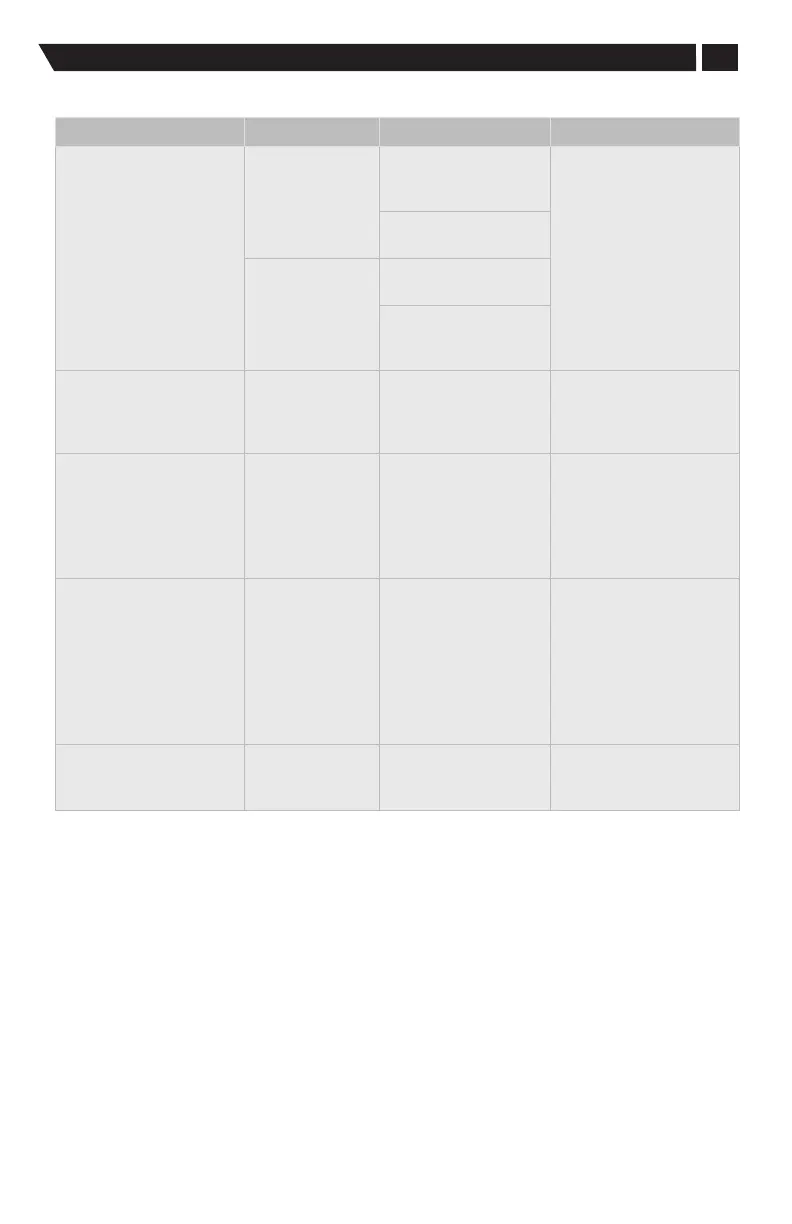
Symptom Status Cause Resolution
Keypad does not
respond to inputs
Condition:
keypad NOT lit
Keypad not powered
by L2K bus, as
required
Secure all NMEA® and
L2K cabling connections:
ensure Purple wire is
connected on 10 pin or
SmartCraft® is connected
to Mercury Junction Box
on SmartCraft® equipped
vessels.
Contact Navico Group™ or
Mercury service
Wake wire not
receiving power
Condition:
keypad lit
Actuators not powered
over L2K bus
Actuators not receiving
commands over L2K
CAN
Keypad back light
not visible
Back light setting
on ‘night’ setting
during bright sun
light.
Excessively bright
sunlight makes the
back light diicult to
see
Adjust DAY/NIGHT mode
Adjust brightness
Port or Starboard
actuator does not
respond to command
Keypad and
one actuator
operating
properly
Faulty actuator Secure all NMEA® cabling
connections:check
power to non-functioning
actuator
Contact Navico Group™ or
Mercury service
HOLD or AUTO function
does not maintain boat
attitude
Boat does not
maintain proper
attitude
IMU needs to be
calibrated
The vessel was
not properly
commissioned
Pro Control Auto
system not properly
calibrated
Calibrate IMU
Recommission the vessel
Recalibrate the Pro
Control Auto system
Contact Navico Group™ or
Mercury service
Auto function turns o
while boat is in motion
Pro Control Auto
function turns o
Excessive IMU
vibration / poor
installation
Check IMU installation
guidance on secure
mounting

Table of Contents