19
lencomarine.com
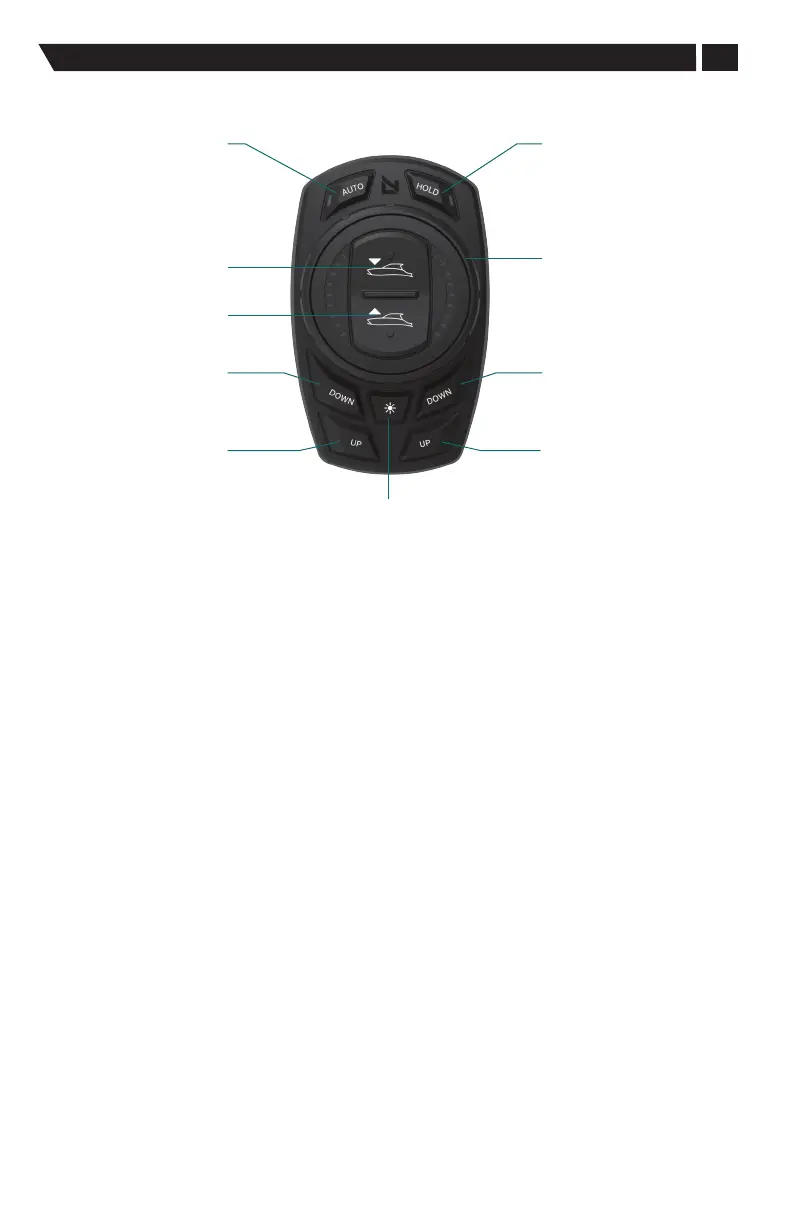
Auto Mode Button Functions
Auto Mode Button Functions
Automatic
Mode
Bow
All Up
Bow
All Down
Starboard
Bow Down
Port
Bow Down
Port
Bow Up
Starboard
Bow Up
Temporary Pitch
and Roll Hold
Instant Roll
Control Dial
DIM
Bow ALL Up / ALL Down:
All down—Changes controlled pitch down by an incremental fraction of a degree
and switches to HOLD mode.
All up—Changes pitch up by an incremental fraction of a degree and switches to
HOLD mode.
Instant Roll Control Dial:
Rotating dial will cause vessel to roll towards rotated side and switches to HOLD mode.
Finite Bow Up/Down:
Pressing port DOWN button will cause the stbd actuator to extend.
Pressing stbd DOWN button will cause the port actuator to extend.
Pressing port UP button will cause the stbd actuator to retract.
Pressing stbd UP button will cause the port actuator to retract.
DIM:
Momentary presses of the DIM button will cycle the brightness in 10% increments.
Long press of the DIM button will cause a change in mode from day to night mode
or from night mode to day mode.
Auto Mode:
AUTO button defaults on when set up is complete and every key cycle after.
Pressing the AUTO button changes the mode between auto and manual operation.
Temporary Pitch and Roll Hold:
The HOLD button will hold the vessel in that position. This is only a temporary position
that will not be stored at key o.
The boat must be on-plane for the HOLD function to work.


 To Next Page