YourcomputercomeswiththeUltraNavpointingdevice.TheUltraNavpointingdeviceconsistsofthe
TrackPointpointingdeviceandthetouchpad.WiththeTrackPointpointingdevice,pointing,selecting,and
draggingareallpartofasingleprocessthatyoucanperformwithoutmovingyourngersfromatyping
position.
Moveyourngertipacrossthetouchpadtomovethepointer.
TheTrackPointandtouchpadbuttonsprovidefunctionssimilartothoseofamouseanditsbuttons.
16Volumecontrolbuttons
Thebuilt-involumecontrolbuttonsenableyoutoquicklyadjustthevolumeormutethesoundfromyour
computer.
Fordetails,refertotheinstructionsin“ThinkpadEdgeE525specialkeys”onpage29.
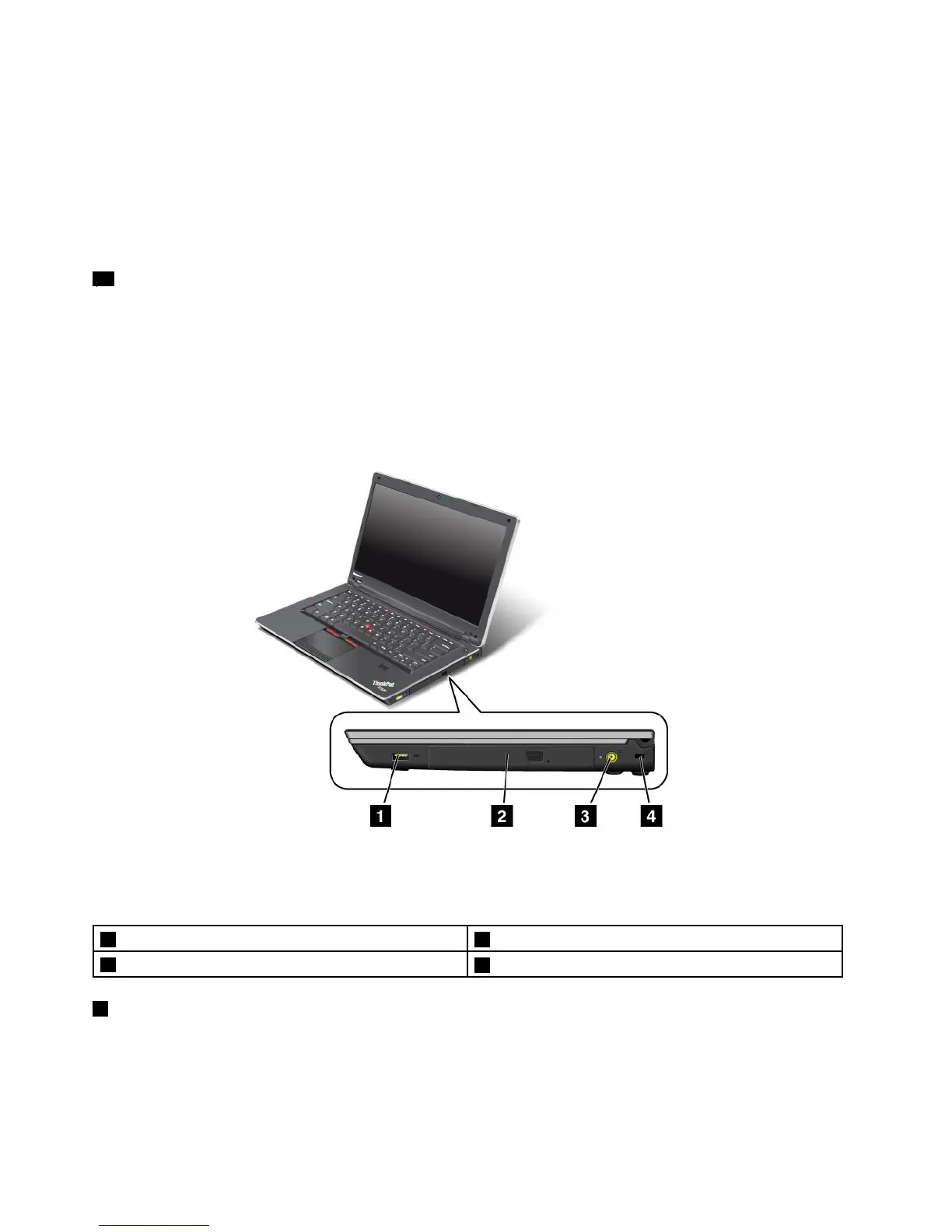
Right-sideview
Figure3.ThinkPadEdgeE425andE525right-sideview
Note:Yourcomputerkeyboardmightlookdifferentfromtheillustrationabove.
1AlwaysOnUSBconnector2Opticaldrive
3Powerjack
4Securitykeyhole
1AlwaysOnUSBconnector
TheAlwaysOnUSBconnectorisusedforconnectingdevicescompatiblewithaUSBinterface,suchas
aprinteroradigitalcamera.
6UserGuide














 To Next Page