1010Batterypack
Importantnoticeforreplacingabatterypack:
•TheLenovoSolutionCenterprogramprovidesanautomaticbatterydiagnostictestthatdeterminesifthebattery
packisdefective.AbatterypackFRUshouldnotbereplacedunlessthisdiagnostictestshowsthatthebatteryis
defective.Theonlyexceptiontothisisifthebatterypackisphysicallydamagedoracustomerisreporting
apossiblesafetyissue.
•IfLenovoSolutionCenterisnotinstalledinthecomputer,thecustomershoulddownloadthisprogrambeforea
non-physicallydamagedbatterypackisreplaced.Notethataphysicallydamagedbatterypackisanon-warranty
replacementpart.
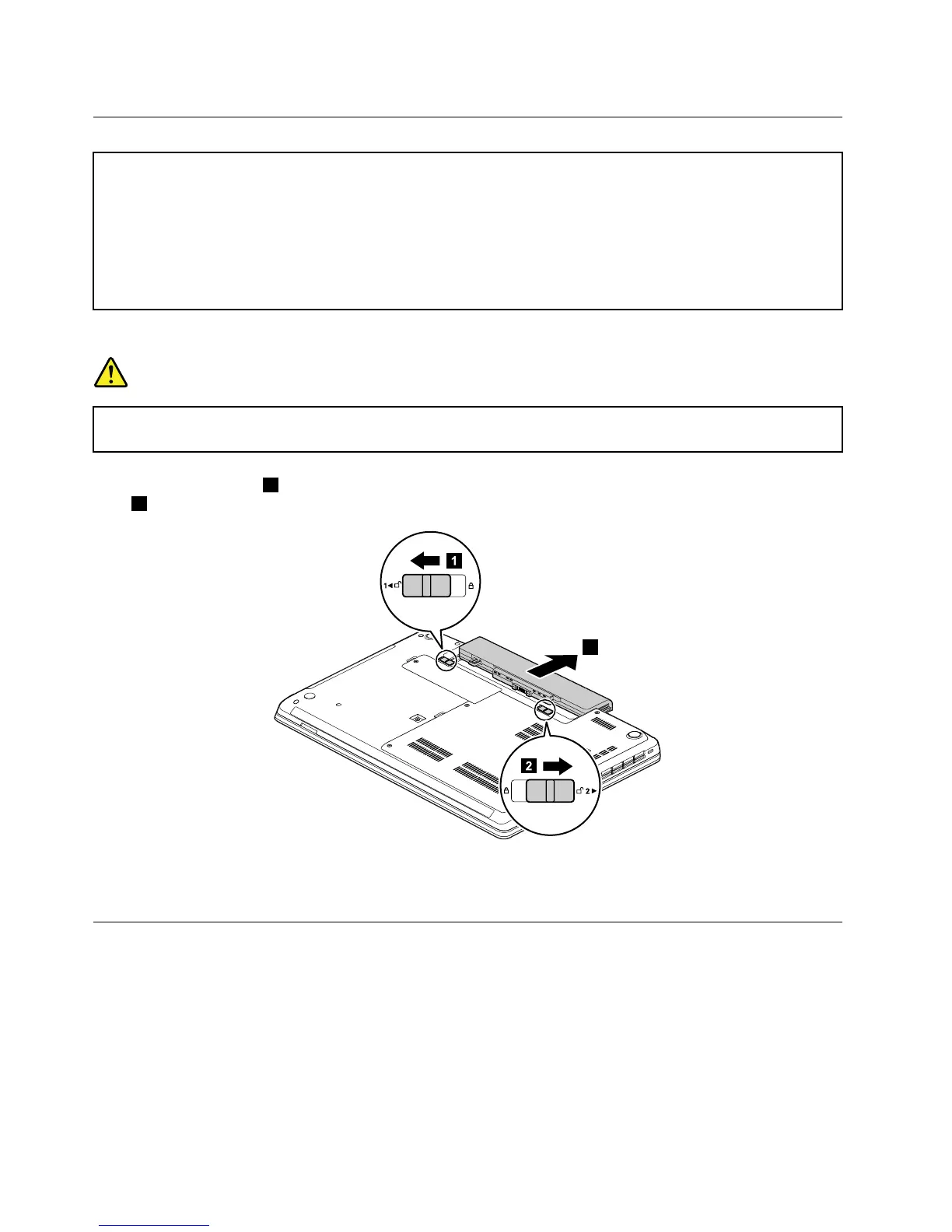
Removalstepsofthebatterypack
DANGER
Useonlytheauthorizedbatteryspeciedforyourcomputer.Anyotherbatterycouldigniteor
explode.
Unlockthebatterylatch1.Holdthebatterylockleverintheunlockedposition,andremovethebattery
pack
2.
Wheninstalling:Installthebatterypackintotheslot.Makesurethatthebatterylatchisinthelocked
position.
1020Largebottomcover
Foraccess,removethisFRU:
•“1010Batterypack”onpage62
62HardwareMaintenanceManual














 To Next Page