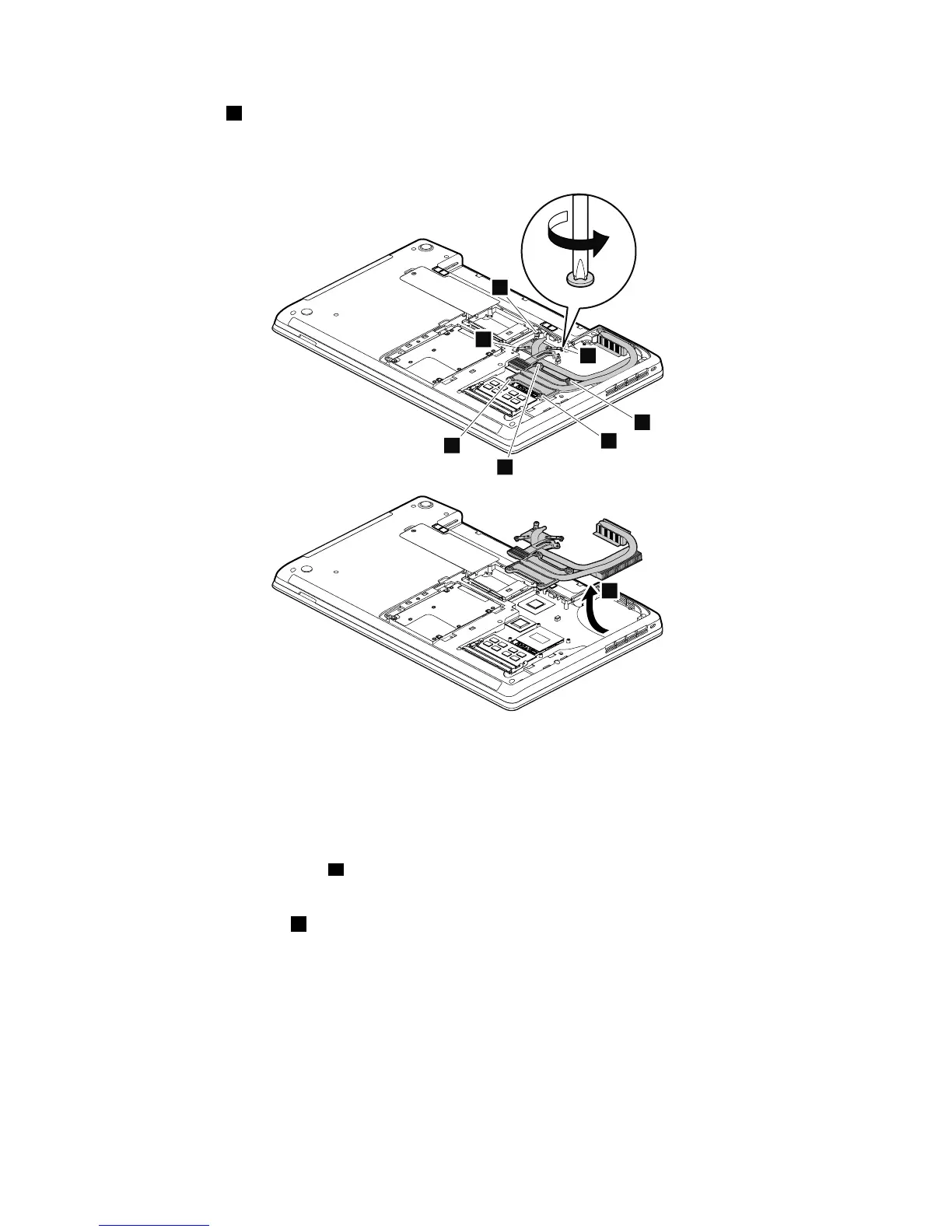
Loosenthescrews1inascendingalphabeticorderasillustrated.Whenattachingthethermalpipes,secure
thescrewsinreverseorder.
Note:Differentmodelsmighthavedifferentnumbersofscrews.
Note:Yourmodelmightlookslightlydifferentfromtheillustrationabove.
Wheninstalling:
•Alwayswearngerstallswhenhandlingthethermalfanassembly.Donottouchorholdanypartofthe
thermalfanassemblywithbarengers.
•Beforeyouattachthethermalfanassemblytothecomputer,applythermalgrease,atanamountof
0.2grams,onthepartmarkedainthefollowingillustration.Eithertoomuchortoolessapplication
ofgreasecancauseathermalproblemduetoimperfectcontactwithacomponent.Ifathermalfan
assemblyneedstobereused,removeandreapplythermalgrease.Youneedtopeelthethinlmoff
fromtherubbersmarkedb.
72HardwareMaintenanceManual














 To Next Page