window,selectOnScreenDisplays.WhentheboxbeforeOnScreenDisplaysisingrey,itmeansthat
theUSBkeyboardfollowsthesystemdefaultsetting,youcanchangethesystemsettingbyclicking
AdvancedOSDsetting.
FormoreinformationabouttheFnkeycombinations,refertotheAccessHelpinformationsystemthat
comeswiththeThinkPadcomputer.
Troubleshooting
ThischaptercontainstroubleshootinginformationfortheUSBkeyboard.
Problem:AllorsomeoftheFnfunctionkeycombinationsorfunctionkeysdonotwork.
Solution:Readthefollowingforsolutionsorexplanations:
•EnsurethatyouhavecorrectlyinstalledtheThinkPadKeyboardSuite.
•EnsurethatalltheFnfunctionkeycombinationsarefunctionalonthekeyboardofyourThinkPad
computer.TherearesoftwaredependenciestogetthemostcompleteFnkeyandhotkeycombination
supportforyourThinkPadcomputer.YoucangetmoredetailedinformationabouttheFnfunctionkey
combinationsfromthedocumentationthatcomeswithyourThinkPadcomputer.Youmightneedto
downloadtheupdatedsoftwarecomponentsforyourThinkPadcomputerat:
http://www.lenovo.com/support
•TheFnfunctionkeycombinationsworkwithalltheThinkPadcomputersexceptThinkPadSLseries
notebookcomputers.MostoftheFnfunctionkeycombinationsdonotworkwithThinkPadSLseries
notebookcomputers,Lenovodesktopcomputers,orcomputersfromothermanufacturers.
•ItisnormalifyoufoundsomeoftheFnfunctionkeycombinationsactdifferentlyondifferentThinkPad
computermodelsduetothedifferencesoftheapplicationsinstalledonyournotebookcomputers.
•Somefunctionkeysarenotsupporteddependingonyouroperatingsystemandcomputer.
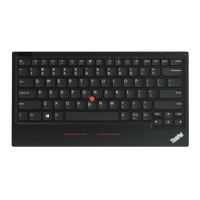
Problem:TheTrackPointcursordriftswhenthecomputeristurnedonorafterthecomputerresumes
normaloperation.
Solution:ThecursormightdriftwhenyouarenotusingtheTrackPointduringnormaloperation.Thisis
anormalfeatureoftheTrackPointandisnotadefect.Cursordriftingmightoccurforseveralseconds
underthefollowingconditions:
•Thecomputeristurnedon.
•Thecomputerresumesnormaloperation.
•TheTrackPointpointingstickiskeptpressedforalongtime.
•Thetemperaturechanges.
Tosolvetheproblem,youcantryreconnectingtheUSBkeyboardorrestartyourcomputer.
Problem:Ipressedabuttononce,butthecomputerrespondedasifIpressedittwice.
Solution:Dependingonyouroperatingsystem,adjustthekeyboardrepeatdelayorrepeatratesettings
bydoingoneofthefollowing:
•FortheWindowsXPorWindowsVistaoperatingsystem:
1.DependingonyourStartmenumode,clickStart➙ControlPanelorStart➙Settings➙Control
Panel
2.DependingonyourControlPanelmode,clickordouble-clickKeyboard.
3.ClicktheSpeedtab.
Chapter2.ThinkPadCompactUSBKeyboardwithTrackPoint9


 To Next Page
 Loading...